Is It Worth Replacing a Phone Battery?
A worn cell can waste a phone that still works. Match the maker's health reading and remaining software support before you replace the phone.
The short answer
A worn cell can waste a phone that still does the rest of its job. Replace the battery when the maker’s health screen says the cell is worn, the published software-support window still covers the time you plan to keep the phone, and the screen, ports, and other hardware still work.
This page is for a phone you already own. It uses Apple and Samsung pages retrieved on 13 October 2026. It does not print a repair price, a health percentage for your phone, or a repair result this site measured.
Replacing the battery is the closer choice only when those three checks agree. Apple’s page published 5 December 2025 says batteries of iPhone 14 models and earlier are designed to retain 80 percent of their original capacity at 500 complete charge cycles under ideal conditions, and batteries of iPhone 15 models and later are designed to retain 80 percent at 1000 complete charge cycles under ideal conditions. Apple says the exact percentage depends on how the phone is used and charged. That 80 percent is a design target at a cycle count, not a rule that Settings must show 80 before a replacement is worth booking.
Scroll horizontally to see all columns.
| Check | What you copy | What it changes |
|---|---|---|
| Health reading | The words on the maker’s screen, and the day you opened it | A worn-cell message points at the battery. A normal message points somewhere else. |
| Cycle count | Only a number the same screen prints | Compare it with the design target for that model group. Leave it blank if the screen has none. |
| Software support | The published endpoint and your planned keep date | A new cell does not move an endpoint that has ended. |
| Other hardware | Screen, ports, buttons, cameras | Battery service does not repair a different broken part. |
| Cost factors | Warranty status, who does the work, shipping, tax | The provider’s estimate is theirs. This page prints no price. |
What type of battery is in a smartphone?
Apple’s iPhone battery and performance page, published 1 June 2026, says iPhone batteries use lithium-ion technology. On that page, battery life is the time the phone runs before it needs a charge. Battery lifespan is the time until the battery needs to be replaced. Chemical age includes charge cycles and how the battery was cared for. It is not only the number of years on a calendar.
Samsung’s Galaxy battery page introduces the lithium-ion battery and says batteries are consumables whose lifespans are affected by usage patterns and environments. That page, retrieved 13 October 2026, does not print a cycle-count design target. Do not borrow Apple’s 500 or 1000 cycles and attach them to a Galaxy phone.
A third brand needs its own page. “Lithium-ion” on an Apple or Samsung page does not identify the cell in a phone those pages do not name. If the maker’s support page for your model does not name the chemistry, leave that cell blank.
The phone on the bench is the object of the decision. The health reading, the support window, and the other hardware are still separate lines on the sheet.
Takeaway: Write the chemistry only when the maker’s page for that phone names it.
How many years should a cell phone battery last?
Apple does not publish a calendar year that fits every iPhone. The design figures are cycle counts, under ideal conditions, and Apple says regular use and charging change the capacity percentage you actually see.
Use the page that names your model group, and keep the two Apple wordings apart:
Scroll horizontally to see all columns.
| Apple page | Published | What it says about 80 percent |
|---|---|---|
| iPhone 11 and later | 5 December 2025 | iPhone 14 and earlier: 80 percent at 500 complete charge cycles. iPhone 15 and later: 80 percent at 1000 complete charge cycles. Both under ideal conditions. |
| iPhone battery and performance | 1 June 2026 | The same 80 percent, 500 cycles, and 1000 cycles, but it names “iPhone 15 models” and does not add “and later.” |
Both pages say the exact capacity percentage depends on how the devices are regularly used and charged. If you have an iPhone newer than the iPhone 15, the December 2025 page is the one that says “iPhone 15 models and later.” The June 2026 page does not use that phrase. Open the current page before you treat either sentence as the one that covers your model.
A complete charge cycle is not every time you plug the phone in. Apple’s lithium-ion page says you complete one cycle when you have used an amount that represents 100 percent of capacity, not necessarily from one charge. Its example is 75 percent one day and 25 percent the next day. The footnote on the December 2025 and June 2026 support pages adds that a complete charge cycle is normalized between 80 percent and 100 percent of original capacity to account for expected diminishing capacity over time. That sentence defines the cycle. It is not a second instruction to replace the battery when Settings shows 80.
Do not turn 500 or 1000 cycles into “two years” or “three years.” A person who uses most of the charge every day finishes cycles faster than a person who uses a small slice. Apple also says there is no need to run the battery to empty before charging. Partial charges across days still add up to cycles.
Samsung’s Galaxy battery page, retrieved the same day, says frequent charging and a noticeable drop in battery life are reasons to visit a service center. It does not state a year or a cycle count. If your Galaxy screen does not show a cycle count, do not fill one in from an iPhone page.
Takeaway: Record cycles and the model group. Leave the year blank unless the maker prints a year.
Where do you read battery health?
The path depends on the model. Copy the menu names from the page that matches the phone, then copy the words your screen actually shows.
Apple’s December 2025 page splits the path:
- iPhone 15 and later with iOS 17.4 and later: open Settings, tap Battery, then tap Battery Health. That screen can show battery health, maximum capacity, whether a replacement is recommended, the cycle count, when the battery was manufactured, and when it was first used.
- iPhone 11, 12, 13, or 14: open Settings, tap Battery, then tap Battery Health & Charging.
The June 2026 performance page says iPhone 6 and later can show battery health, and it tells you to open Settings, tap Battery, then tap Battery Health. If your menu says Battery Health & Charging instead, use the December 2025 path for the 11 through 14 models. Do not rename the menu to force the two pages to match.
On that June 2026 page, maximum capacity is the battery’s capacity relative to when it was new. A lower number can mean fewer hours between charges. Apple also says capacity might show as slightly less than 100 percent depending on the time between manufacture and activation. A reading under 100 is not, by itself, the service message.
The same page lists messages that can appear under Peak Performance Capability. Two of them matter for this decision:
- “Your battery is currently supporting normal peak performance.”
- “Your battery’s health is significantly degraded. An Apple Authorized Service Provider can replace the battery to restore full performance and capacity.”
Apple says the second message does not indicate a safety issue, and that you can still use the battery, with more noticeable battery and performance issues possible. The message is Apple’s service recommendation for that condition. It is not a measurement this site made of your phone, and it is not the same sentence as the 80 percent design target.
If the screen says it cannot verify a genuine Apple battery, Apple’s genuine battery page, published 26 May 2026, says the battery-health information might not be accurate. On iPhone XR, XS models, and later, Settings, General, About can show whether the battery reads Genuine, Used, Unknown, or Finish Repair. An Unknown or unverified battery is a reason to treat the percentage as unreliable, not as a precise health score.
Samsung does not use that iPhone percentage screen. Two pages retrieved 13 October 2026 describe different menus:
- The US diagnostics page says Samsung Members and Device care can check battery health. In Samsung Members, open the app and tap Diagnostics on the Discover tab, or use the Support tab. Device care diagnostics are described for Galaxy devices on Android 12 or later: open Settings, tap Device care, tap Diagnostics, then tap Phone diagnostics. In Device care, tap Battery to review battery usage and health information. That US page does not print Normal, Weak, or Bad.
- The UK battery-status page, updated 15 April 2026, uses Samsung Members: Support, Get Started under Phone diagnostics, then the Battery status result. It defines Normal as no issues with the battery, Weak as efficiency that may have decreased from use or conditions, and Bad as battery life that has significantly degraded, with advice to visit a Samsung support centre.
Samsung notes on those pages that menu names can vary by model and software. If your screen uses different words, write those words down. Do not relabel a US result with the UK trio, or the reverse.
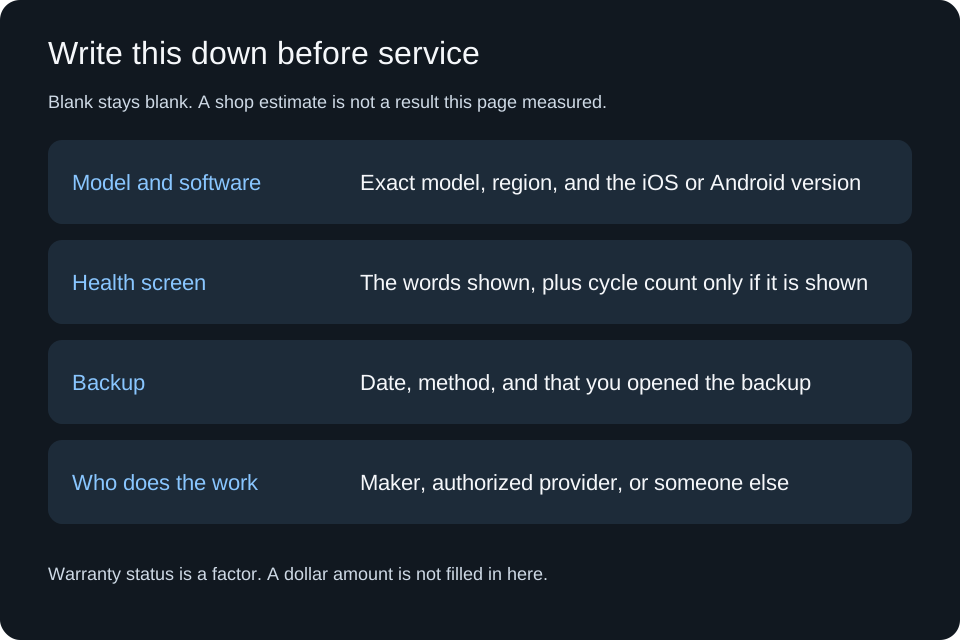
Leave the price blank. Leave the cycle count blank unless that phone’s screen prints one.
Leave the price blank. Leave the cycle count blank unless that phone’s screen prints one.
What wears a phone battery down?
Apple ties lifespan to chemical age: charge cycles and care, not the calendar alone. The June 2026 page says chemically aged lithium-ion batteries hold less charge, so the phone needs charging sooner, and peak power can fall because impedance rises. Impedance also rises temporarily at a low state of charge and in the cold. Those temporary changes are not the same thing as a battery that has reached the service message.
Heat and storage are care factors Apple states directly. The June 2026 performance page says to avoid charging or leaving the iPhone in hot environments, including direct sun, for extended periods, and to keep an iPhone half charged when it is stored for the long term. The maximizing performance page says ambient temperatures higher than 95°F (35°C) can permanently damage battery capacity, that charging in high ambient temperatures can damage it further, and that storing a battery in a hot environment can damage it irreversibly. It also says a very cold environment can decrease battery life temporarily, until the battery returns to its normal operating range. Those are care conditions. They are not a published number of extra cycles.
The same maximizing page tells you to dim the screen or use Auto-Brightness, and that a Wi-Fi connection uses less power than a cellular network, as ways to extend battery life. Battery life there means hours before the next charge. A bright screen or a weak cellular signal can empty the phone today without proving the cell has reached the end of its lifespan. A health screen that still says performance is normal is a reason to look at those settings before booking a replacement.
Samsung’s Galaxy battery page says the same split in different words: usage patterns and environments affect lifespan, and signs of decline include a sharp drop in runtime and unexpected shutdowns, including a shutdown while the screen still shows charge remaining. It tells you to have the device checked at a service center. It does not rank habits by a percent of damage.
Apple’s June 2026 page also describes performance management on listed iPhone models after an unexpected shutdown, when the battery cannot deliver peak power. Apple says replacing the battery can help if you are affected and want to improve performance. The model list and the iOS versions are on that page. A shutdown in the cold, or at a low charge, can be the temporary impedance case instead. Read the message on the phone before you treat every shutdown as a worn cell.
Will you lose everything if the battery is replaced?
A battery is not the place Apple describes as your backup. Nothing on the Apple or Samsung pages retrieved for this guide says a battery repair always keeps your files, and nothing here is a repair this site watched. Back up first, then confirm you can see that backup, before you hand the phone to anyone.
Apple’s backup guide says you can back up with iCloud or a computer. For iCloud: open Settings, tap your name, tap iCloud, tap iCloud Backup, turn on Back Up This iPhone, then tap Back Up Now for a manual backup. iCloud also backs up when the phone is on power, locked, and on Wi-Fi. On a Mac with macOS 10.15 or later, connect the phone, select it in the Finder sidebar, choose General, select the option to back up all data to that Mac, and click Back Up Now. On Windows, Apple’s guide uses the iTunes app: connect the phone, click the iPhone button, then click Back Up Now. Apple says a backup can transfer information if you replace the iPhone. That sentence is about a replacement phone. It is not a promise about a battery repair.
Samsung’s Smart Switch page describes backing up a phone to a PC and restoring to a device, and transferring photos, contacts, and other data to a Galaxy. Use it as a backup you can check. Do not read it as a statement that a repair shop will leave your files in place.
After an iPhone battery repair with genuine parts, Apple’s May 2026 page says Settings, General, About can show Genuine next to Battery, or Finish Repair until Repair Assistant is completed. Those lines are about the part. They do not list your photos. If the health screen later says the battery cannot be verified, treat the new capacity reading as unreliable until a provider who uses genuine parts checks it.
What makes up the cost, without a price?
This page does not print a dollar figure. Apple’s battery service page, retrieved 13 October 2026, says the final fee follows an inspection. The factors it names are enough to ask a provider a useful question.
Scroll horizontally to see all columns.
| Factor | What Apple’s pages say | What you ask |
|---|---|---|
| Warranty | The December 2025 and June 2026 pages say the one-year warranty includes service coverage for a defective battery, in addition to local consumer-law rights. The June page notes a two-year warranty in Türkiye. The battery-service page says the warranty does not cover accidental damage or batteries that wear down from normal use. | Is this visit covered as a defect, or is ordinary wear out of warranty? |
| Who does the work | Out-of-warranty estimates on the service page are for service from Apple. An Apple Authorized Service Provider can set its own fee. | Whose estimate is this, and does it use genuine parts? |
| Inspection | The service page says Apple needs to inspect the product for a personalized estimate. | What did the inspection find besides the battery? |
| Shipping and tax | A shipping fee may be added if Apple ships the device. Estimated fees may be subject to tax. | Is shipping or tax added to the estimate? |
| Where | In person at a Genius Bar or an authorized provider, or by mail with a prepaid box. | Which of those is this appointment? |
| Parts | The May 2026 genuine-battery page says a nongenuine battery might be poorly made, used, damaged, or the wrong model, and that health reporting might be inaccurate. | Will the part read as genuine after the repair? |
Self Service Repair, on that May 2026 page, offers genuine parts, tools, and manuals for customers who already know how to repair electronics. Apple says it is available in certain countries or regions for specific iPhone models introduced in 2021 or later. Parts and tools are another cost factor. The page retrieved here does not list a price, and this guide does not add one.
Samsung’s UK page says a Bad result should go to a Samsung support centre for advice. The US Galaxy battery page says a declining battery should be checked at a service center. Ask that center whether the visit is warranty service or paid service. Write down the answer they give you. Do not fill a price in from a forum or from a different model.
A lower price from a shop that will not say whether the part is genuine can be a different product from Apple’s out-of-warranty battery service. The cheaper line is not automatically the better decision, and the higher line is not automatically required. The missing fact is the part and the warranty status.
When is a new battery the better choice?
A new battery does not move a software-support endpoint that has already ended. Compare the three checks, then stop at the first one that fails.
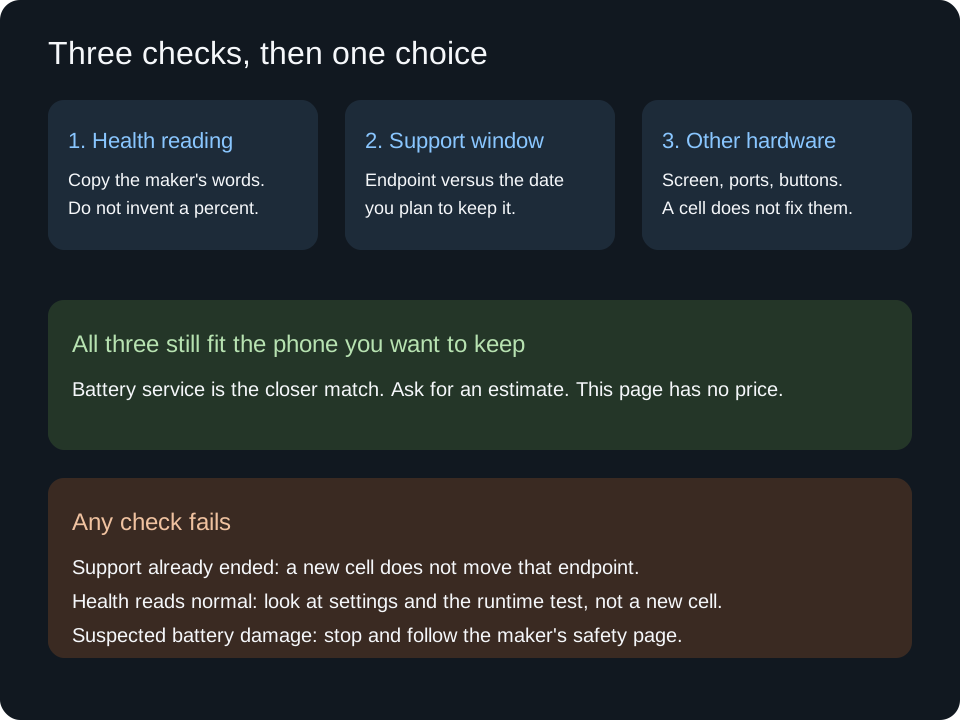
All three have to fit the phone you want to keep. One failed check is a reason to look at a different fix.
Start with the health words:
- Apple shows the significantly degraded message, or Samsung’s UK test shows Bad, and the other checks below still pass. Battery service is the closer match. Apple’s own degraded-battery message says an authorized provider can replace the battery to restore full performance and capacity. That is Apple’s statement about that message. It is not a result measured on your phone after a repair.
- Apple shows normal peak performance, or Samsung’s UK test shows Normal. A new cell is not what that message is asking for. Check brightness, signal, and background activity before you compare this phone’s runtime with a different phone. Samsung’s Weak result, on the UK page, means efficiency may have decreased. It is not the same sentence as Bad. Write Weak down and ask the provider what they do with that result. Do not promote it to Bad.
- The health screen is missing, or Apple says the battery cannot be verified. You do not have a reliable percentage. Service that can identify the part comes before a decision that depends on the number.
Then the support window. Use the software-support guide for the model, the region, and the published endpoint. If that endpoint arrives before the month you plan to keep the phone, a fresh cell leaves the security and update clock where it was. If the endpoint is unpublished, write “not stated” and do not invent a year of support to make the battery look worth replacing.
Then the rest of the hardware. A cracked screen, a port that does not hold a cable, or a button that has failed is a different repair. If the other hardware is the part that fails your day, battery service does not fix it.
If the case is bulging, or you suspect damage to the battery, stop. Apple’s iPhone safety information says to discontinue use if you suspect damage to the iPhone or the battery, because it may cause overheating or injury, and that an iPhone battery should be repaired only by a trained technician. Follow that page and Apple’s service path. This guide does not add handling or disposal steps. Samsung’s Galaxy battery page tells you to have battery problems checked at a service center. Use the maker’s page for the phone you have.
Buying a different phone because a list ranks its runtime is the battery-life guide’s job. Keeping this one because the cell is the part that failed is this page’s job.
Sources
Pages retrieved 13 October 2026. Cycle counts and the 80 percent figures are Apple’s design statements under the conditions named above. Samsung’s pages retrieved here do not state a cycle count. No repair price and no repair outcome were added.
- Apple Support: iPhone battery and performance (published 1 June 2026)
- Apple Support: battery and performance of iPhone 11 and later (published 5 December 2025)
- Apple: why lithium-ion
- Apple: maximizing performance
- Apple Support: about genuine iPhone batteries (published 26 May 2026)
- Apple Support: iPhone battery service
- Apple Support: back up iPhone
- Apple Support: important safety information for iPhone
- Samsung US: Galaxy battery
- Samsung US: device diagnostics
- Samsung UK: Galaxy battery status (updated 15 April 2026)
- Samsung US: Smart Switch
Related articles
How to Compare Phone Battery Life Before You Buy
Best smartphone battery life depends on stored energy, power draw and the test behind the hour. Record those before you trust a yearly list.
Read article
How Much RAM Does a Smartphone Need in 2026?
Buying only more RAM can sacrifice storage or support budget. Compare an 8GB Android option with nearby configurations and your actual app-switching needs.
Read article
How to Choose a Phone Display: A Practical Buyer Checklist
Misreading peak brightness can waste money on an uncomfortable screen. Choose by readable text, everyday lighting and motion before panel labels.
Read article