
How to Compare Phone Software Support Before You Buy
A discount on older stock wastes the years you thought the receipt restarted. Subtract your purchase month from the maker's start month plus the published year count.
Buying a discounted older phone wastes the support years you thought the receipt restarted. Compare the exact model with the published start month and year count, then subtract the month you will pay.
Pixel 8 and later get 7 years of OS and security updates from first availability on the US Google Store, and Pixel 7a, Pixel 7, Pixel 7 Pro, Pixel 6a, Pixel 6, Pixel 6 Pro, and the original Pixel Fold get 5 years from that same start. Google’s Pixel update page, fetched 17 October 2026, is the source of both lists, and it says new or upgraded Pixel Drop features may also be included. The availability table prints the start as a month: Pixel 8 in October 2023, Pixel 6 in October 2021. Subtract the month you will pay from that start plus the year count, and set the result next to the month you plan to replace the phone.
On a narrow screen, swipe the table sideways to see the last column.
Scroll horizontally to see all columns.
| Input or item | Typical value or source | Why it matters |
|---|---|---|
| Pixel 8 and later | 7 years of OS and security updates, Google Pixel update page | The year count for that named list |
| Pixel 6, Pixel 7, original Fold, plus the Pro and a models named with them | 5 years of OS and security updates, same page | A shorter list inside the same brand |
| Pixel 8 start | October 2023, Google availability table | Month precision. No day is printed |
| Pixel 8a start | May 2024, same table | Same 7-year list, different start month |
| Pixel 6 start | October 2021, same table | Five years from this month is October 2026 |
| Apple on 28 September 2026 | iOS 27.0.1 and iOS 26.7.1 both name iPhone 11 and later; the iPad generations differ. Apple security releases | A release record, not a future end date |
| Galaxy Z Fold6 and Z Flip6 | 7 years of Android OS upgrades and 7 years of security updates, Samsung Gulf support page | One named pair. Market timing can still differ |
Match the exact model to its year-count list
The failure sits in the name you copy. Pixel 8 and Pixel 8a are both on Google’s 7-year list. The availability table gives Pixel 8 October 2023 and Pixel 8a May 2024. Those are two start months. A shop label that says only “Pixel 8 series” does not tell you which row to use.
Scroll horizontally to see all columns.
| Shortlist error | Dominant failure mode | Prevention |
|---|---|---|
| Family name | Pixel 8 and Pixel 8a share a 7-year list and have different start months | Copy the exact name from the update page and the availability table |
| Sealed older stock | The receipt is treated as year zero while the clock has run since the availability month | Compute remaining months before you weigh the discount |
| Stopped models | Pixel 5a with 5G and the earlier Pixels named on the update page no longer receive Android version updates or security updates | Leave the 5-year formula off that list |
| Carrier lag | An update that is on another phone is missing here, and you treat the window as closed | Google says rollouts depend on carrier and device and can take a few weeks |
| Version list | A One UI 8 model name is read as a seven-year promise | Keep Samsung’s year pages apart from the US One UI 8 list |
| Release history | A row dated 28 September 2026 is read as the last month Apple will ship anything | Record the OS branch and the devices named that day |
Google’s update page heads the stopped group “Pixel 5a & earlier” and then lists Pixel 5a with 5G, Pixel 5, Pixel 4a (5G), Pixel 4a, Pixel 4 and Pixel 4 XL, Pixel 3a and Pixel 3a XL, Pixel 3 and Pixel 3 XL, Pixel 2 and Pixel 2 XL, and Pixel 1 and Pixel 1 XL. That list is a published stop. It is a different record from a phone that is still on the 5-year or 7-year list.
Takeaway: Copy the exact model onto the list that names it, and leave a stopped model off the year-count formula.
Subtract the purchase month
Google prints a start month and a year count. The update page does not print an endpoint day. Add the year count to the start month, then subtract the month you will pay. Stay in whole months.
remaining_months = (Y0 * 12 + M0 + N * 12) - (Yp * 12 + Mp)
Y0 and M0 are the availability year and month. N is the year count on the list that names that phone. Yp and Mp are the purchase year and month. October is month 10. May is month 5.
Worked example. For a Pixel 8 bought in October 2026, Y0 is 2023, M0 is 10, N is 7, Yp is 2026, and Mp is 10. 2023 * 12 is 24,276. Add month 10 and the result is 24,286. Seven years is 84 months, so the endpoint index is 24,370. October 2026 is 2026 * 12 + 10, which is 24,322.
24,370 - 24,322 = 48
Forty-eight months remain. The endpoint month is October 2030. That month is the sum. Google did not print “October 2030” on either page.
Pixel 8a uses the same 7-year list and a May 2024 start. The same steps give 24,377 - 24,322 = 55. Fifty-five months remain, and the endpoint month is May 2031. Both phones sit on the 7-year list. The seven-month gap is the later start.
Pixel 6 is on the 5-year list, with an October 2021 start. The same steps give 24,322 - 24,322 = 0.
Zero means October 2026 is the endpoint month. The pages do not print a day inside that month, so the stop stays at month precision. Pixel 6 is still named on the 5-year list, and it is absent from the “no longer receive” list.
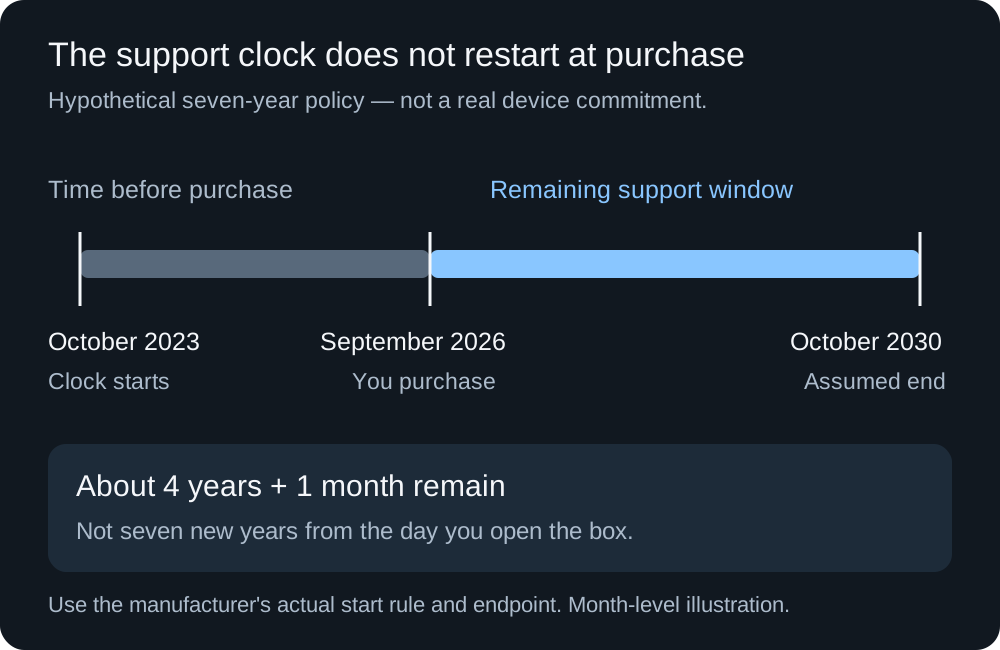
Month arithmetic from Google’s availability table and the year counts on the Pixel update page, both fetched 17 October 2026. The endpoint month is the sum. Google does not print the day.
Rule of thumb. If you plan to keep the phone 36 months and remaining_months is under 36, the published window does not cover that plan. For a Pixel, the start month is the US Google Store availability month, and the year count is the list that names that exact phone. Google’s Android version page says update schedules vary by device, manufacturer, and carrier, and it tells you to contact the manufacturer or carrier for a phone that is not a Pixel. Leave this formula off a brand whose page does not print both a start and a year count.
The hidden cost of a short remainder is another phone inside the months you already planned to keep this one. Leave the price out of the note. Put two months in it: the endpoint month, and the month you planned to replace the phone. When the endpoint arrives first, the discount has to carry that earlier replacement. A long window has a different hidden cost, a cell or a screen that gives out while updates are still promised. Use the phone battery-life comparison for which runtime was measured, and the battery replacement guide when the worn part is the cell.
Takeaway: Subtract the purchase month from the start month plus the published years, and keep the result in whole months.
Keep a release record off the year count
Apple’s security releases, fetched 17 October 2026, record updates that have shipped, the devices named for each one, and the release date. The page does not print a year count you can drop into the Pixel formula. Using that formula on an iPhone would invent an endpoint Apple did not publish.
On 28 September 2026 the page lists two iPhone branches. iOS 27.0.1 and iPadOS 27.0.1 name iPhone 11 and later, iPad Pro 12.9-inch 4th generation and later, iPad Pro 11-inch 2nd generation and later, iPad Air 4th generation and later, iPad 9th generation and later, and iPad mini 6th generation and later. The row notes that this update has no published CVE entries. It still names devices. iOS 26.7.1 and iPadOS 26.7.1, same date, also name iPhone 11 and later, and they name an older iPad set: iPad Pro 12.9-inch 3rd generation and later, iPad Pro 11-inch 1st generation and later, iPad Air 3rd generation and later, iPad 8th generation and later, and iPad mini 5th generation and later.
An iPad that appears only on the 26 branch is absent from the 27 row. That absence answers which branch named it on that date. It does not answer when security releases for the 26 branch will stop. Check the branch you will actually run.
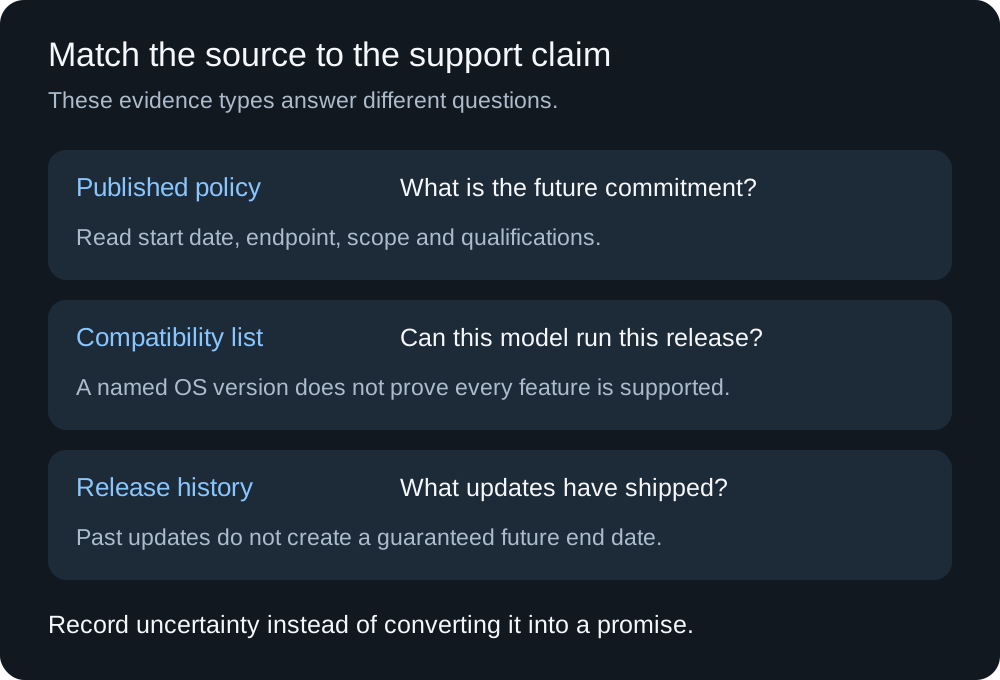
A year-count policy, a start month, and a release record answer different questions. Fetched 17 October 2026.
Takeaway: Read Apple’s security-release row as history for the branch and the devices it names.
Read a version list as eligibility
Samsung’s global newsroom article, published 19 June 2024, says Samsung is providing up to seven years of security updates and seven years of operating system upgrades, starting with the Galaxy S24 series. The footnote says availability and timing of Android OS upgrades and security updates may vary by device model and market. “Up to seven years” and “starting with the Galaxy S24 series” are both part of that sentence. The footnote blocks you from pasting the number onto every Galaxy in every country.
Samsung’s Gulf support answer is narrower and specific. It says the Galaxy Z Fold6 and Galaxy Z Flip6 are eligible for 7 years of Android OS upgrades and 7 years of security updates. Use that sentence for those two models on that page. Repeat the check on the support page for your market before you treat the Gulf wording as the US promise. The newsroom footnote is why that second check exists.
Samsung’s US One UI 8 page, fetched 17 October 2026, names Galaxy S, Z, Tab S, and A models expected to receive One UI 8.0, including S22 and S24 lines and Fold6. The page also says more models are expected to receive the update. A name on today’s list means that version is the one Samsung is describing for that model. It does not print a security end date. An S22 name on the One UI 8 list does not, by itself, put that phone under the newsroom sentence that starts seven years with the S24 series. The page adds a separate limit: AI features may be limited on the Tab S10 FE and Tab S10 FE+, and may be limited or unsupported on the A-series phones it names. That limit is about features inside the update.
Takeaway: A named OS version tells you what is being offered now. The year count has to come from the page that prints years.
Separate warranty, carrier lag, and the handset in front of you
Google’s update page says it is about Pixel software updates, and it sends warranty questions to the Hardware Warranty Center. A seller’s support period belongs in its own cell until you know which of those two it is. The sealed date on the box does not replace the availability month when the policy is launch-dated.
The same Pixel page says updates roll out gradually, depend on carrier and device, and can take a few weeks to arrive. You get a notification when the update is ready. To check, open Settings, tap System, then Software update. The page also says the Android version number and the security update level are in the Settings app. A phone that is a few weeks behind another unit on the same model is still inside that rollout description.
Samsung’s US update instructions say screens and settings vary by wireless provider, software version, and model. Some carriers require Wi-Fi before the phone will check for an update. During the update the device cannot be used, files are inaccessible, and you cannot make calls, even to emergency services. That is downtime for the install. It is also the reason to run the install while you still have another way to call, and it is not a reason to skip the update the maker is still shipping.
Match the policy to this handset. The photo shows the object you are identifying. It does not show a brand, a model number, or an update screen.
On a used or imported phone, ask for the model name and the software-information screen with personal data covered. Compare that name with the policy list, not with the family name in the listing title. An old installed version can be a pending update. Ask the seller to run the official check during the inspection you are allowed to make, and write down any error the screen shows. A suggestion to install unofficial software later is a different project from the maker’s update path.
Software support still leaves the screen and the cell unchecked. After the month arithmetic, use the phone display guide for the panel you will actually look at. A phone inside a long update window can still be the wrong buy if the glass fails that trial.
Takeaway: Put warranty, carrier rollout, and the model name on the handset in separate cells.
Put the months next to the rest of the phone
Copy one row per candidate. Leave a blank as “not stated” when the page you fetched does not print it.
Scroll horizontally to see all columns.
| Field | What to write |
|---|---|
| Exact model, region, carrier | The name on the policy list and on the handset |
| Start month | The availability month, or “not stated” |
| Year count | OS updates and security updates on their own lines |
| Endpoint month | The sum, labeled as arithmetic, plus any day the maker actually printed |
| Evidence | Policy, start table, version list, or release record |
| Planned replacement | Your month, then whether remaining months cover it |
| Page and date checked | The URL and the day you opened it |
Reopen the official page before you pay, and replace the note if the year count or the model list differs from what you saved. After purchase, leave the normal update path on. The smartphone guides hold this support record next to display, RAM, and the rest of the ownership checks, including the RAM guide for the apps you keep open. A larger memory figure does not put a phone on an update list.
Takeaway: Keep the endpoint month, your replacement month, and the URL in the same note.
Sources
Pages fetched 17 October 2026. Year counts and start months below are copied from those pages. Endpoint months in the worked example are the arithmetic, and the source pages do not print those endpoint days.
- Google: Learn when you’ll get software updates on Google Pixel phones
- Google: Find when your Pixel device became available
- Google: Check and update your Android version
- Apple: security releases
- Samsung Newsroom, 19 June 2024: Knox, including the seven-year sentence and the market footnote
- Samsung Gulf: Galaxy Z Fold6 and Z Flip6 update years
- Samsung US: One UI 8.0 device list
- Samsung US: How to update your Galaxy phone or tablet
Related articles
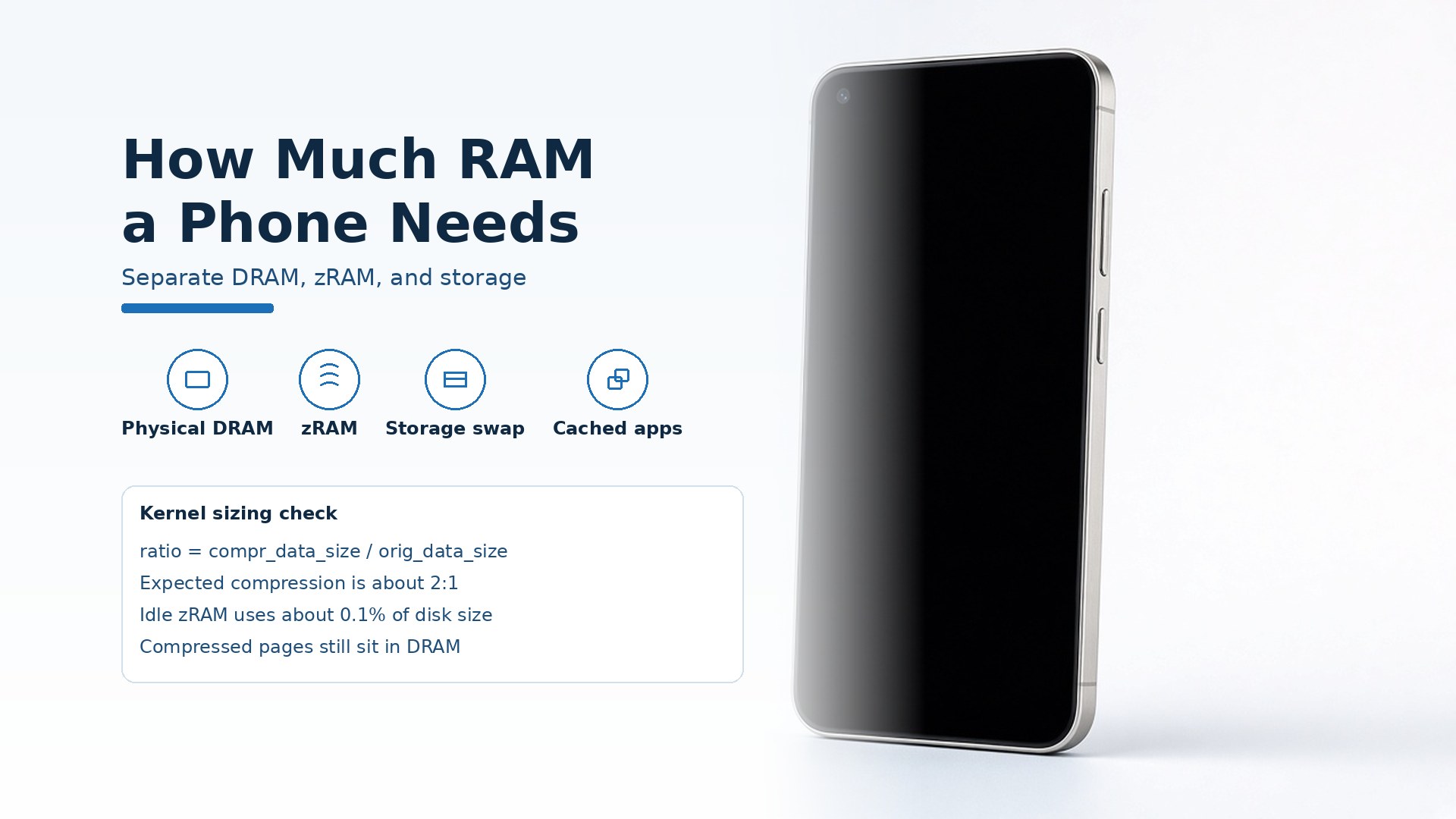
How Much RAM Does a Smartphone Need?
A smartphone needs enough physical DRAM to keep your apps cached. Keep zRAM and storage-backed virtual memory in separate columns.
Read article
Using USB-C Headphones on Android: Digital Audio & DAC Checks
USB-C headphones stay silent when the adapter is analog-only. Use the AOSP digital-to-analog rules, then log playback, the microphone, buttons, and a blank call cell.
Read article
Is It Worth Replacing a Battery in a Cell Phone?
A worn battery can waste a cell phone that still works. Match the health screen, the software-support window, and the other hardware before you replace the phone.
Read article