What Is Auracast: Broadcast Audio & Hearing Aids
Auracast is a Bluetooth LE Audio broadcast feature that streams from one transmitter to unlimited hearing aids, earbuds, and headphones without pairing.
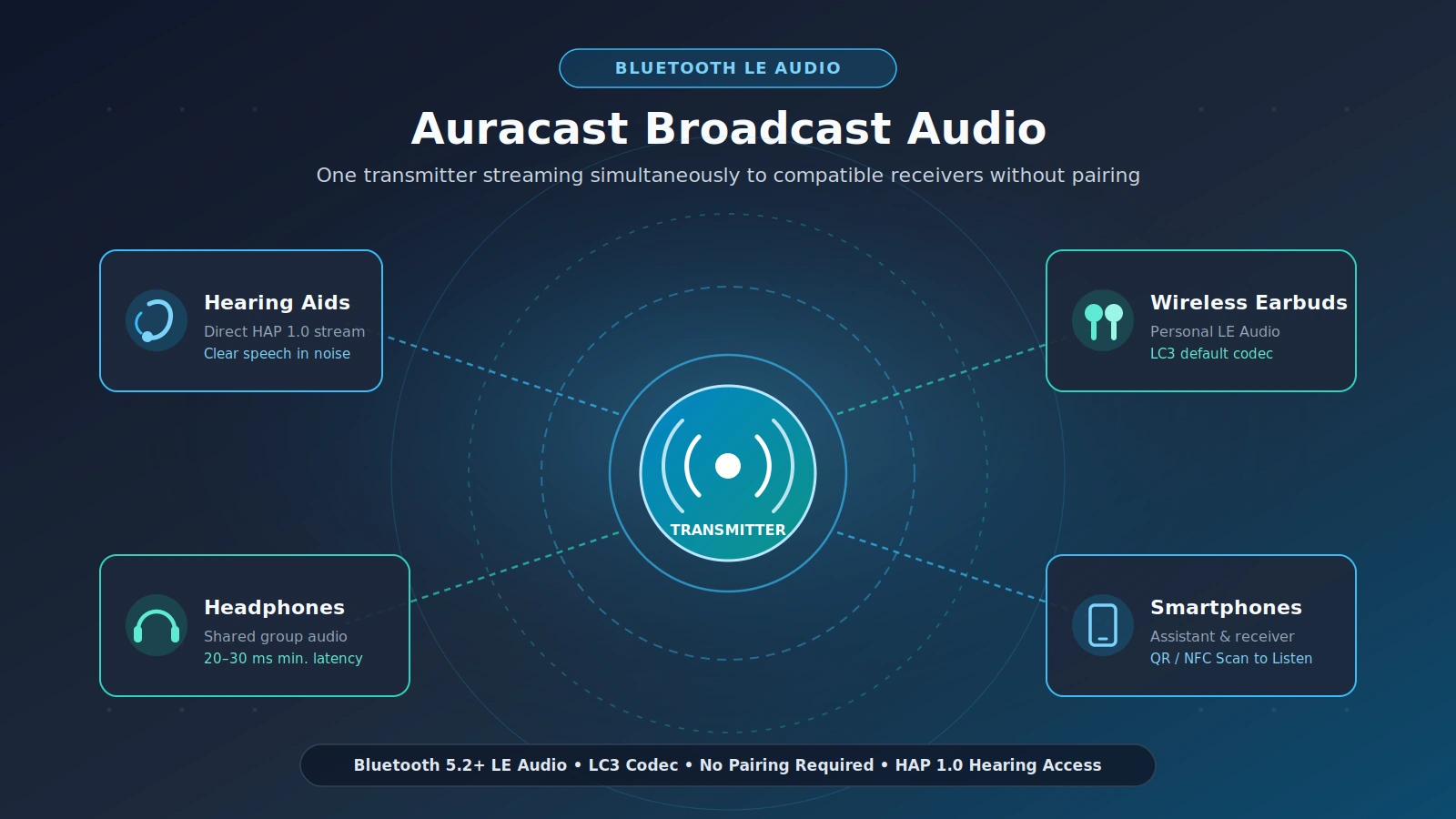
Auracast is a broadcast audio feature of Bluetooth Low Energy (LE Audio), introduced with Bluetooth 5.2, that lets a single transmitter stream audio simultaneously to potentially unlimited compatible receivers without traditional one-to-one pairing. Owned as a trademark by the Bluetooth Special Interest Group (SIG), it delivers direct broadcasts to compatible hearing aids, earbuds, headphones, and smartphones.
Because Auracast runs on the Bluetooth LE Audio architecture rather than legacy Bluetooth Classic audio, listeners do not pair their earbuds or hearing aids with a venue television, public-address system, or friend’s device. Instead, compatible receivers tune into a local broadcast stream much like joining a shared radio channel, while keeping lower power consumption and lower minimum latency.
How does Auracast broadcast audio work?
Auracast works by broadcasting one or more audio streams encoded with the LC3 codec over Bluetooth Low Energy, alongside Bluetooth advertising packets that announce the stream name, content type, and language. Listeners join directly through a Bluetooth LE smartphone assistant or by scanning a Scan to Listen QR code or near-field communication (NFC) tag, bypassing device pairing entirely.
Bluetooth SIG announced the completion of Bluetooth LE Audio on 12 July 2022, building the broadcast stack on top of Bluetooth 5.2 and 5.3. Within that stack, seven core Bluetooth LE profiles and services coordinate how transmitters announce streams, how receivers declare audio capabilities, and how smartphones help users select channels.
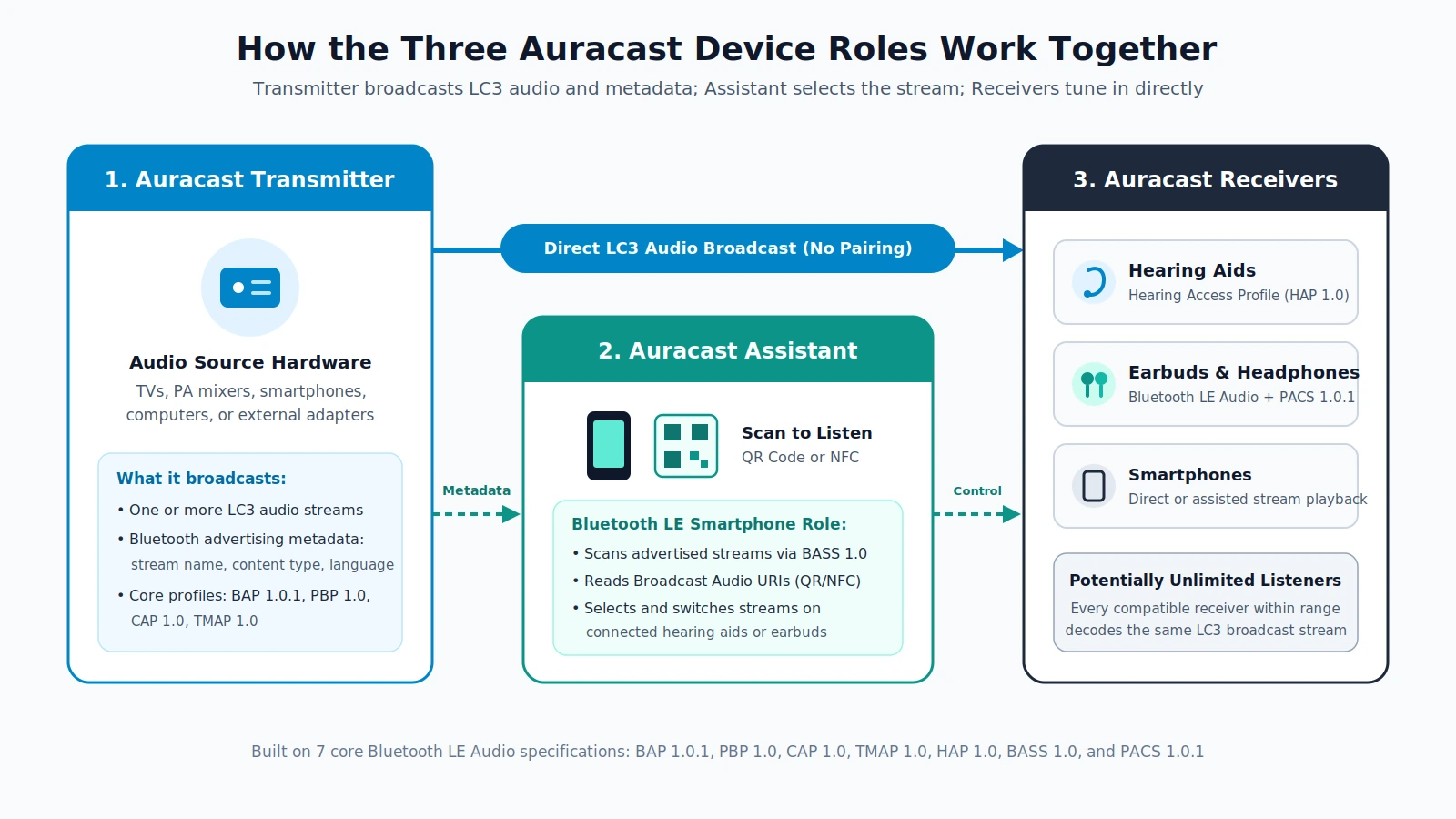
An Auracast session separates broadcasting, stream selection, and audio playback across three defined roles so unlimited compatible receivers can listen at once.
The three device roles in every Auracast session
Every Auracast deployment relies on three distinct roles working together:
- Auracast Transmitter: An audio source—such as a television, computer, smartphone, public-address mixer, or external broadcast adapter—that encodes one or more audio channels in LC3 and broadcasts stream metadata over Bluetooth advertising.
- Auracast Assistant: A Bluetooth LE-enabled smartphone (or similar controller) that scans advertised broadcasts, reads QR code or NFC Broadcast Audio Uniform Resource Identifiers (URIs), and selects or switches streams on connected headphones or hearing aids.
- Auracast Receiver: A compatible hearing aid, pair of earbuds, set of headphones, or smartphone within range that decodes the broadcast stream directly without pairing to the transmitter.
Core Bluetooth LE Audio profiles and services
Instead of a single monolithic audio profile, Auracast combines seven specifications that handle broadcast transport, public channel discovery, hearing aid access, and device capability reporting.
Scroll horizontally to see all columns.
| Specification | Version | Role in Auracast broadcast audio |
|---|---|---|
| Basic Audio Profile (BAP) | 1.0.1 | Defines core Bluetooth LE Audio unicast and broadcast audio streaming behavior |
| Public Broadcast Profile (PBP) | 1.0 | Standardizes public audio broadcasting services so receivers can join without pairing |
| Common Audio Profile (CAP) | 1.0 | Coordinates common audio control procedures across LE Audio devices |
| Telephony and Media Audio Profile (TMAP) | 1.0 | Supports telephony and media audio streaming use cases over LE Audio |
| Hearing Access Profile (HAP) | 1.0 | Enables direct broadcast and wireless audio streaming to compatible hearing aids |
| Broadcast Audio Scan Service (BASS) | 1.0 | Lets an Auracast Assistant scan broadcasts and pass tuning instructions to receivers |
| Published Audio Capabilities Service (PACS) | 1.0.1 | Publishes a receiver’s supported audio configurations and codec capabilities |
How Scan to Listen connects listeners in public spaces
When multiple broadcasts operate in the same building, Bluetooth advertising carries each stream’s name, content type, and language so an Assistant can display a readable list. Auracast also supports Broadcast Audio URIs, marketed as Scan to Listen, which let listeners join a specific stream via QR code or NFC tap.
According to the Bluetooth Low Energy specification overview, Scan to Listen URIs allow users to select exact audio channels for museum audio guides, simultaneous multi-language translations, silent television screens in bars or community centers, public events and performances at conference halls, sports venues, or houses of worship, public transit station announcements, and airport flight announcements.
How is Auracast different from standard Bluetooth Classic pairing?
Standard Bluetooth Classic (BR/EDR) audio connects one source to one paired device at a time using legacy SBC encoding and a claimed minimum latency of 100 to 200 ms. Auracast runs on Bluetooth LE Audio, streaming one-to-many broadcasts without pairing while using the royalty-free LC3 codec, lower battery consumption, and a claimed minimum latency of 20 to 30 ms.
At the radio layer, Bluetooth Low Energy and Bluetooth Classic both operate in the 2.4 GHz band, which allows dual-mode smartphones and headphones to share a single radio antenna. However, BLE uses a different channel plan and a slightly different modulation system than Classic Bluetooth. Because of those radio differences, BLE is independent of Classic Bluetooth and has no direct compatibility with it, even though BR/EDR and BLE can coexist inside the same dual-mode hardware.
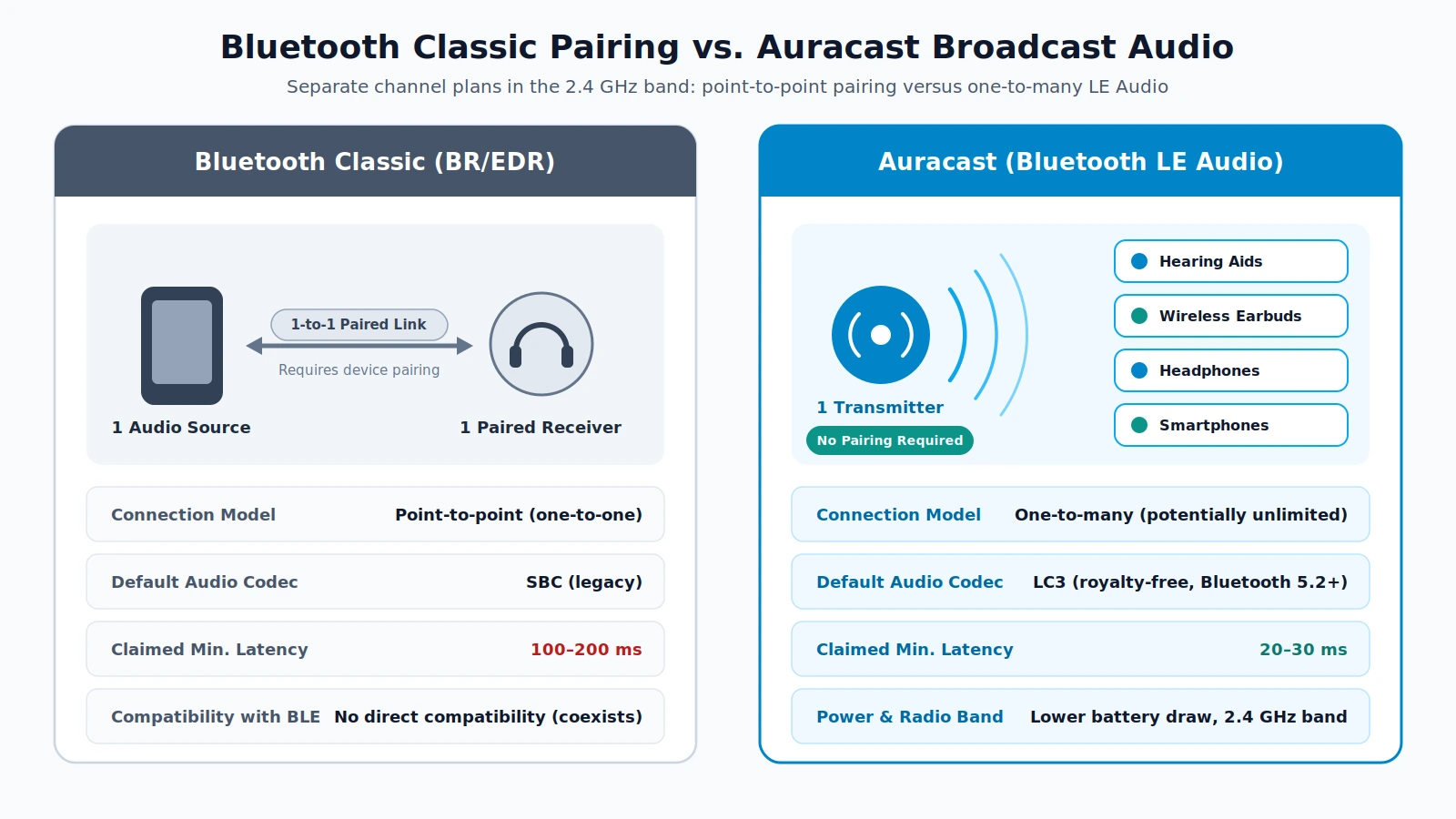
Bluetooth Classic and Bluetooth LE Audio coexist in the 2.4 GHz band, but Auracast replaces one-to-one pairing and SBC with one-to-many broadcasting and LC3.
Scroll horizontally to see all columns.
| Feature | Bluetooth Classic (BR/EDR) | Auracast (Bluetooth LE Audio) |
|---|---|---|
| Connection topology | Point-to-point (one-to-one pairing) | One-to-many broadcast (potentially unlimited receivers) |
| Pairing step | Required before streaming | Not required for public broadcasts |
| Radio band and compatibility | 2.4 GHz band; no direct compatibility with BLE | 2.4 GHz band; coexists with BR/EDR in dual-mode devices |
| Default audio codec | SBC (legacy codec) | LC3 (royalty-free, developed by Fraunhofer IIS and Ericsson) |
| Claimed minimum latency | 100 to 200 ms | 20 to 30 ms |
| Power consumption | Higher baseline battery draw | Lower battery consumption than regular Bluetooth Audio |
| Hearing aid broadcast support | Not built for standardized multi-user broadcast | Standardized via Hearing Access Profile (HAP) 1.0 |
Why the LC3 codec matters for broadcast quality
Announced in January 2020 alongside LE Audio, the Low Complexity Communication Codec (LC3) is a royalty-free audio codec developed by Fraunhofer IIS and Ericsson to succeed SBC. In subjective testing conducted by the Bluetooth SIG and ETSI, LC3 delivered higher audio quality and better packet loss concealment than both SBC and G.722, helping broadcast streams stay clear even when wireless interference drops packets in crowded public spaces.
How does Auracast work with hearing aids?
Auracast was developed from the early 2010s by the Bluetooth SIG in direct collaboration with hearing aid manufacturers seeking lower power consumption, broader compatibility, and simultaneous multi-user streaming. Compatible hearing aids receive broadcasts directly through Hearing Access Profile (HAP) 1.0, while a Bluetooth LE smartphone acts as an assistant to discover, select, and switch streams.
For hearing aid wearers, direct broadcast streaming sends speech straight into the ear without picking up room echo or background crowd noise, improving speech intelligibility in noisy environments compared to older technologies such as an audio induction loop. Because the same open broadcast standard serves both hearing aids and consumer earbuds, venues can serve accessibility needs and everyday travelers from a single broadcast transmitter.
Real-world transit and airport deployments
Public transportation hubs have begun moving Auracast from trials into permanent infrastructure:
- Bristol Temple Meads railway station (2025): Tested an Auracast installation as part of its station innovation zone and kept the system in place to deliver translated announcements alongside English announcements.
- Frankfurt Airport (2026): Conducted a trial deployment of Auracast to stream gate announcements directly to passengers’ personal devices.
- Brighton railway station (2026): Installed Auracast permanently for passenger announcements.
How does Auracast compare with a traditional hearing loop, FM, or infrared system?
According to the National Institute on Deafness and Other Communication Disorders (NIDCD, NIH), traditional large-facility assistive listening systems include hearing loops, FM systems, and infrared systems—each with physical wiring, range, or lighting trade-offs. Auracast replaces venue-specific receivers and floor-perimeter wiring with direct Bluetooth LE Audio streaming to personal hearing aids and compatible earbuds.
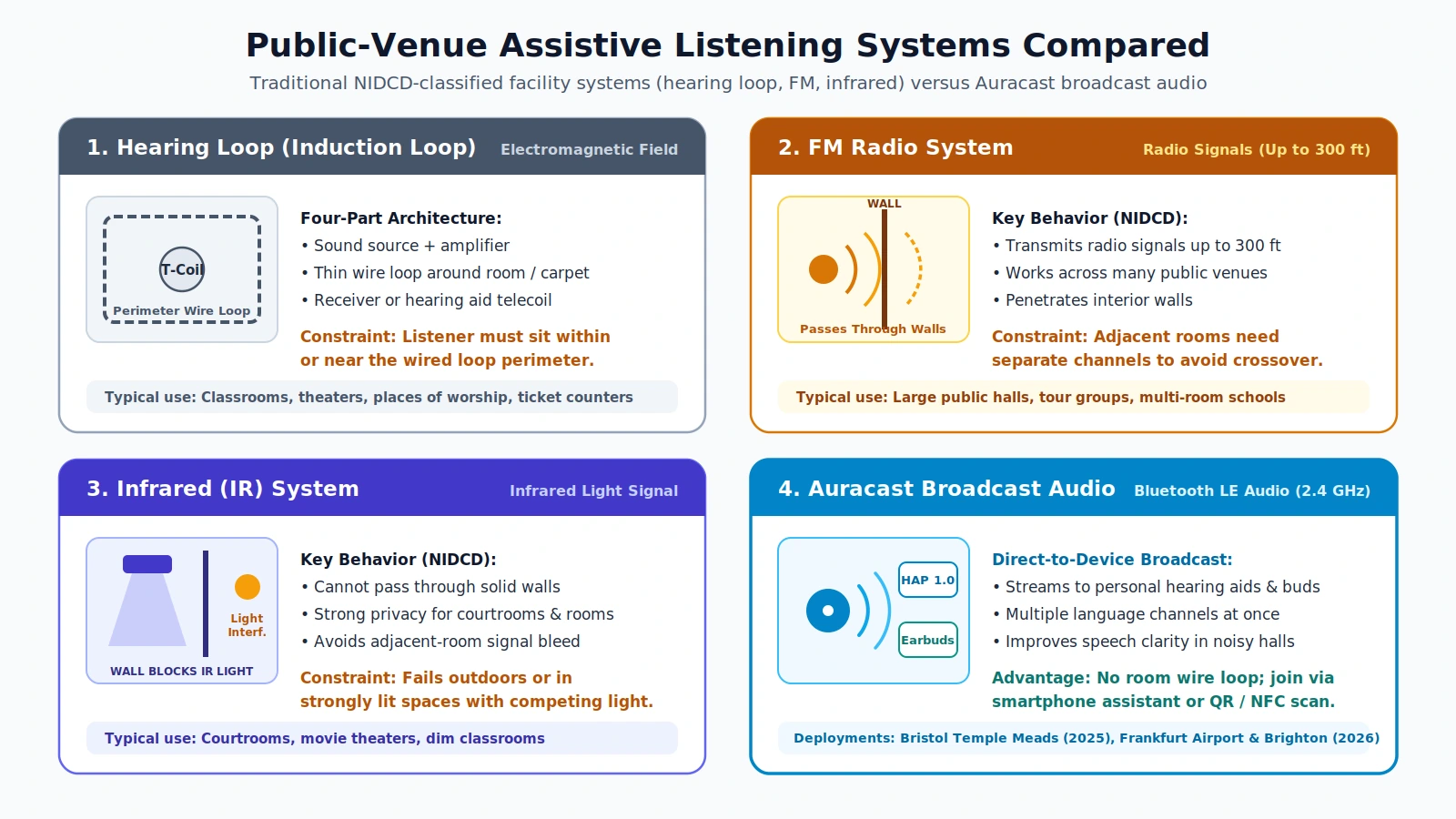
Each venue assistive listening technology balances installation complexity, room containment, and listener hardware differently.
Trade-offs across large-facility assistive listening systems
Scroll horizontally to see all columns.
| Assistive listening system | Signal medium | Venue infrastructure and constraints | Listener hardware requirement |
|---|---|---|---|
| Hearing loop (induction loop) | Electromagnetic field | Four parts: sound source, amplifier, thin wire loop around a room or under carpeting, and receiver; listener must stay within or near the loop | Hearing loop receiver or telecoil built into hearing aids or cochlear implants |
| FM system | Radio signals | Transmits up to 300 feet and penetrates walls; adjacent rooms need separate channels to avoid mixed signals | Dedicated FM receiver tuned to the room channel |
| Infrared (IR) system | Infrared light | Cannot pass through walls, preserving confidentiality in courtrooms or classrooms; fails outdoors or in strongly lit rooms with competing light sources | Dedicated infrared receiver with clear reception |
| Auracast broadcast audio | Bluetooth LE Audio (2.4 GHz) | Compact broadcast transmitter; supports multiple language streams and Scan to Listen QR or NFC selection without floor loop wiring | Compatible personal hearing aids (HAP 1.0), earbuds, headphones, or smartphones |
Infrared systems remain well suited to confidential spaces like courtrooms because light cannot cross walls, while FM systems cover up to 300 feet across large halls when channel separation is managed. Where venues want listeners to use their own daily hearing aids or earbuds without checking out shared receivers or laying perimeter wire beneath carpeting, Auracast offers a standardized wireless alternative.
What does an Auracast-ready or compatible label mean on audio gear?
An Auracast trademark indicates Bluetooth SIG-defined broadcast capability, but buyers must check which role—Transmitter, Receiver, or Assistant—a device supports and whether the OS, hardware, and drivers enable LE Audio and LC3. Because many Bluetooth LE integrated circuits use software radio, some gear ships ready for a future firmware upgrade rather than active support out of the box.
A common purchasing mistake is assuming that any headphone or phone listing Bluetooth 5.2 or 5.3 automatically supports Auracast. Bluetooth 5.2 introduced the underlying LE Audio foundation, yet manufacturers must still implement the required broadcast profiles (BAP, PBP, CAP, TMAP, HAP, BASS, or PACS) and LC3 codec support across firmware and OS drivers.
Platform, hardware, and firmware readiness checklist
Scroll horizontally to see all columns.
| Device category | Required role or standard | What to verify before buying |
|---|---|---|
| Android smartphones | Assistant and/or Receiver (LC3 / LE Audio) | Android 13 or newer includes LC3 codec support (backed by Google’s open-source liblc3 project); confirm explicit Auracast Assistant or broadcast menu support in device specifications |
| Windows PCs | Transmitter and/or LE Audio sharing | Windows 11 version 22H2 or newer with compatible hardware and drivers; Intel PCs require Intel 13th gen or newer CPUs supporting Intel Smart Sound Technology plus an Intel AX210 or newer card (Wi-Fi 6E and Bluetooth 5.3) with the latest drivers |
| Earbuds, headphones, and hearing aids | Receiver (BAP 1.0.1, PACS 1.0.1, HAP 1.0 for hearing aids) | Confirm active Auracast Receiver support rather than Classic Bluetooth only, and check whether firmware updates are already released |
| Televisions and public audio sources | Transmitter (BAP 1.0.1, PBP 1.0) | Confirm built-in Auracast Transmitter support or plan to attach a dedicated external Auracast transmitter |
Because firmware updates determine whether software-radio Bluetooth LE chips gain new capabilities over time, reviewing a phone’s long-term update commitment in our phone software support comparison guide helps protect your purchase. If you also rely on wired digital audio on Android phones, check our separate Android USB-C headphones and DAC adapter compatibility guide, or browse our full smartphone guides hub for broader handset decisions.
When do you need a dedicated Auracast transmitter?
You need a dedicated Auracast transmitter whenever your audio source—such as an older television, gym screen, public-address mixer, or legacy computer or smartphone—lacks built-in Bluetooth LE Audio broadcast hardware. Because Bluetooth Low Energy has no direct compatibility with Classic Bluetooth, a source that only supports Classic Bluetooth cannot send an Auracast stream on its own.
Adding an external Auracast transmitter bridges that gap by taking the legacy source’s audio output, encoding it with LC3, and broadcasting both the audio stream and Bluetooth advertising metadata to compatible receivers in range. For home televisions, community centers, and transit or venue PA systems that are not ready for full equipment replacement, a dedicated transmitter is the fastest path to enabling direct hearing aid and earbud listening.
Frequently asked questions
Does Auracast require Bluetooth pairing?
No. Auracast implements public audio broadcasting services that let multiple compatible receivers tune into a single transmitter without going through traditional one-to-one Bluetooth device pairing. Listeners can join via a Bluetooth LE smartphone assistant or by scanning a Scan to Listen QR code or NFC tag.
Will my older Bluetooth Classic headphones work with Auracast?
No. Bluetooth Low Energy and Bluetooth Classic (BR/EDR) use different channel plans and modulation in the 2.4 GHz band and have no direct compatibility. Headphones must include Bluetooth LE Audio hardware and Auracast Receiver support (with the LC3 codec) to decode an Auracast broadcast.
How much lower is Auracast latency compared to standard Bluetooth audio?
Bluetooth LE Audio with LC3 claims a minimum latency of 20 to 30 ms, compared to Bluetooth Classic audio’s 100 to 200 ms, while also reducing battery consumption.
Can Auracast replace a hearing aid telecoil and room hearing loop?
Auracast streams audio directly to compatible hearing aids via Hearing Access Profile (HAP) 1.0, improving speech intelligibility in noisy environments without requiring a perimeter wire loop around the room or under carpeting. However, venues with existing telecoil users may run both systems during the transition until HAP 1.0 hearing aids are universal.
Can existing Bluetooth LE devices get Auracast through a firmware update?
Sometimes. Many Bluetooth Low Energy integrated circuits use software radio, which allows specification updates to be added via a firmware upgrade. Even so, buyers should confirm that the manufacturer has actually released Auracast firmware and OS driver support for their exact model rather than assuming an update will arrive.
Sources
- Wikipedia — Auracast: Overview of Auracast broadcast audio, Bluetooth 5.2 LE Audio origin, core profiles and services (BAP 1.0.1, PBP 1.0, CAP 1.0, TMAP 1.0, HAP 1.0, BASS 1.0, PACS 1.0.1), Bluetooth advertising metadata, Scan to Listen URIs, hearing aid development, and 2025–2026 transit deployments.
- Wikipedia — Bluetooth Low Energy: Technical details on 2.4 GHz coexistence and non-compatibility with Bluetooth Classic (BR/EDR), LE Audio completion date (12 July 2022), 20–30 ms vs. 100–200 ms minimum latency, Scan to Listen venue use cases, and software-radio firmware upgrades.
- Wikipedia — LC3 (codec): LC3 royalty-free codec details (Fraunhofer IIS and Ericsson), Bluetooth SIG and ETSI subjective quality and packet loss concealment findings versus SBC and G.722, and Android 13, Windows 11 22H2+, and Intel 13th gen / AX210 hardware and driver requirements.
- NIDCD (NIH) — Assistive Devices for People with Hearing, Voice, Speech, or Language Disorders: Authoritative definitions and constraints for large-facility assistive listening systems, including four-part hearing loops, 300-foot FM systems, and infrared systems.
Related articles
USB-C Hub for Android: Power Role & Video
Why a USB-C hub for Android stops charging or drops video: USB-C Sink/DFP roles, 15W hub reserve, PPS limits, Fast Role Swap, and connection order.
Read article
USB-C to HDMI Adapter for Phone: DisplayPort Alt Mode Test
Check your phone’s wired video support, then run a USB-C to HDMI no-signal test. Separate DisplayPort Alt Mode, cable faults, and app restrictions.
Read article
Using USB-C Headphones on Android: Digital Audio & DAC Checks
USB-C headphones stay silent when the adapter is analog-only. Use the AOSP digital-to-analog rules, then log playback, the microphone, buttons, and a blank call cell.
Read article