Battery Cycle Count: Meaning & Health Checks
One battery cycle equals 100% cumulative capacity discharged across partial charges. Learn how cycles affect battery health and how to check your count.
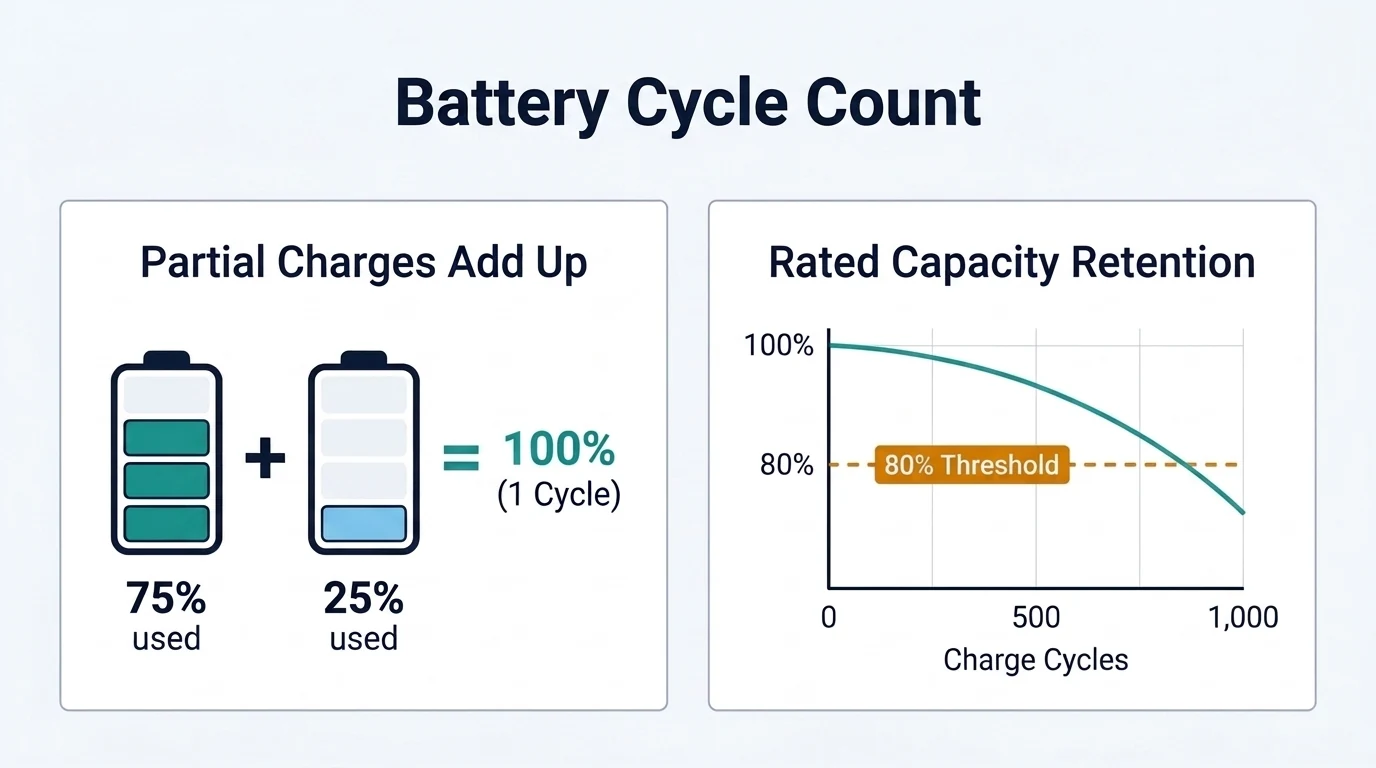
A battery cycle count measures how many times a rechargeable lithium-ion battery has discharged a cumulative amount equal to 100% of its capacity, whether in one continuous drain or across several partial charges. Plugging in a charger does not automatically add a cycle, and manufacturers typically rate cycle life until usable capacity drops to 80% of rated value.
Because modern phones and laptops accumulate fractional discharges across days, confusing each plug-in session with a full cycle often leads to unnecessary charging anxiety. Tracking both cycle count and capacity retention helps separate normal chemical wear from heat stress, charging habits, and software-reported health thresholds.
What does battery cycle count mean for partial daily top-ups?
For partial daily top-ups, battery cycle count means your device adds up smaller discharge segments until the cumulative energy used equals 100% of battery capacity. A charge cycle is not a unit of time, and topping up halfway through the day only adds the fraction of capacity you actually discharged rather than a whole cycle.
In battery engineering, draining a cell completely before recharging is called a deep discharge, whereas partially discharging and recharging is called a shallow discharge, as defined in standard charge cycle terminology. Battery researchers sum those partial discharges into an equivalent number of full charge-discharge cycles when tracking long-term wear.
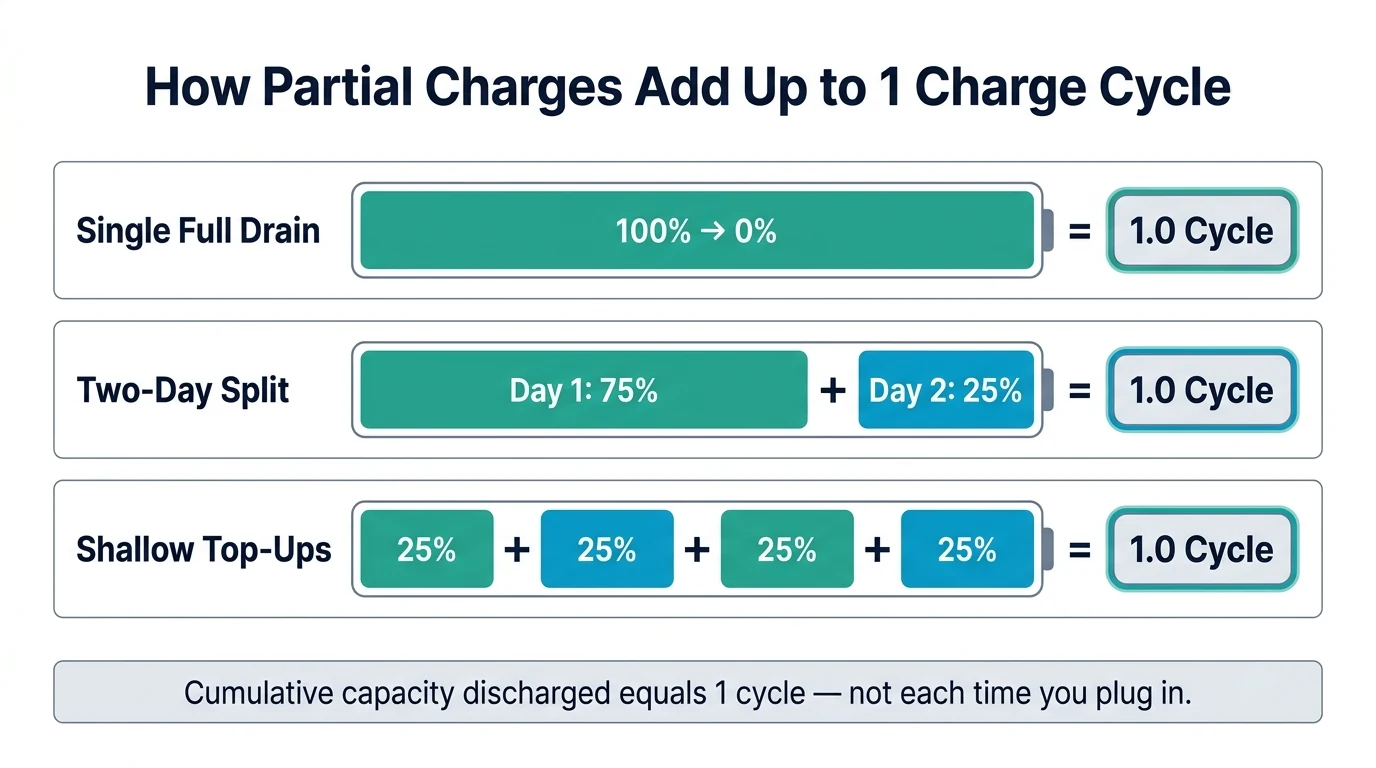
Every pattern above totals 100% cumulative capacity discharged and counts as one charge cycle, regardless of how many times you plug in the cable.
Worked cumulative cycle examples
Apple’s Batteries: Why Lithium-ion documentation illustrates the cumulative rule with a two-day example: using 75% of battery capacity on one day, recharging fully overnight, and using 25% the next day totals 100% discharged and counts as one charge cycle. Similarly, Google Pixel Phone Help states that using a phone from 100% charge down to 50% and recharging to 100% counts as 0.5 cycles.
Scroll horizontally to see all columns.
| Daily charging pattern | Discharge segments before hitting 100% | Equivalent cycles added | Discharge type |
|---|---|---|---|
| Single full drain | Full 100% discharge down to empty in one session | One cycle | Deep discharge |
| Two-day uneven split | 75% used on day one plus 25% used on day two | One cycle | Shallow discharge |
| Half-battery daily top-up | 100% down to 50% once (0.5 cycles), repeated across two sessions | One cycle (0.5 per session) | Shallow discharge |
| Frequent light top-ups | Four separate 25% discharge segments recharged between uses | One cycle | Shallow discharge |
Notice that a charge cycle is independent of wall-clock charging duration: the time spent plugged in or discharging does not change the cycle tally itself. On iPhone models, Apple Support also notes that a complete charge cycle is normalized between 80% and 100% of original capacity to account for expected diminishing capacity over time.
Why shallow charging reduces lithium-ion stress
Although two 50% drains and one 100% drain add the same single cycle to the counter, they do not impose identical chemical stress on the cell. Keeping a lithium-ion battery state of charge around 60% to 80% can reduce capacity loss compared with cycling repeatedly between empty and full.
Standard lithium-ion charging follows a constant-current then constant-voltage (CC/CV) profile, tapering current down to a minimum threshold once the battery reaches its maximum voltage. Apple notes that its lithium-ion batteries fast-charge to 80% capacity and then switch to slower trickle charging to ease electrical current and extend lifespan. Staying within safe cell voltage windows—roughly 2.5 V to 3.65 V, 4.1 V, 4.2 V, or 4.35 V depending on cell chemistry—prevents premature aging and stress.
How does battery cycle count affect overall battery health?
Battery cycle count affects overall battery health because every full cycle slightly reduces the amount of cyclable lithium-ion charge the battery can hold while raising internal resistance. Manufacturers generally define cycle life as the number of complete cycles a cell can undergo before usable capacity drops to 80% of its rated value.
Over a battery’s lifespan, gradual degradation reduces ampere-hour (Ah) capacity and increases internal resistance, which lowers operating voltage under heavy load. Apple Support explains that higher battery impedance creates a larger voltage drop when the processor demands peak power, which can trigger a protective system shutdown—and impedance also rises temporarily at a low state of charge or in cold temperatures.
Cycle aging versus calendar aging
Peer-reviewed electrochemical modeling in a 2025 RSC Advances storage degradation study (PMC) (published July 2, 2025, volume 15, issue 28, pages 22576–22586) divides lithium-ion battery degradation into two distinct mechanisms:
- Cycle aging: Wear driven by repetitive charge-discharge stresses, which depends strongly on depth of discharge (DoD), current rate (C-rate), temperature, and state-of-charge (SOC) window.
- Calendar aging: Degradation during idle storage driven by parasitic side reactions at elevated temperatures and high SOC levels, which irreversibly consume cyclable lithium and raise internal resistance.
During both mechanisms, solid electrolyte interphase (SEI) growth on the anode from electrolyte reduction consumes active lithium and raises ionic and electronic resistance. In that pseudo-two-dimensional (P2D) storage study, cells held at 55 °C and 90% SOC for 36 months showed synergistic degradation with SEI thickness exceeding 300 nm and conductivity loss over 20%. That explains why a battery’s chemical age reflects its temperature history and charging patterns rather than calendar time or cycle count alone—and why a newly activated phone can occasionally read slightly under 100% maximum capacity depending on the time elapsed between manufacture and activation.
Manufacturer rated cycle-life thresholds at 80% capacity
Official manufacturer cycle ratings represent ideal-condition design benchmarks for retaining 80% of original capacity rather than hard failure dates. Different hardware generations carry distinct thresholds:
Scroll horizontally to see all columns.
| Device group | Rated capacity retention threshold | Rated complete charge cycles | Official documentation basis |
|---|---|---|---|
| iPhone 14 models and earlier | 80% of original capacity | 500 cycles (ideal conditions) | Apple Support: About the battery and performance of iPhone 11 and later |
| iPhone 15 models and later | 80% of original capacity | 1000 cycles (ideal conditions) | Apple Support: About the battery and performance of iPhone 11 and later |
| Pixel 3 through Pixel 8 Pro and Pixel Fold | Up to 80% capacity | About 800 cycles | Google Pixel Phone Help: Understand your Pixel battery |
| Pixel 8a and later | Up to 80% capacity | About 1000 cycles | Google Pixel Phone Help: Understand your Pixel battery |
| Modern MacBook laptops | Up to 80% of original charge capacity | 1000 cycles (maximum rating) | Apple Support: Determine battery cycle count for Mac laptops |
Reaching a rated cycle count does not mean the battery immediately stops working, nor does it guarantee you need a new phone. If your capacity is dropping and you are deciding between a replacement cell and a new handset, our phone battery replacement guide walks through the health screen, software-support window, and hardware checks. If you are shopping for a new handset and comparing endurance before buying, see our guide on how to compare phone battery life.
How is battery cycle count reported on an iPhone?
On iPhone 15 models and later running iOS 17.4 and later, battery cycle count is reported natively inside Settings under Battery and then Battery Health alongside maximum capacity, replacement recommendations, and battery manufacture date. Earlier models such as iPhone 11, 12, 13, and 14 display Maximum Capacity and Peak Performance Capability without a cycle count row.
Checking the exact menu path depends on your handset generation:
- iPhone 15 models and later (iOS 17.4 and later): Open Settings, tap Battery, then tap Battery Health. The screen displays battery health status, maximum capacity percentage, whether a battery replacement is recommended, the cumulative cycle count, and when the battery was manufactured.
- iPhone 11, 12, 13, and 14 models: Open Settings, tap Battery, then tap Battery Health & Charging. This screen reports Maximum Capacity relative to new and Peak Performance Capability—such as the confirmation that your battery is currently supporting normal peak performance—rather than a direct cycle counter.
Charge Limit and Optimized Battery Charging on iPhone
To slow calendar aging from sitting at full charge, Apple provides two built-in controls documented in Apple Support’s Charge Limit and Optimized Battery Charging guidance. On iPhone 15 models and later, Settings under Battery and then Charging lets you choose a Charge Limit between 80% and 100% in 5% increments. When Charge Limit is set below 100%, your iPhone occasionally charges to 100% to maintain accurate state-of-charge estimates.
When Charge Limit is set to 100%, Optimized Battery Charging is available to delay charging past 80% in routine situations and reduce time spent fully charged. Optimized Battery Charging requires at least 14 days to learn your charging habits and at least 9 charges of 5 hours or more in a given location before it engages.
How do you check battery cycle count on an Android phone?
You can check battery cycle count directly on Pixel 8a and later by opening Settings, tapping About phone, and selecting Battery information, while Android’s system platform added native cycle-count reporting at API level 34 via BatteryManager EXTRA_CYCLE_COUNT. Exact menu availability still varies across Android models and manufacturer skins.
At the operating-system layer, the Android Developers BatteryManager API reference introduced EXTRA_CYCLE_COUNT at API level 34 as an integer value representing the battery charging cycle count. Even though the platform exposes that field, each hardware maker decides whether to surface it inside consumer Settings menus.
Pixel Battery information and Battery health assistance
Google Pixel Phone Help splits battery health reporting and voltage management by model generation:
- Pixel 8a and later: Open Settings, tap About phone, and tap Battery information to view the battery cycle count. Under Settings, Battery, and Battery health, supported phones estimate remaining capacity relative to original capacity and display either Normal or Reduced, switching to Reduced when remaining capacity falls below 80%.
- Pixel 6a, Pixel 7, Pixel 7 Pro, Pixel 7a, Pixel 8, and Pixel 8 Pro: Google documentation notes that these models do not indicate battery health status inside Settings.
Google also implements Battery health assistance, which begins adjusting maximum battery voltage at 200 charge cycles and continues gradually until 1000 charge cycles to stabilize aging and performance. On Pixel 9a and later, Battery health assistance is turned on by default and cannot be turned off. For everyday charging, Google recommends using a compatible USB-C PD or PPS charger in a cool spot around 25 °C (78 °F); if you are verifying charger standards, our USB-C Power Delivery explainer covers how PD and PPS negotiate voltage and current.
How do you check battery cycle count on a Mac or Windows laptop?
On a Mac laptop, check battery cycle count by opening System Information, selecting Power in the sidebar, and reading the count under Battery Information. On a Windows laptop, run powercfg /batteryreport in Command Prompt or Windows Terminal to generate an HTML report showing battery usage characteristics over the lifetime of the system.
Keeping one cross-platform checklist makes it easy to inspect every phone and laptop you own without installing unverified third-party apps:
Scroll horizontally to see all columns.
| Platform and device | Built-in lookup path or command | Key health outputs shown | Notes on availability |
|---|---|---|---|
| iPhone 15 and later (iOS 17.4+) | Settings > Battery > Battery Health | Cycle count, maximum capacity, manufacture date, replacement recommendation | Native cycle counter included |
| iPhone 11, 12, 13, and 14 | Settings > Battery > Battery Health & Charging | Maximum capacity percentage, Peak Performance Capability | Cycle count not listed natively |
| Google Pixel 8a and later | Settings > About phone > Battery information; Settings > Battery > Battery health | Cycle count, Battery health status (Normal or Reduced below 80%) | Pixel 6a through Pixel 8 Pro omit Battery health status |
| Android (API level 34 and later) | System API via BatteryManager EXTRA_CYCLE_COUNT | Integer battery charging cycle count | Menu visibility depends on device maker |
| Mac laptops (macOS) | System Information > Power > Battery Information | Current cycle count alongside battery status | Modern MacBooks rated to 80% at 1000 cycles |
| Windows laptops | Run powercfg /batteryreport from Command Prompt or Terminal | Lifetime battery usage and capacity report in HTML | Built into Windows powercfg utilities |
Documenting the cycle count and capacity status on the same date gives you a clean baseline for tracking how quickly your battery ages over the coming months.
Can leaving a device plugged in overcharge the battery or add cycles?
Leaving a healthy phone or laptop plugged in overnight does not overcharge the battery or keep adding charge cycles, because built-in battery management circuits stop charging current once the cell reaches its target limit. However, holding a battery at 100% state of charge in warm conditions still accelerates calendar aging over time.
Commercial lithium-ion cells rely on layered hardware and firmware safeguards. As detailed in an ACS Omega study on lithium-ion cell safety (PMC), reputable lithium-ion cells integrate internal positive temperature coefficient (PTC) layers, current interrupt devices (CID), and battery management systems (BMS) to guard against short circuits and overcharge events. During an overcharge fault, internal gas pressure activates the CID to disconnect the electrical pathway while excess pressure vents through top cover holes. Conversely, battery packs without effective management circuits are vulnerable when overcharged or deeply discharged, faulty chargers can damage protection circuits, and failing to respect current and voltage limits causes excessive heating or even explosion.
On iPhone models using Charge Limit, Apple explains that charging stops within a few percentage points of the selected ceiling and only resumes if the battery level drops more than 5% while connected to power—preventing rapid micro-cycling at the top of the charge curve.
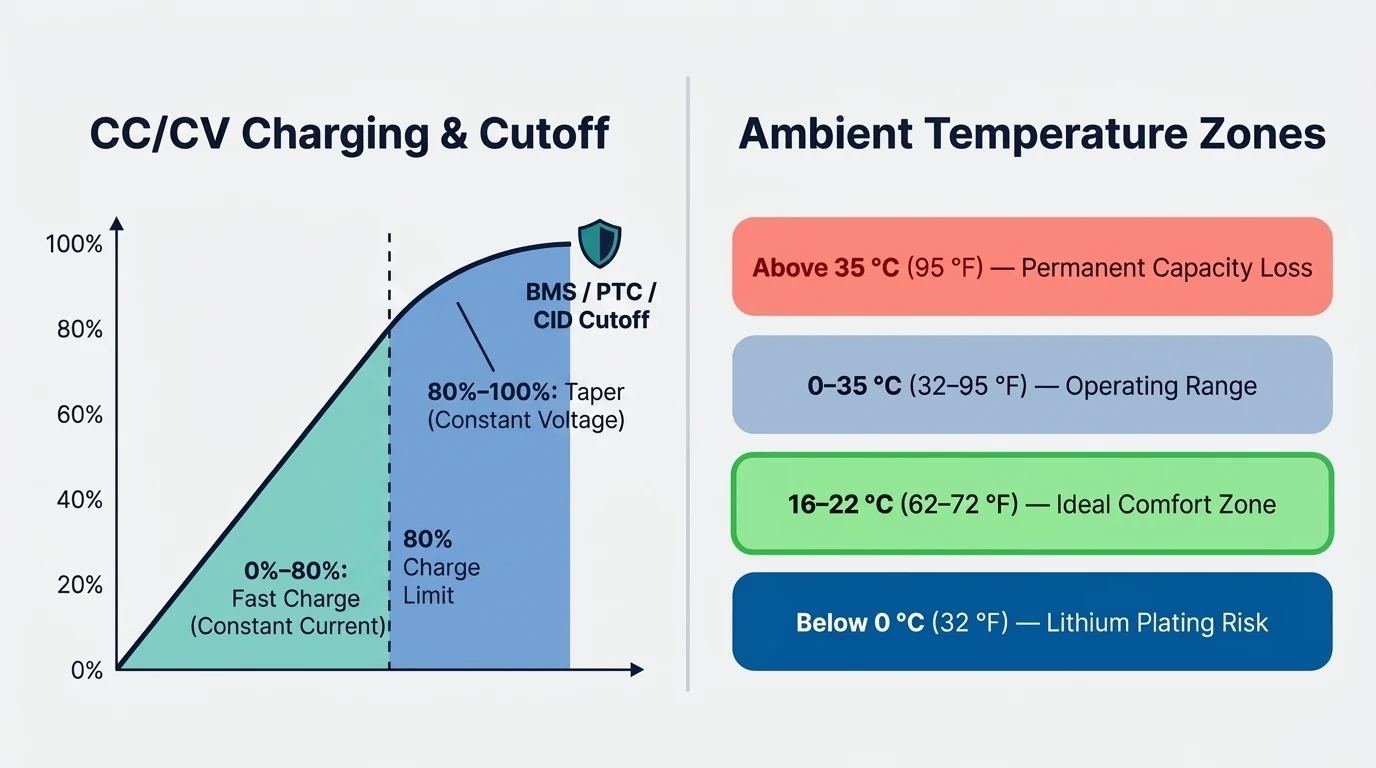
Hardware cutoffs prevent electrical overcharging, while keeping ambient temperature inside the 16–22 °C comfort zone slows permanent chemical capacity loss.
Safe temperature windows and long-term storage limits
Heat and freezing temperatures damage lithium-ion batteries far faster than routine partial top-ups. Apple warns that charging inside certain cases can trap excess heat and recommends removing a phone from its case if it gets hot while charging, while Google advises avoiding prolonged exposure of at least 6 hours above 35 °C (95 °F).
Scroll horizontally to see all columns.
| Condition or activity | Temperature or charge threshold | Why it matters for battery health |
|---|---|---|
| Ideal ambient comfort zone (Apple) | 16 to 22 °C (62 to 72 °F) | Minimizes thermal stress during daily use and charging |
| Recommended charging spot (Google Pixel) | Around 25 °C (78 °F) | Cool environment with compatible USB-C PD or PPS charger |
| Normal operating range (iPhone, iPad, Apple Watch) | 0 to 35 °C (32 to 95 °F) | Standard safe operating window (storage -20 to 45 °C or -4 to 113 °F) |
| Normal operating range (MacBook) | 10 to 35 °C (50 to 95 °F) | Standard laptop operating window (storage -20 to 45 °C or -4 to 113 °F) |
| Good charging and fast-charging range | 5 to 45 °C | Allows normal charging rates; 0 to 5 °C requires reduced current |
| Freezing charging hazard | Below 0 °C (32 °F) | Risks metallic lithium plating on the anode, capacity loss, and internal short circuits; many cells cannot be charged safely below 0 °C |
| High-heat permanent damage threshold | Above 35 °C (95 °F) | Can permanently damage battery capacity; avoid prolonged 6-hour exposure |
| Long-term storage charge and climate | Around 50% charge; below 32 °C (90 °F) | Avoids deep-discharge failure and full-charge capacity loss during idle storage |
For extended storage, Apple advises placing devices in a cool, moisture-free environment below 32 °C (90 °F) and charging to 50% every six months if stored longer than six months. Google similarly recommends storing a Pixel phone with at least 50% charge when unused for more than 30 days.
Battery swelling warning signs and safety rules
Cycle count and maximum capacity percentage do not tell the whole safety story on their own. Electrolyte decomposition can generate gases inside a lithium-ion cell, raising internal pressure and causing physical swelling.
Google Pixel Phone Help warns that a swollen smartphone battery can lift the screen away from the body and expose the cell to liquids, dust, or accidental physical damage that can lead to overheating and injury. If a phone screen begins separating or the casing bulges, stop using the device immediately—do not press on the glass, do not pry the device open, and do not discard it in household waste. For broader handset ownership decisions—including displays, memory, and update longevity—explore our smartphone guides.
Frequently asked questions
Does charging my phone from 50% to 100% count as one full battery cycle?
No. Charging from 50% to 100% after discharging half the battery counts as 0.5 cycles, not a full cycle. You complete one charge cycle only when cumulative discharges equal 100% of battery capacity—such as two 50% sessions or 75% on one day followed by 25% the next day.
Is a battery ruined once it reaches 500 or 1000 charge cycles?
No. Manufacturer thresholds—such as 500 cycles for iPhone 14 and earlier, about 800 cycles for Pixel 3 through Pixel 8 Pro and Pixel Fold, and 1000 cycles for iPhone 15 and later, Pixel 8a and later, and modern MacBooks—mark when batteries are designed to retain up to 80% of original capacity under ideal conditions. The device still works past that mark, though runtime shrinks and impedance rises.
Why does my phone still lose battery health if my cycle count is low?
Battery health declines from calendar aging as well as cycle aging. Even while idle, elevated temperatures and holding a high state of charge accelerate SEI layer growth and electrolyte decomposition, permanently consuming cyclable lithium and raising internal resistance without incrementing the cycle counter.
Does an 80% charge limit stop the battery from calibrating accurately?
No. On iPhone 15 models and later, Apple notes that when Charge Limit is set below 100%, the phone occasionally charges all the way to 100% on its own to preserve accurate state-of-charge estimates while still limiting everyday top-off wear.
Why shouldn’t I charge a lithium-ion phone below 0 °C (32 °F)?
Charging lithium-ion cells below 0 °C risks metallic lithium plating onto the anode, which accelerates permanent capacity loss and increases internal short-circuit risk. Lithium-ion cells allow good charging and fast charging between 5 °C and 45 °C, while charging at temperatures from 0 °C to 5 °C requires reduced charge current.
Sources
- Wikipedia — Charge cycle: Definition of a charge cycle, cycle life, why cycle count is not a unit of time, and deep versus shallow discharge terminology.
- Wikipedia — Lithium-ion battery: Standard 80% rated cycle-life benchmark, capacity fade and internal resistance rise, CC/CV charging, safe cell voltage windows, moderate state-of-charge longevity, temperature charging limits, electrolyte gas generation, and BMS protection risks.
- PMC / RSC Advances (2025) — Impact of temperature and state-of-charge on long-term storage degradation in lithium-ion batteries: Peer-reviewed P2D modeling study (published July 2, 2025, Vol. 15, Issue 28, pp. 22576–22586) detailing cycle aging (DoD, C-rate, temperature, SOC window) versus calendar aging, SEI growth, and 36-month storage at 55 °C and 90% SOC.
- PMC / ACS Omega — Safety and Quality Issues of Counterfeit Lithium-Ion Cells: Peer-reviewed safety analysis documenting PTC layers, current interrupt devices (CID), battery management systems (BMS), and gas-pressure vent cutoff mechanisms during overcharge events.
- Apple — Batteries: Why Lithium-ion and Maximizing Performance: Official Apple documentation covering cumulative charge-cycle calculation, fast charge versus trickle taper, ideal ambient comfort zone, operating and storage temperature ranges, heat damage warnings, case heat guidance, and long-term storage practices.
- Apple Support — About the battery and performance of iPhone 11 and later, iPhone battery and performance, About Charge Limit and Optimized Battery Charging on iPhone, and Determine battery cycle count for Mac laptops: Official Apple Support documentation for iPhone and MacBook cycle ratings, normalized cycle counting, Battery Health menus, Charge Limit hysteresis, Optimized Battery Charging learning criteria, impedance-driven protective shutdowns, and macOS System Information Power lookup.
- Google Pixel Phone Help — Understand your Pixel battery: Official Google documentation for partial-cycle calculation, Pixel rated cycle tiers, Pixel Battery information and Battery health menus, Battery health assistance voltage adjustment, charging temperature and USB-C PD or PPS guidance, long-term storage recommendations, and swollen battery handling safety.
- Android Developers — BatteryManager API Reference: Official Android OS API reference documenting BatteryManager EXTRA_CYCLE_COUNT added at API level 34 as an integer representing battery charging cycle count.
- Microsoft Learn — Powercfg command-line options: Official Windows hardware documentation for generating lifetime battery usage reports with powercfg /batteryreport.
Related articles

Is It Worth Replacing a Battery in a Cell Phone?
A worn battery can waste a cell phone that still works. Match the health screen, the software-support window, and the other hardware before you replace the phone.
Read article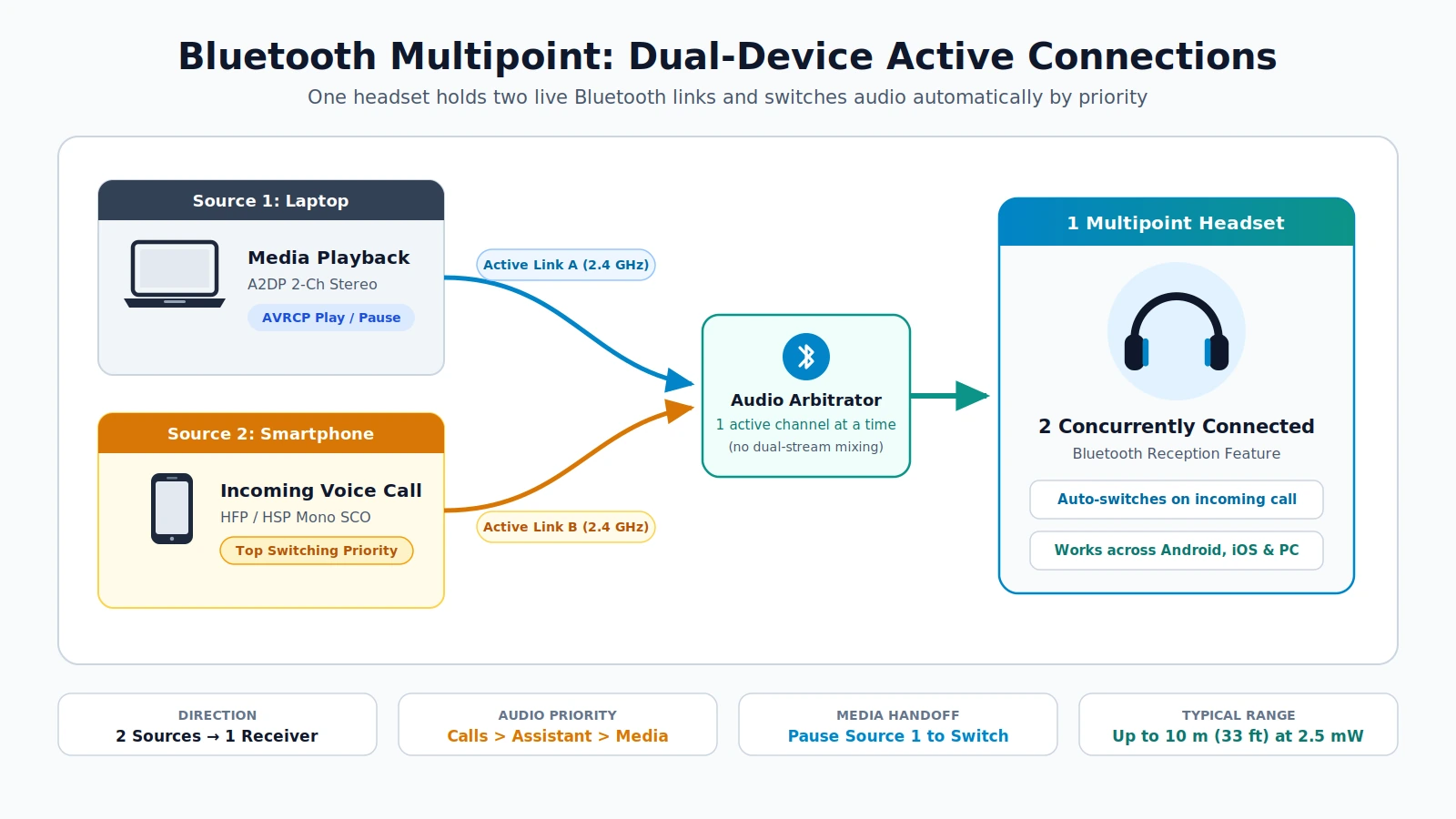
Bluetooth Multipoint: Switching & Setup
Bluetooth multipoint lets one pair of headphones stay connected to two devices at once, switching audio by call priority without unpairing or mixing streams.
Read article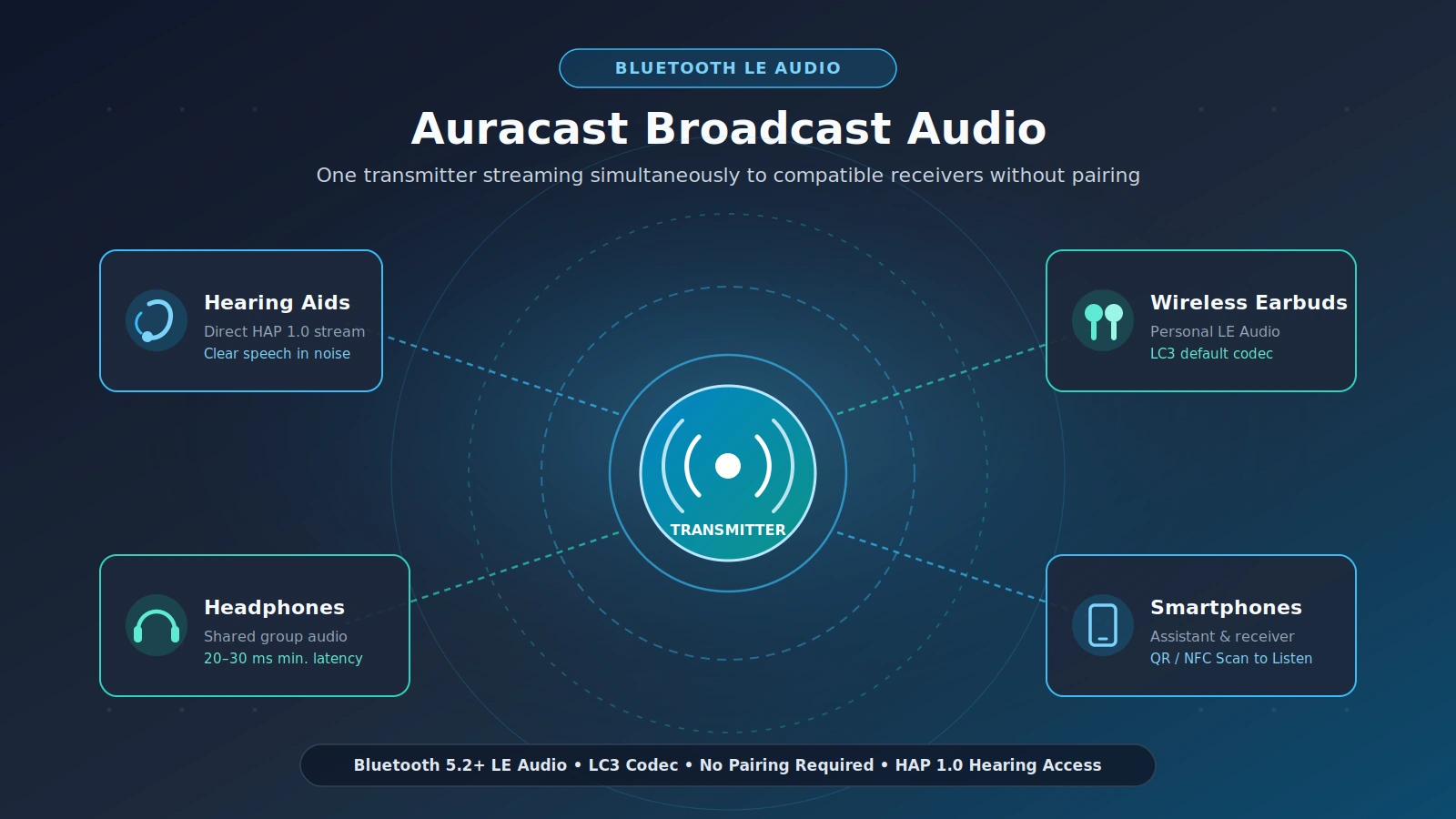
What Is Auracast: Broadcast Audio & Hearing Aids
Auracast is a Bluetooth LE Audio broadcast feature that streams from one transmitter to unlimited hearing aids, earbuds, and headphones without pairing.
Read article