Bluetooth Multipoint: Switching & Setup
Bluetooth multipoint lets one pair of headphones stay connected to two devices at once, switching audio by call priority without unpairing or mixing streams.
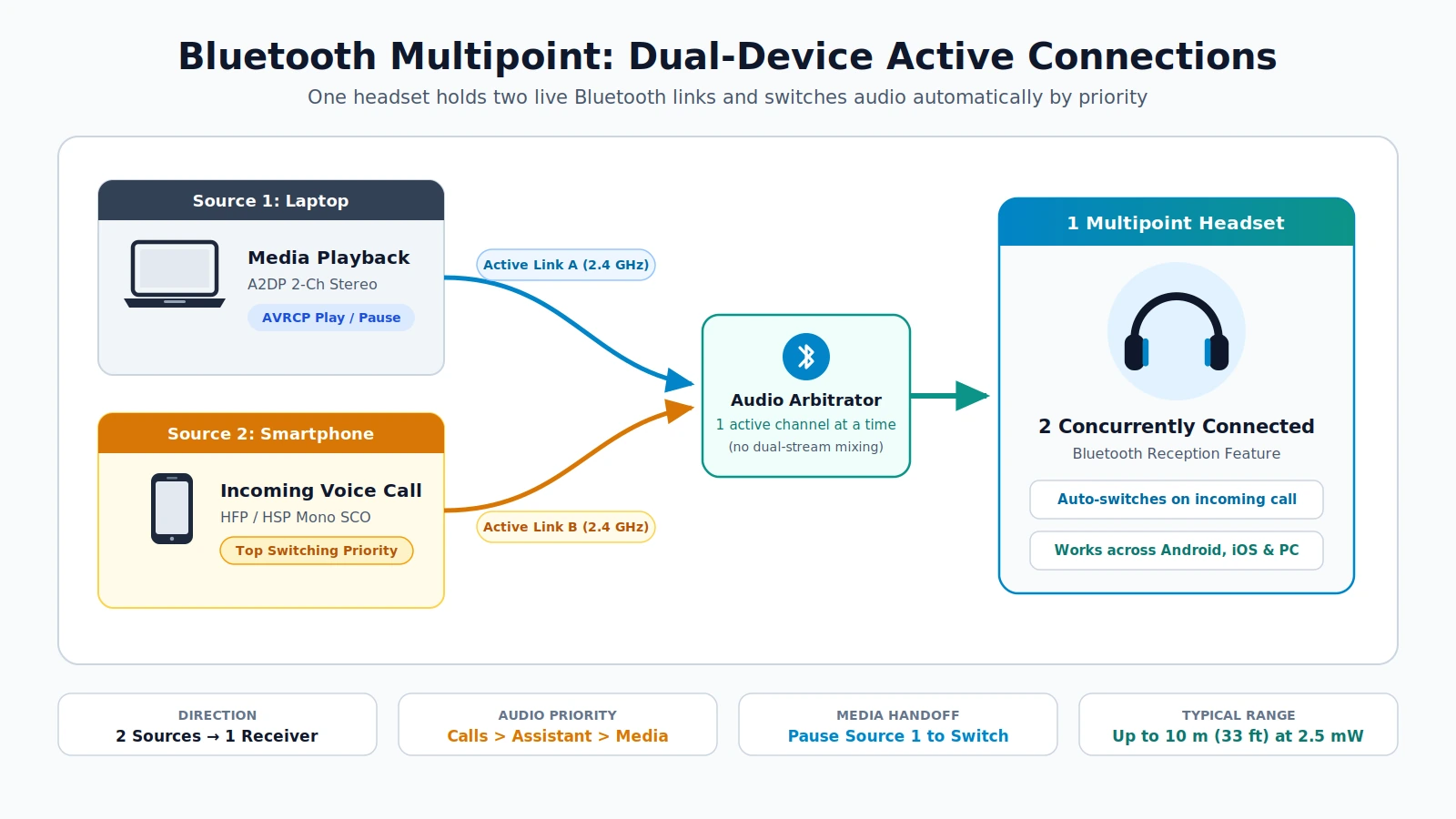
Bluetooth multipoint is a wireless reception feature that lets one pair of headphones or earbuds stay actively connected to 2 Bluetooth audio sources—such as a laptop and a smartphone—at the same time. Instead of unpairing to switch devices, the headset automatically routes audio by priority, letting incoming calls interrupt media without mixing both streams.
Because multipoint handles reception on the headset rather than splitting output from a phone, it works across operating systems including laptops, tablets, televisions, Android phones, and iOS phones. Understanding how dual links arbitrate calls, stereo music, and stored pairing bonds prevents common setup surprises and helps you separate multipoint from multi-pairing and Dual Audio.
How does multipoint Bluetooth work between a phone and a laptop?
Multipoint Bluetooth works between a phone and a laptop by keeping 2 active Bluetooth links open to your headphones simultaneously and switching the single active audio channel according to event priority. When a phone or video call arrives on your phone, laptop music automatically pauses and the headset routes the call immediately.
While both devices stay connected over the NIST-documented Bluetooth wireless personal area network (WPAN) standard, the headset does not mix music from both screens into one combined stream. Instead, an internal arbitration hierarchy governs which connected source controls the speakers and microphone at any moment.
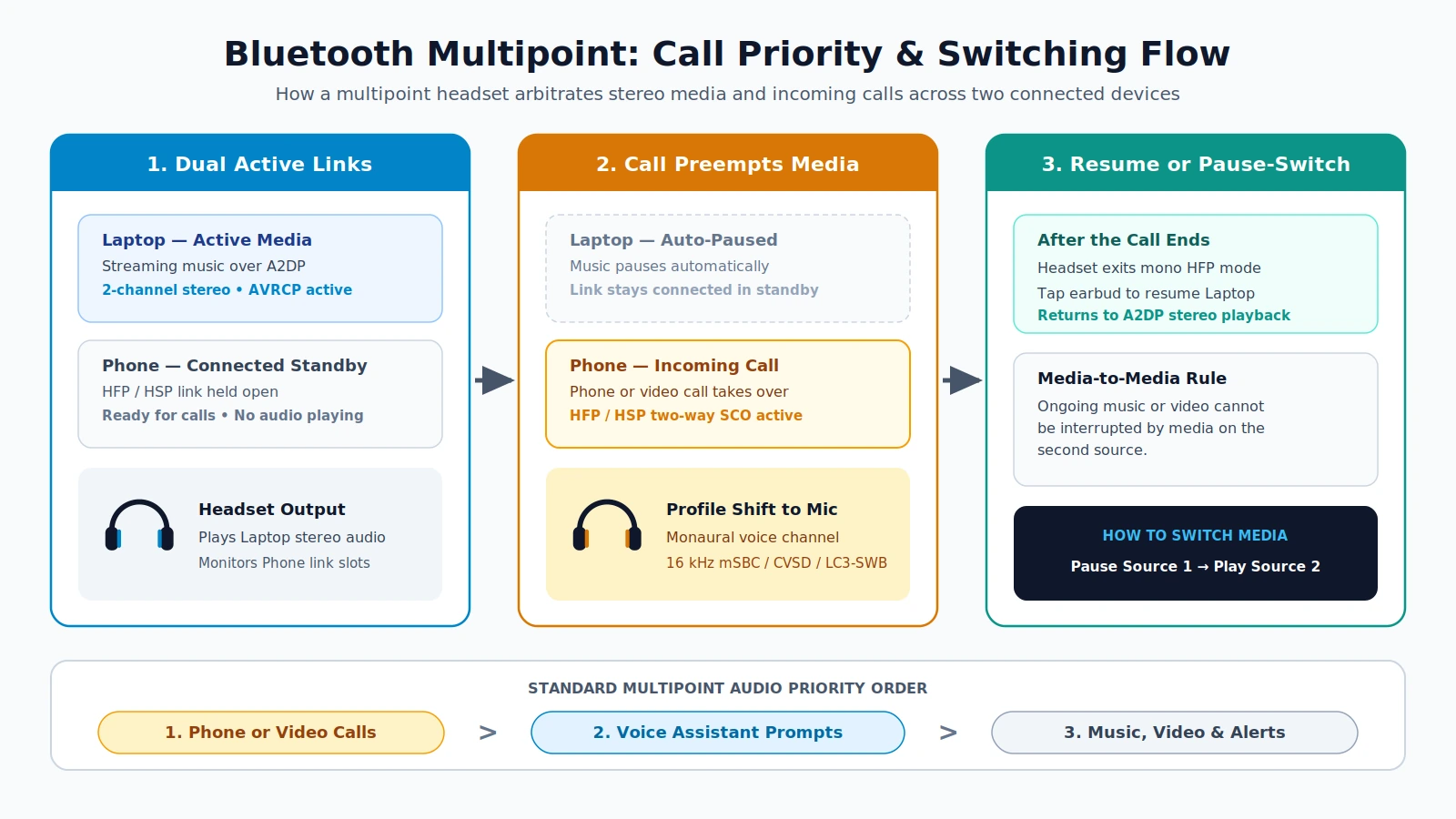
A multipoint headset monitors both active links continuously, letting incoming calls preempt stereo playback while preventing competing media apps from interrupting each other.
Priority hierarchy: calls, voice assistant, and media
Consumer multipoint implementations such as Google Pixel Buds enforce a predictable three-tier priority order: phone or video calls take precedence over voice assistant prompts, and voice assistant prompts take precedence over media such as music, notifications, or system sounds.
Scroll horizontally to see all columns.
| Connected laptop state | Connected phone event | What the multipoint headset does | How to switch back |
|---|---|---|---|
| Playing stereo music or video | Incoming phone or video call | Pauses laptop media and switches audio to the phone call | Tap the earbud after the call ends to resume laptop playback |
| Playing stereo music or video | Voice assistant prompt activated | Temporarily routes the voice assistant over lower-priority media | Returns to media once the assistant prompt finishes |
| Playing stereo music or video | Pressing play on phone music or video | Keeps playing laptop media; ongoing media cannot be interrupted by the second source | Pause playback on the laptop first, then press play on the phone |
| Paused or idle | Pressing play on phone media | Routes phone media immediately over the active link | Pause phone media before starting audio on the laptop |
That non-interruption rule for competing media explains why a muted browser tab or background video left running on a laptop can block a smartphone from taking over audio. Pausing playback on the first source clears the media channel so the second connected device can claim it cleanly.
Radio slots and audio profiles behind dual-device links
Classic Bluetooth operates in the unlicensed ISM radio band between 2.402 and 2.480 GHz (2.400 to 2.4835 GHz including 2 MHz bottom and 3.5 MHz top guard bands). At the link layer, as detailed in NIST SP 800-121 Rev. 2, a Classic Bluetooth (BR/EDR) network uses a master and slave architecture inside a piconet and uses time division multiplexing (TDM) to link two or more piconets into a scatternet so a device participates across multiple links.
Even with two active links open, Classic Bluetooth transfers data between a master and one other device at any instant by switching rapidly in round-robin time slots. Classic Bluetooth provides application throughput (goodput) of 0.7 to 2.1 Mbit/s with a typical wake latency of 100 ms from a non-connected state, compared with 0.27 to 1.37 Mbit/s and 6 ms wake latency for Bluetooth Low Energy. Above that radio layer, headphones rely on separate Bluetooth audio profiles—Advanced Audio Distribution Profile (A2DP) and Audio/Video Remote Control Profile (AVRCP) for media playback and state signaling, alongside Hands-Free Profile (HFP) or Headset Profile (HSP) for calls.
What is the difference between Bluetooth multipoint and multi-pairing?
The difference between Bluetooth multipoint and multi-pairing is the number of active connections maintained at once. Multi-pairing only stores pairing keys from multiple past devices so your headphones can reconnect to one device at a time without repeating setup, whereas Bluetooth multipoint holds 2 active connections simultaneously and switches audio automatically.
During Bluetooth pairing, two devices exchange credentials and store a shared secret known as a link key. Once pairing completes—using Secure Simple Pairing (SSP), required since Bluetooth v2.1 rather than legacy v2.0 PIN codes—a bond forms between the two devices. That stored bond lets either device reconnect later without reconfirming identities, which is all multi-pairing provides.
Comparing multipoint, multi-pairing, and account-based switching
Many modern earbuds also include ecosystem switching features alongside or instead of hardware multipoint. For example, Audio switch on Android 8+ devices running Google Play Services on the same Google account shifts Fast-paired earbuds automatically based on activity, whereas standard Bluetooth multipoint works across mixed platforms such as a Windows laptop and an iPhone.
Scroll horizontally to see all columns.
| Feature | Bluetooth multipoint | Multi-pairing (stored bonds) | Account-based audio switching |
|---|---|---|---|
| Active connections at once | 2 concurrent active links | One active link at a time | Switches active link automatically across signed-in devices |
| Core mechanism | Simultaneous active Bluetooth links on the headset | Stored shared-secret link keys (bonds) in memory | Ecosystem software coordination (such as Android 8+ with Google Play Services) |
| Cross-platform support | Works across laptops, tablets, TVs, Android, and iOS | Works with any previously paired Bluetooth device | Requires compatible devices signed into the same account |
| Incoming call on second device | Automatically pauses media and routes the call | Missed on the headset unless you manually reconnect | Switches automatically if both devices share the ecosystem account |
| Typical switching effort | Automatic for calls; pause first source for media | Open Bluetooth menu and tap reconnect manually | Automatic based on activity, with an option to revert |
Both hardware multipoint and ecosystem audio switching can run together on supported earbuds, where keeping multipoint enabled speeds up handoffs because both links are already live.
Can you connect two headphones to one phone, or is that dual audio?
Connecting two pairs of headphones to one phone is not Bluetooth multipoint—that is Dual Audio or Bluetooth broadcast audio. Multipoint is strictly a reception feature connecting 2 sources to one headset, whereas Dual Audio is a transmission feature that sends audio from one phone or TV to two headsets simultaneously.
Confusing reception with transmission is the single most common buying mistake in wireless audio. If you want one headset to listen to both your work laptop and your phone, you need multipoint support in the headphones. If two people want to watch a movie together from one phone or television on separate earbuds—or if a public venue wants to broadcast shared sound similar to NIDCD-described assistive listening devices (ALDs) in classrooms, theaters, places of worship, and airports—the transmitting device must support Dual Audio or Auracast broadcast audio.
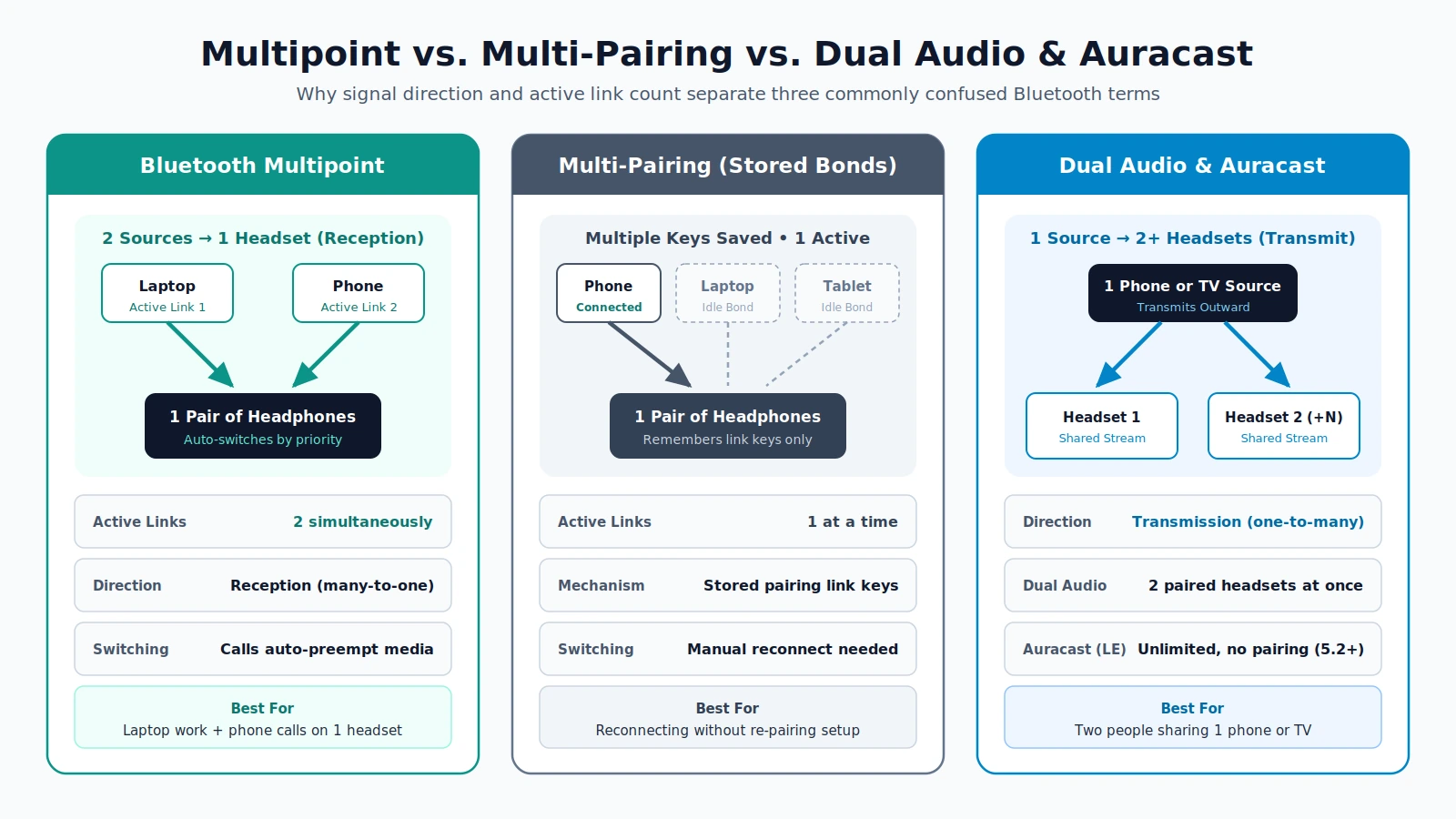
Signal direction separates all three features: multipoint pulls two sources into one headset, multi-pairing remembers idle bonds, and Dual Audio or Auracast pushes one source out to multiple headsets.
Multipoint vs. Dual Audio vs. Auracast broadcast audio
While Dual Audio handles one-to-two paired streaming on compatible transmitters, Auracast—introduced as part of Bluetooth LE Audio with Bluetooth 5.2—extends one-to-many transmission further by broadcasting one or more audio streams to potentially unlimited compatible receivers (hearing aids, earbuds, headphones, and smartphones) without one-to-one device pairing.
Scroll horizontally to see all columns.
| Capability | Bluetooth multipoint | Bluetooth Dual Audio | Auracast (Bluetooth 5.2 LE Audio) |
|---|---|---|---|
| Signal direction | Reception (many sources to one headset) | Transmission (one source to two outputs) | Broadcast transmission (one transmitter to many receivers) |
| Typical simultaneous devices | 2 audio sources connected to one headset | One source streaming to two pairs of headphones or speakers | One transmitter streaming to potentially unlimited compatible receivers |
| Pairing requirement | Both sources must be paired to the headset first | Both headsets must be paired to the source | No traditional one-to-one device pairing required |
| Where feature must live | Inside the headphones or earbuds | Inside the transmitting phone, TV, or adapter | Transmitter and compatible LE Audio receivers |
| Primary everyday use case | Taking phone calls while working on a laptop | Two people sharing one TV, tablet, or phone stream | Shared public venues, group listening, and hearing aids |
If your main goal is streaming one audio source to multiple listeners or compatible hearing aids without pairing, our dedicated guide on how Auracast broadcast audio works covers receiver roles and LE Audio requirements in detail.
How do you set up Bluetooth multipoint on headphones?
To set up Bluetooth multipoint on headphones, first pair the headset with both audio sources individually, enable the Multipoint toggle in your headphone companion app or connected-device settings—since it can ship off by default—and then connect the first and second sources sequentially through each device’s Bluetooth menu.
Follow this sequence to verify that both links are active rather than merely saved in pairing history:
- Pair both audio sources first: Put your headphones in pairing mode and complete Bluetooth pairing with your first device (such as your smartphone), then repeat pairing with your second device (such as your laptop) so both store valid link keys.
- Turn on Multipoint in settings: Check the companion app or connected-device Bluetooth settings and enable Multipoint, because supported earbuds such as Pixel Buds ship with Multipoint turned off by default.
- Connect the first audio source: With the headphones powered on and worn, open the first device’s Bluetooth settings and verify that the headphones show as connected.
- Connect the second audio source without disconnecting the first: Open the second device’s Bluetooth menu and select the headphones so both sources maintain active connections simultaneously.
- Verify range and priority switching: Keep both sources within standard Bluetooth transmission range—up to 10 metres (33 ft) at 2.5 milliwatts in the most widely used mode—then play media on your laptop and place a test call to your phone to confirm the music pauses cleanly.
Common multipoint setup problems and fixes
Most multipoint complaints trace back to a disabled toggle, a paused-media conflict, or a cleared pairing bond rather than broken hardware.
Scroll horizontally to see all columns.
| Symptom | Most likely cause | Practical fix |
|---|---|---|
| Connecting laptop drops the phone | Multipoint toggle is still turned off by default | Open the headphone companion app or connected-device settings and turn Multipoint on, then reconnect both devices |
| Phone video stays silent while laptop is connected | Ongoing media on the laptop cannot be interrupted by a second media stream | Pause or close the active audio tab on the laptop, then start playback on the phone |
| Headset refuses to reconnect to one device | Link key was deleted from one side, breaking the stored bond | Forget the headphones on that device and re-pair from scratch so both devices store the same link key |
| Audio stutters when walking away from desk | One of the two sources exceeded the 10 metres (33 ft) Bluetooth range | Keep both active sources within range or temporarily disconnect the distant device |
Can multipoint Bluetooth headphones stay connected to three devices?
Most consumer multipoint Bluetooth headphones stay actively connected to 2 devices at the same time rather than three, even though the underlying Classic Bluetooth protocol permits more links. Because multi-master scatternet behavior and active connection limits are implementation-dependent in headset firmware, you must verify explicit three-device support on a product’s official specification sheet.
At the protocol layer, a Classic Bluetooth (BR/EDR) piconet allows one master device to communicate with up to seven active slave devices while keeping up to 255 additional slave devices inactive, or parked, ready to swap into active status once another active station parks. The Bluetooth Core Specification also allows two or more piconets to connect as a scatternet so a device can act across multiple piconets, and permits a slave device to connect to more than one master—yet explicitly leaves scatternet behavior implementation-dependent.
In practical headphone design, every additional active link must share the same radio antenna and Classic Bluetooth goodput ceiling of 0.7 to 2.1 Mbit/s. High-bitrate A2DP codecs such as aptX or LDAC demand tight radio scheduling alongside mandatory SBC and optional AAC or HE-AAC streams, so most headset makers cap simultaneous active multipoint links at 2 devices while storing additional paired bonds in memory for quick manual reconnection.
How do microphone calls behave on multipoint Bluetooth headphones?
On multipoint Bluetooth headphones, an incoming phone or video call automatically pauses media on the other connected source and switches the headset from unidirectional stereo playback to a two-way monaural voice profile. That profile change enables the headset microphone immediately, which explains why audio temporarily sounds narrower until the call ends.
High-fidelity music playback uses the Advanced Audio Distribution Profile (A2DP), which transfers a one-way audio stream in up to 2-channel stereo using mandatory SBC or optional codecs such as AAC, HE-AAC, MP2, MP3, ATRAC, aptX, and LDAC, paired with AVRCP 1.0 transport commands (play, pause, stop) and AVRCP 1.3 media-player state reporting. Because standard A2DP is unidirectional, it does not carry a return microphone channel during telephone calls.
Why call audio sounds different: A2DP vs. HFP and HSP
When your phone rings—acting as the Audio Gateway (HFP Server) while your headphones act as the HFP Client—the headset activates its separate Hands-Free Profile (HFP) or Headset Profile (HSP) over a Synchronous Connection Oriented (SCO) link.
Scroll horizontally to see all columns.
| Bluetooth profile | Audio direction and channels | Codec and specification milestones | Call and control capabilities |
|---|---|---|---|
| A2DP (with AVRCP) | Unidirectional streaming, up to 2-channel stereo | Mandatory SBC; optional AAC, HE-AAC, MP2, MP3, ATRAC; manufacturer codecs such as aptX and LDAC | Play, pause, stop (AVRCP 1.0) and playing/stopped state metadata (AVRCP 1.3) |
| HFP (Hands-Free Profile) | Two-way monaural voice over SCO link | CVSD or PCM; Version 1.6 adds optional 16 kHz monaural wideband speech (mSBC); Version 1.7 adds battery-level indicator; Version 1.9 adds LC3-SWB | Call waiting, voice dialing, last-number redial, and hands-free call routing |
| HSP (Headset Profile) | Two-way monaural voice over SCO link (mono only) | 64 kbit/s CVSD or PCM | Subset of GSM 07.07 AT commands to ring, answer, hang up, and adjust volume |
Most Bluetooth headsets implement both HFP and HSP so they can handle extra mobile telephony features like call waiting, voice dialing, and last-number redial. Once you hang up, the headset releases the monaural SCO voice link and returns to 2-channel stereo A2DP, allowing you to tap the earbud to resume media playback on your laptop or previous source.
If you prefer wired digital audio for calls and inline controls on Android phones without Bluetooth profile switching, see our Android USB-C headphones and DAC adapter compatibility guide. For broader handset planning—from multitasking workloads in our smartphone RAM guide to display and update longevity—browse the full smartphone guides hub.
Frequently asked questions
Can Bluetooth multipoint play audio from two devices at the same time?
No. Bluetooth multipoint keeps 2 devices actively connected at the same time, but it plays one active audio channel at a time rather than mixing both streams together. Incoming phone or video calls pause ongoing media on the other source, while switching between two media sources requires pausing playback on the first device first.
Does Bluetooth multipoint work between an iPhone and a Windows laptop?
Yes. Standard Bluetooth multipoint is handled at the headset reception layer and switches between 2 concurrently paired Bluetooth devices across mixed platforms, including laptops, tablets, televisions, Android phones, and iOS phones. By contrast, account-based audio switching requires devices signed into the same ecosystem account.
Why won’t my multipoint headphones connect to a second device?
On supported models such as Google Pixel Buds, multipoint connectivity ships turned off by default and must be enabled in the companion app or connected-device Bluetooth settings before a second active link will stay open. You must also pair both audio sources individually first so both devices store valid Bluetooth link keys.
Why does my laptop audio sound muffled when a call starts on my phone?
Activating a call shifts the headset off unidirectional 2-channel stereo A2DP and onto a two-way monaural SCO voice channel under HFP or HSP (such as 64 kbit/s CVSD/PCM or 16 kHz monaural mSBC wideband speech). Stereo quality returns automatically once the call ends and the headset switches back to A2DP.
What is the difference between Bluetooth multipoint and Auracast?
Bluetooth multipoint connects 2 audio sources simultaneously to one pair of paired headphones so a single listener can switch between devices. Auracast, part of Bluetooth 5.2 LE Audio, works in the opposite direction by broadcasting from one transmitter to potentially unlimited compatible receivers—such as hearing aids, earbuds, and headphones—without one-to-one pairing.
Sources
- NIST SP 800-121 Rev. 2 — Guide to Bluetooth Security (Full Publication PDF): Primary U.S. government technical reference for Bluetooth 2.4000–2.4835 GHz ISM band operation, BR/EDR piconet limits (up to 7 active slave devices and up to 255 inactive slave devices), time division multiplexing (TDM) scatternets across BR/EDR and Bluetooth Low Energy, link-key pairing and bonding, and Bluetooth 2.1 + EDR / 4.1 Secure Simple Pairing (SSP).
- NIST CSRC — SP 800-121 Rev. 2 Publication Overview: Official NIST publication record covering Bluetooth wireless personal area networks (WPANs) and Bluetooth Low Energy support introduced in versions 4.0 and later.
- NIDCD (NIH) — Assistive Devices for People with Hearing, Voice, Speech, or Language Disorders: U.S. National Institutes of Health overview of assistive listening devices (ALDs) for large public facilities such as classrooms, theaters, places of worship, and airports.
- Wikipedia — List of Bluetooth profiles: Profile specifications for A2DP unidirectional 2-channel stereo streaming and codecs (SBC, AAC, HE-AAC, MP2, MP3, ATRAC, aptX, LDAC), AVRCP 1.0 and 1.3 playback controls and state reporting, HFP (SCO monaural voice, Version 1.6 16 kHz mSBC, Version 1.7 battery indicator, Version 1.9 LC3-SWB, Audio Gateway/HFP Server vs. HFP Client), and HSP (64 kbit/s CVSD/PCM mono SCO and GSM 07.07 AT commands).
Related articles
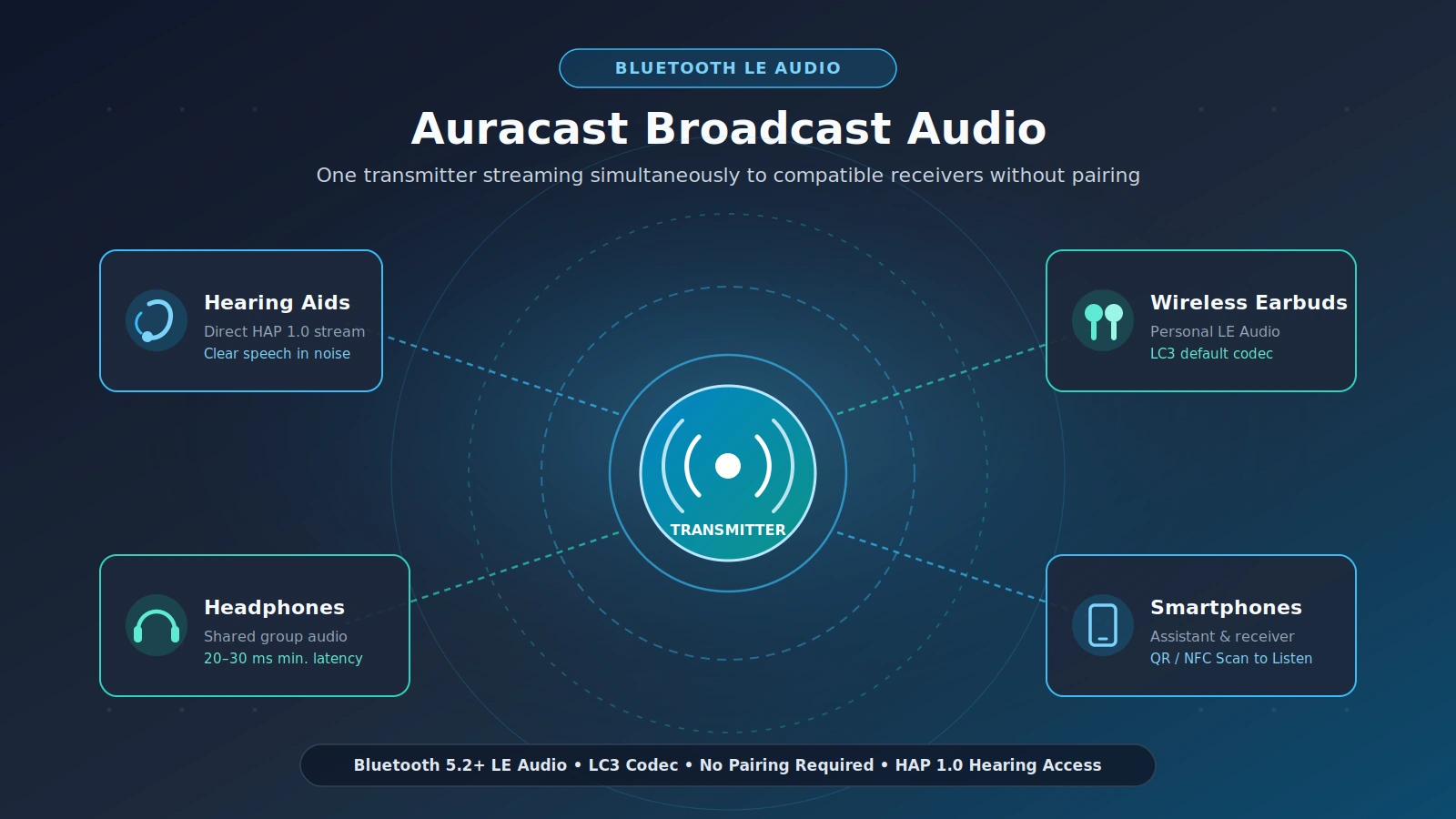
What Is Auracast: Broadcast Audio & Hearing Aids
Auracast is a Bluetooth LE Audio broadcast feature that streams from one transmitter to unlimited hearing aids, earbuds, and headphones without pairing.
Read article
USB-C Hub for Android: Power Role & Video
Why a USB-C hub for Android stops charging or drops video: USB-C Sink/DFP roles, 15W hub reserve, PPS limits, Fast Role Swap, and connection order.
Read article
USB-C to HDMI Adapter for Phone: DisplayPort Alt Mode Test
Check your phone’s wired video support, then run a USB-C to HDMI no-signal test. Separate DisplayPort Alt Mode, cable faults, and app restrictions.
Read article