What Is PPS Charging? A Practical USB PD Guide
PPS is the Programmable Power Supply feature of USB Power Delivery 3.0. A shared charger budget can waste the higher PPS row once a second port is loaded.
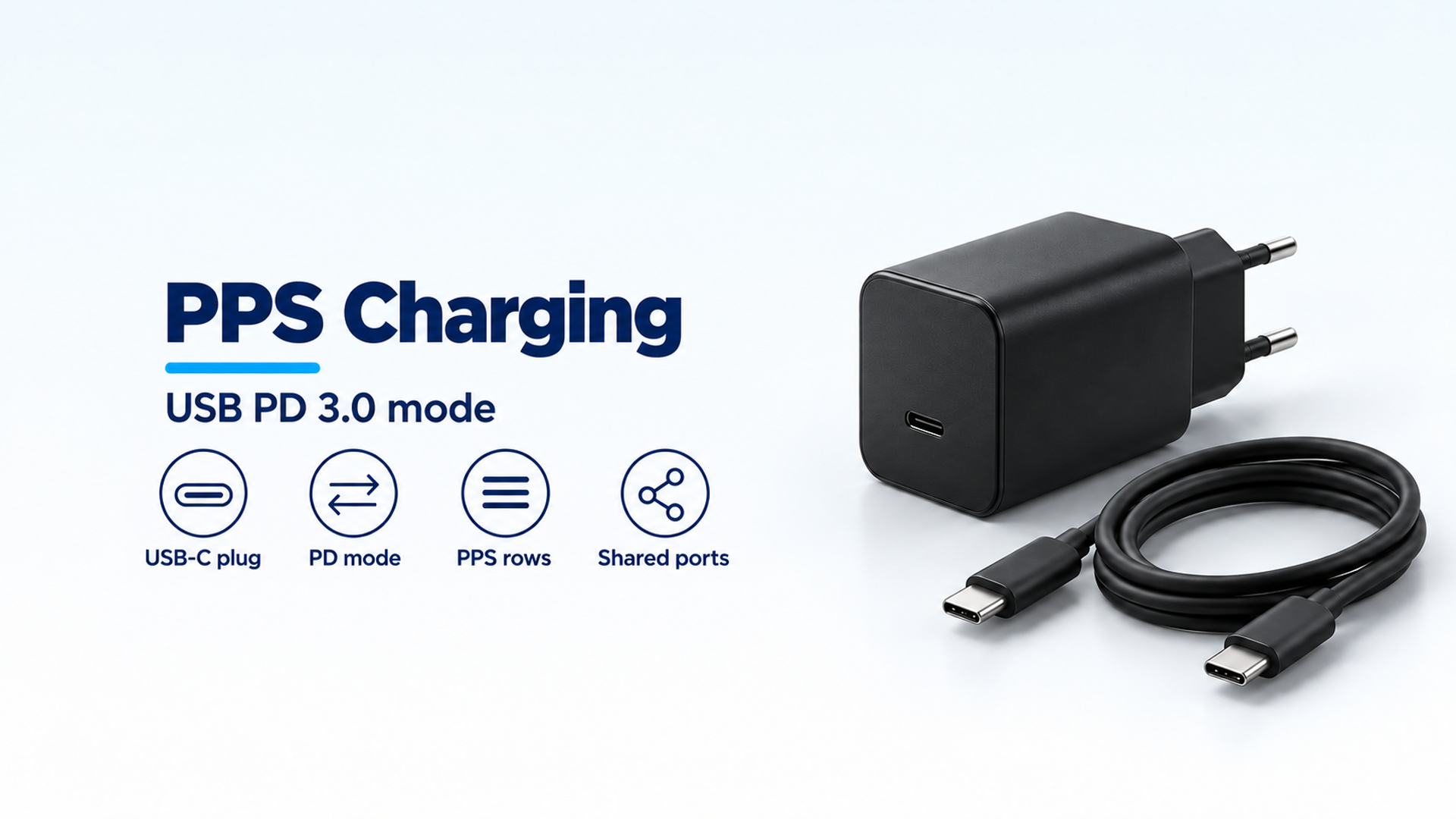
A shared charger budget can waste the higher PPS row once a second port is loaded. PPS is a USB Power Delivery mode. It is the Programmable Power Supply feature of the USB Power Delivery 3.0 specification. It is not a cable, and it is not USB4.
PPS charging is the case where the host, the device, and the charger all support Programmable Power Supply. USB-IF’s certified fast-charger page names PPS as a feature of USB Power Delivery 3.0 and says those three pieces are required before a user gets the full feature. A certified USB fast charger stays backwards compatible with USB Type-C and USB Power Delivery devices. The 26 May 2021 announcement prints a separate adjustable range, 15V up to 28V, 36V, or 48V in 100 mV steps, and that file does not use the name PPS. Cable logos of 60W and 240W belong to the cables and connectors page. USB4’s page prints data performance up to 80 Gbps on 80 Gbps certified cables. The PPS voltage and current rows quoted below are the example VIF lines in the 14 August 2024 QuadraMAX PPS test guide.
- USB-IF’s fast-charger page is the page that names PPS.
- The test guide is the page that prints example PPS rows and the shared-budget subtraction.
- The 26 May 2021 announcement is the page that prints 100 mV and the 28V, 36V, and 48V fixed voltages.
- The cables page is the page that prints the 60W and 240W logos.
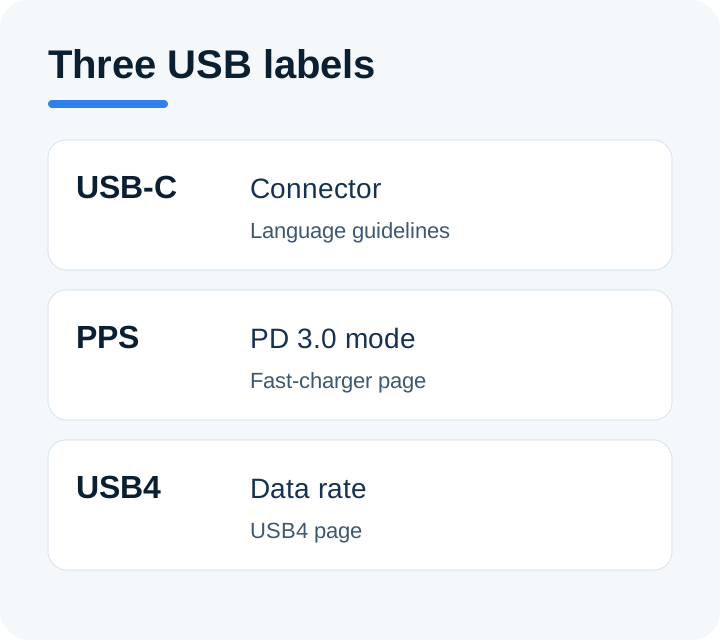
Each name stays with the USB-IF page that defines it. The cable logo is a fourth label, handled below.
PPS is the Programmable Power Supply feature
USB-IF’s page titled “USB-IF Introduces Fast Charging to Expand its Certified USB Charger Initiative” prints four highlights that define the feature for a buyer.
Certified USB fast chargers support the Programmable Power Supply (PPS) feature of the USB Power Delivery 3.0 specification. New USB hosts, devices, and chargers supporting PPS are required for users to take full advantage of this feature. Certified USB fast chargers will be backwards compatible with devices that support USB Type-C and USB Power Delivery. Consumers are reminded to purchase compliant USB products from trusted sources that display USB-IF certified logos on packaging, in product briefs, or on the cable or device itself.
That is the whole public definition on that page. It names the feature, the specification generation, and the three product roles. It does not print a voltage step, a current step, or a watt ceiling for PPS.
The USB-IF document library, on the Power Delivery entry saved for this page, lists USB Power Delivery Specification Revision 3.2 Version 1.2, with 09/14/2026 on that library row, as a zip of the specification and the adopters agreements. This article does not unpack that zip. The PPS sentences here are the ones printed on the fast-charger page and in the test guide.
USB-C, PPS, and USB4 answer different questions
USB-IF’s cable and connector language guidelines, in the file dated 20 March 2023, call USB Type-C a type of connector. The same file says “USB-C” is acceptable when a shorter name is needed. Both “USB Type-C” and “USB-C” are registered trademarks of USB Implementers Forum for that connector.
The guidelines then separate the other names. USB Type-C is not USB 3.2 or USB4. The connector specification supplements those data specifications, and the terms are not interchangeable. USB Type-C is not USB Power Delivery. Power Delivery is a protocol and hardware solution that increases USB power capabilities up to 240W, and those terms are not interchangeable. A manufacturer can add USB Power Delivery, USB4, or USB 3.2. None of the three is required for a product to be a USB Type-C product.
When a product does support Power Delivery, the guidelines tell the maker to write “PRODUCT supports USB Power Delivery.” Data claims sit on different lines: USB 80Gbps, USB 40Gbps, USB 20Gbps, USB 10Gbps, or USB 5Gbps, matching what that product actually signals. A USB 2.0 Type-C cable supports USB 2.0 data, up to 480Mbps in the guidelines, and can support USB Power Delivery. That cable does not include USB 3.2 or USB4.
The USB-C Power Delivery explainer stays with the plug and the power contract. This page stays with PPS.
USB4’s own page calls USB4 a major update to USB architecture that extends USB Type-C performance, builds on USB 3.2 and USB 2.0, and supports up to 80 Gbps operation over 80 Gbps certified cables. It keeps compatibility with USB 3.2, USB 2.0, and Thunderbolt 3. That page is about bandwidth and display data. It does not define PPS.
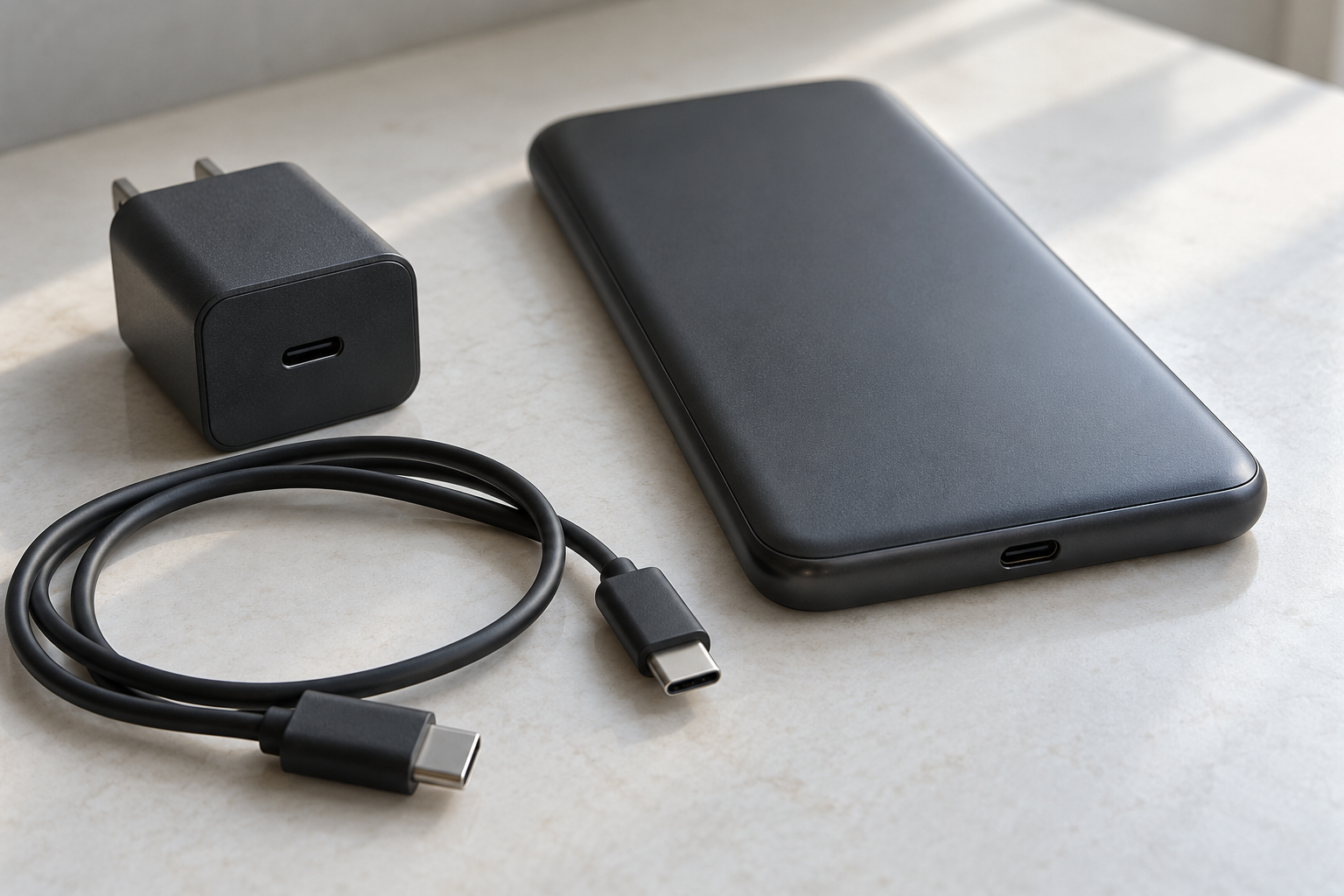
The oval plug is the connector. The handset is a generic shape, not a named phone. Nothing in the photo is a PPS rating.
The 2021 adjustable range is a different sentence
The USB Promoter Group’s announcement, dated 26 May 2021, releases USB Power Delivery Revision 3.1 and says the specification enables delivering up to 240W over the USB Type-C cable and connector. Before that update, USB PD was limited to 100W via a solution based on 20V using USB Type-C cables rated at 5A. The USB Type-C specification was updated to Release 2.1 to define the 240W cable requirements.
The announcement lists the fixed voltages in one bullet: 28V above 100W, 36V above 140W, and 48V above 180W, joining previously defined 5V, 9V, 15V, and 20V. The next bullet is the adjustable mode: a range from 15V to one of three maximum voltages, 28V, 36V, or 48V, depending on the available power, with the powered device requesting voltages to a 100 mV resolution.
The USB charger page repeats some of those sentences and prints one pairing the announcement does not. It says the new 28V, 36V, and 48V fixed voltages enable up to 140W, 180W, and 240W respectively. It describes an adjustable voltage supply mode as intermediate voltages between 15V and the maximum fixed voltage that charger offers. The 100 mV figure stays on the announcement. The 140W, 180W, and 240W pairing for those three fixed voltages stays on the charger page.
Read the file. The 26 May 2021 announcement does not use the name PPS. The charger page does not use it either. Those watts and voltages stay on the pages that printed them. They are not a PPS rating, and this page does not turn 240W or 140W back into a current.
Scroll horizontally to see all columns.
| Mark on the product | The saved page that prints it | What that page is describing |
|---|---|---|
| Programmable Power Supply (PPS), USB PD 3.0 | Fast-charger page | The mode in the title of this guide |
| 15V to 28V, 36V, or 48V, in 100 mV steps | 26 May 2021 announcement | That announcement’s adjustable mode |
| 28V, 36V, and 48V enabling up to 140W, 180W, and 240W | USB charger page | Fixed voltages after the 2021 update |
| 60W or 240W logo, including 20V at 3A marked 20Gbps/60W | Cables and connectors page | A cable label |
| Up to 80 Gbps on 80 Gbps certified cables | USB4 page | A data rate |
Worked check on the pre-update ceiling. The announcement states 100W, 20V, and cables rated at 5A in one sentence. Power equals voltage times current: 20 V × 5 A = 100 W. That product matches the pre-update ceiling the announcement describes. It is not a PPS row.
A PPS port is tested alone and with the other ports loaded
USB-IF’s QuadraMAX PPS Test Guide is dated 8/14/2024 on its first page. The document library lists the same manual on 12/30/2024 and says it covers PPS. The guide tells a test lab when to run PPS tests and how to run them on QuadraMAX hardware. It is a compliance procedure, not a phone review.
The guide says SPT PPS tests include SPT.6, the Voltage Step Test, and SPT.7, the Current Limit Test, from the USB Type-C and PD Source Power Requirements Test Specification. Those tests are required when the VIF for the port under test contains an APDO. In the guide’s own examples, each PPS line in that VIF is the APDO: a voltage range, a current, and a watt figure printed beside them. The guide names the Voltage Step Test. It does not print the step size. Copy the range from the charger row in front of you. Do not fill the blank with a step this guide never prints.
QuadraMAX tests one PPS port at a time, so a multiport product needs a separate setup for each PPS port. For compliance, each PPS port needs three kinds of condition: PPS tested while every other port is disconnected, PPS tested while the other ports sit at Max Static Load, and all PPS ports tested together. When more than one port runs a PPS test in the same condition, the guide starts those ports on a stagger, with 5 minute intervals between starts.
Max Static Load means a constant load at the maximum power available on that port. For a PD port, the guide calls that maximum the PDP. The tester requests the highest fixed PDO and loads it to its maximum current. For a Type-A port, the guide’s example is a BC 1.2 port loaded to 1.5A. That 1.5A figure is the Type-A example. It is not a PPS current.
A shared-capacity product with no PPS still runs SPT.1 through SPT.5. The PPS conditions above apply when the product has PPS.
The guide’s 54W example, worked out
Example 1 in the guide is a two-port shared-capacity PPS device. The VIF values are printed as:
Product_Total_Source_Power_mW = 54W. Port_Source_Power_Gang_Max_Power = 54W. PPS port PDP = 45W.
Scroll horizontally to see all columns.
| Source capability in Example 1 | Printed as |
|---|---|
| Fixed | 5V 3A, 15W |
| Fixed | 9V 3A, 27W |
| Fixed | 15V 3A, 45W |
| Fixed | 20V 2.25A, 45W |
| PPS | 5-11V 3A, 33W |
| PPS | 5-16V 2.8A, 44.8W |
| PPS | 5-21V 2.1A, 44.1W |
These rows are the guide’s example. They are not a charger on a store shelf, and they are not a phone’s required mode.
The guide’s arithmetic uses the PDP first. Remaining power is the gang total minus the PPS power you selected. With every APDO available, 54 W − 45 W = 9 W. The lowest fixed PDO on the other port is 15W, and 9W does not cover it.
Rule of thumb. If total source power minus the PPS PDP is below the other port’s lowest fixed PDO, step the PPS port down to a lower APDO. In Example 1, 54 − 45 = 9, and 9 is below 15, so the guide selects the 5-11V 3A APDO.
That selected row is printed as 33W. Check it against the top of the range: 11 V × 3 A = 33 W. Then 54 W − 33 W = 21 W. The guide says 21W is plenty for the first fixed PDO, 15W, and not enough for the second, 27W. For the two conditions where one port runs PPS and the other holds Max Static Load, one port runs only that first APDO, and the loaded port is set to 15W on the 5V 3A PDO.
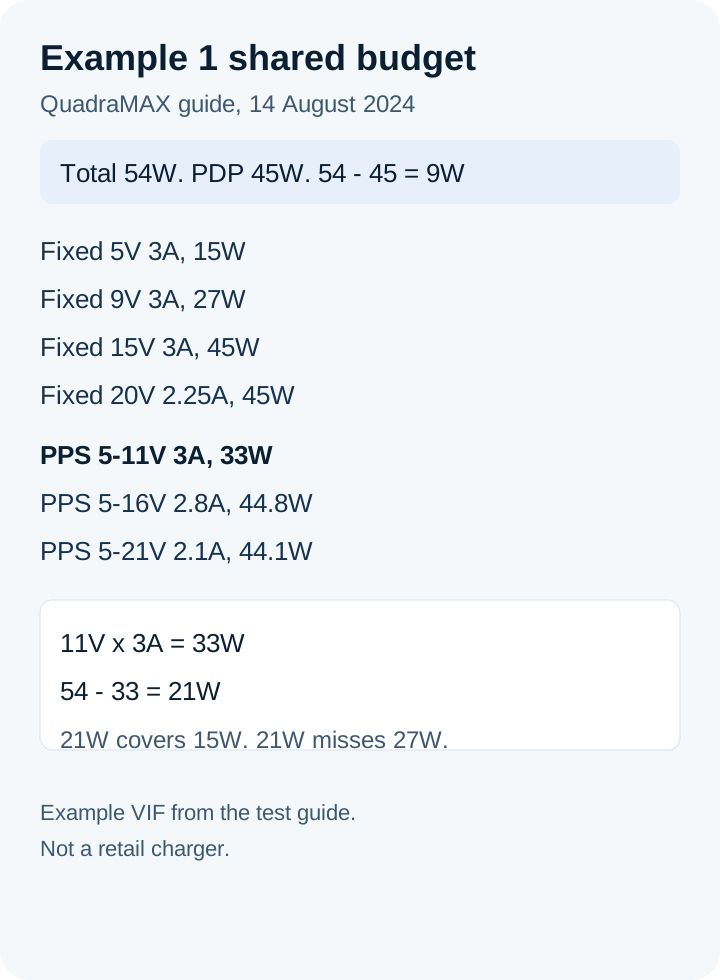
The rows and the subtractions are the ones the test guide prints for Example 1. The figure is an example VIF, not a retail rating.
Example 2 keeps the same device and asks what happens when both ports run PPS together. The lowest pair of APDOs is 33W + 33W = 66W. That sum exceeds the 54W gang total. The guide says to mark that condition Not Applicable, because no pair of APDOs fits inside 54W.
Example 3 is a different printed VIF, still an example, with Product_Total_Source_Power_mW = 120W, the same figure for gang max power, and a PPS port PDP of 100W. Its fixed rows are 5V 5A at 25W, 9V 5A at 45W, 15V 5A at 75W, and 20V 5A at 100W. Its PPS rows are 3.3-11V 5A at 55W, 3.3-16V 5A at 80W, and 3.3-21V 5A at 105W. For the both-ports PPS condition, the guide targets the first PPS row on both ports: 55W + 55W = 110W, which is under 120W. It says the second and third PPS rows would each push the pair over the 120W gang power.
Use the same subtraction on a listing you can actually buy. Write down that charger’s total source power and the one PPS row you intend to use. Subtract. If the remainder is under the fixed PDO the second device needs, that pair of loads does not fit, even when both numbers look fine on their own lines.
A wall charger’s port-allocation chart is where that pair is printed for the model in your hand. The guide to choosing a GaN charger walks through that chart. The chart is the maker’s table. The 54W and 120W blocks above are the test guide’s examples, not a substitute for the table.
A 60W or 240W logo rates the cable
The cables and connectors page says cables do not all have the same capabilities, and a certified cable does not add capabilities to the charger or the computer. For the compliance program, every USB-C to USB-C cable category must be labeled with a power capability of 60W or 240W. Data-rate marks are separate. The page’s worked marking case is a USB 20Gbps USB-C to USB-C cable that supports 20V at 3A: it must carry the combined 20Gbps/60W logo. A USB 2.0 USB-C to USB-C cable needs the power icon. The USB 2.0 data logo on that cable is optional.
Worked check on that logo. 20 V × 3 A = 60 W. That is why the cable page ties this 20V at 3A case to a 60W mark. The 60W figure stays on that page. It is a cable label. It is not the PPS row in Example 1, and it is not the 100 mV adjustable mode in the 2021 announcement.
The USB-C cable guide is the next page when you need to separate a power mark from a data mark. Bring the device’s PPS row with you. The logo answers whether the cable’s power class is the 60W class or the 240W class in the compliance program. It does not answer which APDO the charger offers.
What to copy before you order
Start from the phone or laptop page, then the charger table, then the cable logo. USB-IF’s fast-charger page already told you the order of the roles: the device, the host, and the charger each have to support PPS before the full feature is in play. A charger that lists PPS still does nothing with that feature if the phone never requests it. Backwards compatibility means the certified fast charger can still power a USB Type-C and USB Power Delivery device that is not using PPS.
- Find the word PPS, or a PPS line, on the exact device and on the exact charger port. If the listing only says fast charge, you do not yet have this feature.
- Copy the voltage range, the current, and the watt figure that listing prints for that line. If a field is blank, leave it blank.
- Copy the total source power and the fixed PDO the other port will hold. Subtract, the way Example 1 does. If you do not have the total, you do not yet know the shared case.
- Record the cable logo as 60W or 240W, in its own cell, from the cable or its spec. Do not write that logo into the PPS cell.
- If a second port will be occupied, ask for the simultaneous table. The test guide’s three conditions exist because the empty-port PPS result and the loaded-port result are different tests.
For a Samsung phone or another Android phone, the guide to matching that phone with a USB-C charger is where you read the port’s PDO and PPS lines for that brand. Copy the row that page points at. Do not paste Example 1 or Example 3 onto the phone.
A pack is a different source. The power bank guide matches a pack to USB PD 3.0 and PPS, including what happens when more than one of its ports is in use.
If the phone does not charge at all, change one part at a time. The USB-C charger troubleshooting guide separates a damaged plug, a bad cable, and a port that never starts a session. A missing PPS row is a compatibility gap. A port that stays dead is a different fault.
Takeaway: Copy one PPS row from the listing, subtract it from that charger’s total source power, and keep the 60W or 240W cable logo in a separate cell.
Where the path fails
Scroll horizontally to see all columns.
| Path | What the saved page calls it | Dominant failure mode | Prevention |
|---|---|---|---|
| USB-C plug | A connector. Reversible. Not required to include Power Delivery or USB4 | The plug fits, and the phone, host, or charger lacks PPS | Require PPS on the device and on the charger port, as the fast-charger page requires for the full feature |
| PPS row on a shared charger | An APDO in the VIF, tested alone, at Max Static Load, and with other PPS ports | The PDP is read as power still available while another port holds its fixed PDO | Subtract, as in Example 1: 54W minus the 45W PDP leaves 9W, under the 15W fixed PDO |
| Both PPS ports at once | Example 2: 33W + 33W = 66W inside a 54W gang | The two lowest PPS rows still exceed the gang total | Mark that pair impossible until a lower pair fits, which the guide calls Not Applicable when none fits |
| Cable logo | 60W or 240W. The 20V at 3A case is the 20Gbps/60W logo | The 60W logo is copied into the PPS cell | Leave 20 V × 3 A = 60 W on the cables page |
| 2021 adjustable mode | 15V to 28V, 36V, or 48V, at 100 mV, on the 26 May 2021 announcement | Those voltages are pasted onto a PPS chart | Leave 100 mV and 28V, 36V, and 48V on the announcement. The announcement does not name PPS |
| USB4 mark | Up to 80 Gbps on 80 Gbps certified cables | A data rate is treated as the charging mode | Keep gigabits on the USB4 page |
The third row is the one a headline wattage hides. Example 2 does not pick a dramatic failure. It adds the two smallest PPS rows in Example 1 and gets 66W against a 54W ceiling. The charger can offer each row on its own and still be unable to offer them together.
There is no price on this page. The waste is a row you cannot contract at the same time as the other device. In Example 1, the 45W PDP and a 15W fixed PDO do not fit inside 54W. The brick still has PPS. The pair of loads does not.
The Charging and Power guides collect the plug, the cable, the phone charger, and the power bank pages so the next check stays on this site.
When the full PPS feature is the wrong goal
Use the backwards-compatible sentence on the fast-charger page. A certified USB fast charger still supplies USB Type-C and USB Power Delivery devices that are not asking for PPS. If the phone already finishes its charge on a fixed PDO, and you never occupy a second port, the extra APDO lines are unused capacity. Shared-capacity products without PPS are outside this procedure: the guide sends those products through SPT.1 to SPT.5 instead.
Stop using a plug, cable, or charger that is damaged, hot, or scorched. The 2021 announcement says products in the 100W to 240W range follow the safety specifications of each country where they are sold. That sentence is about the higher range in the announcement. It is not a home test, and it is not a PPS measurement.
Sources
Checked 18 October 2026. Every voltage, current, and watt figure in the body is copied from the page named beside it. The QuadraMAX rows are that guide’s examples. The 26 May 2021 announcement does not use the name PPS. The 60W and 240W logos are cable labels.
- USB-IF: certified USB fast chargers and Programmable Power Supply
- USB-IF: QuadraMAX PPS Test Guide, 14 August 2024
- USB-IF document library: QuadraMAX PPS Test Manual, listed 12/30/2024
- USB Promoter Group: USB PD Revision 3.1 developer update, 26 May 2021
- USB-IF: USB Charger (USB Power Delivery)
- USB-IF: USB Type-C language guidelines, file dated 20 March 2023
- USB-IF: Cables and Connectors
- USB-IF: USB4
- USB-IF document library: USB Power Delivery Specification Revision 3.2 Version 1.2, listed 09/14/2026
Related articles
How to Choose a USB-C Car Charger for a Phone or Laptop
Match the socket limit, charger input, port PDO and PPS, and cable logo. PPS is USB PD 3.0 Programmable Power Supply. 60W and 240W are cable logos.
Read article
How to Choose a Fast Charger for a Samsung Android Phone
Match the Galaxy model row, then copy that adapter's PDO and PPS. PPS is USB Power Delivery 3.0 Programmable Power Supply. A 60W or 240W cable mark is a logo.
Read article
Which USB-C Charger and Cable Does Your iPhone Need?
Match the iPhone port, then copy the adapter watts from the Apple page for that model. A 60W or 240W mark on a USB-C cable is a cable logo. PPS is a USB Power Delivery 3.0 mode.
Read article