How to Choose a USB-C Car Charger for a Phone or Laptop
Check your car's accessory-socket limit, the charger's input range, each USB-C port's PDO and PPS output, the shared-port split and the cable before you buy.
The short answer
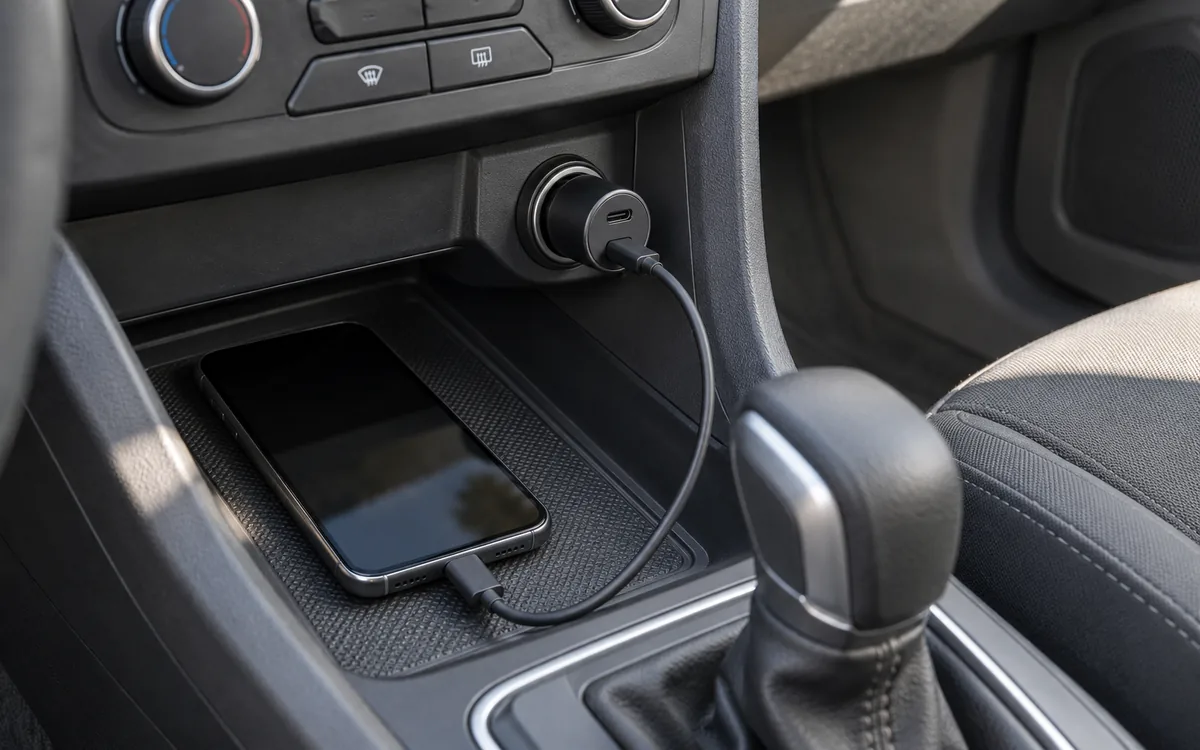
A USB-C car charger is a good buy when four documents agree: your vehicle manual’s limit for the accessory socket, the charger’s input range, the output table for the port you will use, and the cable your device’s fast mode requires. Read the headline wattage last. On a multi-port charger it may be the combined output of all ports, shared between whatever you plug in.
This guide uses official documents from USB-IF, Ford, Belkin, Anker, Samsung and Apple, checked October 11, 2026. The named chargers appear as examples of how to read a specification sheet. Tech Gadgets Now has not tested them and does not rank them.
Scroll horizontally to see all columns.
| Check | Where the answer lives | What to copy down |
|---|---|---|
| Accessory socket | Your vehicle owner’s manual | Socket location and its stated watt or amp limit |
| Charger input | Charger spec sheet or FAQ | Input voltage range, and input current if published |
| Port output | Output table for the port you will use | Fixed PDO lines and any PPS ranges, each with its current |
| Two devices at once | Maker’s shared-port table | What each occupied port gets |
| Cable and device | Device maker’s charging instructions | Required cable type or current, and the device’s named mode |
If you are still choosing between a car, wall or battery source, the Charging & Power hub sorts the guides by task.
Start with your vehicle’s accessory socket
Look up the socket in your owner’s manual before you compare chargers. The manual tells you which receptacle is meant for accessories and what load it accepts. That number belongs to your car, so a charger listing cannot supply it.
The 2016 Ford Focus Electric manual shows what to look for. In its Auxiliary Power Points section (printed page 111), Ford says not to use the power point over the vehicle capacity of 12 volt DC 180 watt or a fuse may blow. A separate note on the same page mentions appliances with a maximum current rating of 20 amps, and a warning tells owners not to plug optional accessories into the cigar lighter socket. Copy each statement as written for your own car. Do not combine two notes into one circuit figure, and do not assume another vehicle has the same rating.
That Ford page also separates two kinds of receptacle: a cigar lighter and 12-volt power points. If your vehicle has both, plug the charger into the one the manual names for accessories.
You will also see voltage numbers attached to car chargers by USB-IF. Its automotive certification requirement, effective July 2018, makes USB-C car chargers seeking certification pass the compliance program at 9V, 12.5V and 16V input, to simulate the range found in a vehicle. These are test conditions for certification. They are not your socket’s rating, and passing them does not mean a charger suits every car or truck.
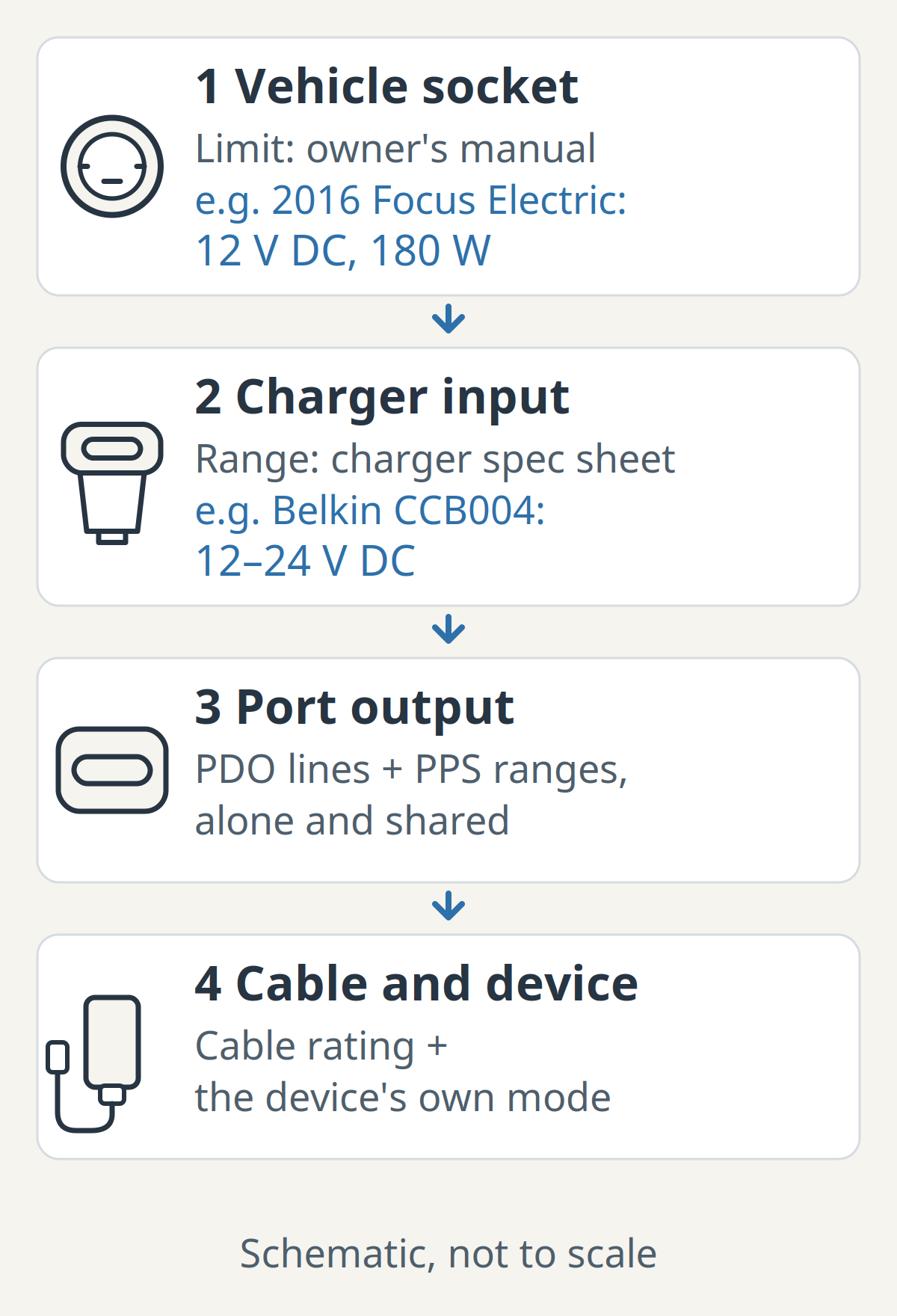
Common mistake: Using a “typical” socket amperage from a forum or listing. Use the figure your manual prints, and if it prints none, treat the limit as unknown and ask the vehicle maker.
Takeaway: Copy your own manual’s socket statement before you compare chargers.
Read the charger’s input and output lines separately
The input range says which vehicle voltages the charger accepts. The output table says what each USB port can offer a device. Read them as two different checks, then read the output table line by line, because fixed-voltage profiles and adjustable PPS ranges have separate current limits.
Belkin’s FAQ for the BOOST↑CHARGE Dual Car Charger with PPS (CCB004) is a clear example because it prints every line:
Scroll horizontally to see all columns.
| CCB004 line | Published value | How to read it |
|---|---|---|
| Input | 12V – 24V DC | Accepts 12V and 24V systems; Belkin says it is designed for both |
| USB-C fixed (PDO) | 5V / 3A and 9V / 2.77A | Two fixed profiles a device can request |
| USB-C PPS | 3.33V – 5.9V / 3A | Adjustable range, current up to 3A |
| USB-C PPS | 3.33V – 11V / 2.25A | Wider range, but current up to 2.25A |
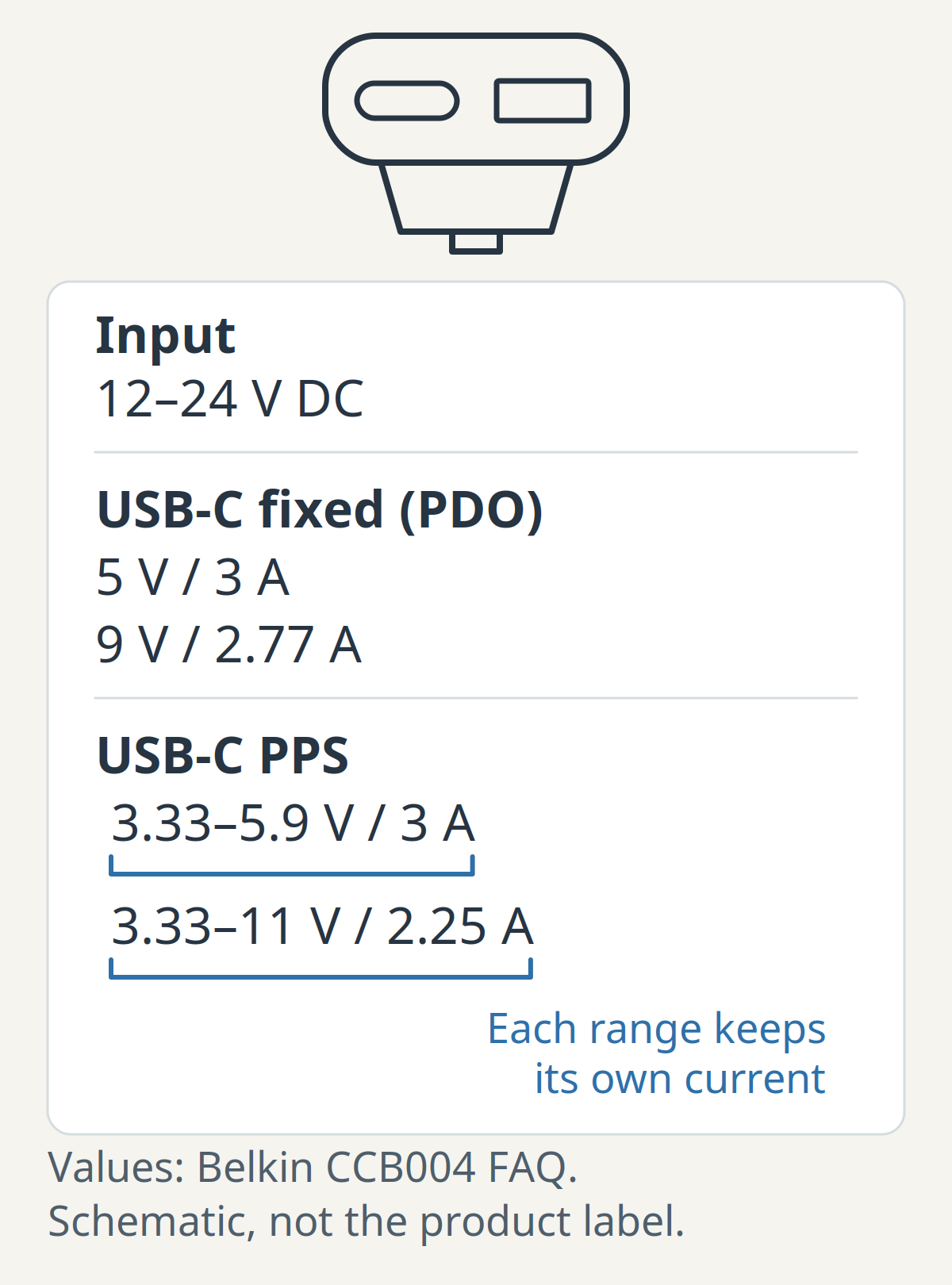
The 3A figure belongs to the lower PPS range only. Attaching it to the 3.33V to 11V range overstates that profile. Some listings print only “PD” and a total wattage; those leave the PPS question open.
Input data varies between makers too. Anker’s Japan listing for the 535 Car Charger (67W) gives an input of 12–24V with a current of 7.2A, while Belkin’s FAQ gives the voltage range alone. Record whatever your shortlisted charger publishes and leave blank anything it does not.
Next, match the output lines to the device. Phones that use a named fast mode depend on particular voltage and current combinations. Samsung’s 45W Travel Adapter (EP-TA845) page shows how specific this gets: it lists PPS 4.05A at 3.3–11.0V, 2.8A at 3.3–16.0V and 2.1A at 3.3–21.0V, and it states that Super Fast Charging 2.0 at 45W needs a 5A C-to-C cable with the listed phones. That is a wall adapter, but the lesson carries into the car: a USB-C plug and a “PD” label do not tell you whether your phone’s named mode is available.
A higher output ceiling also does not set the speed you will see. Samsung’s fast-charging instructions say the device determines the fastest charging available based on the connected charger and battery status.
For background on the two kinds of output line, read how USB Power Delivery negotiates power and what PPS changes. For phone-specific targets, the Samsung and Android charger guide and the iPhone charger and cable guide list the documented conditions model by model.
Takeaway: Pair each voltage with its own current, then confirm your device’s named mode appears in those lines.
Check what each port gets when two devices are plugged in
A multi-port car charger’s headline wattage may be the combined output of all its ports. Once a second device is connected, each port gets its share of that total, and the maker’s shared-port table is the only place that tells you the split. If the listing has no such table, the split is unknown.
Belkin describes the CCB004 as a 37W dual-port car charger that powers a phone up to 25W from the USB-C port while charging another device from the 12W USB-A port. The 37W figure is the sum of the two. No single port offers it.
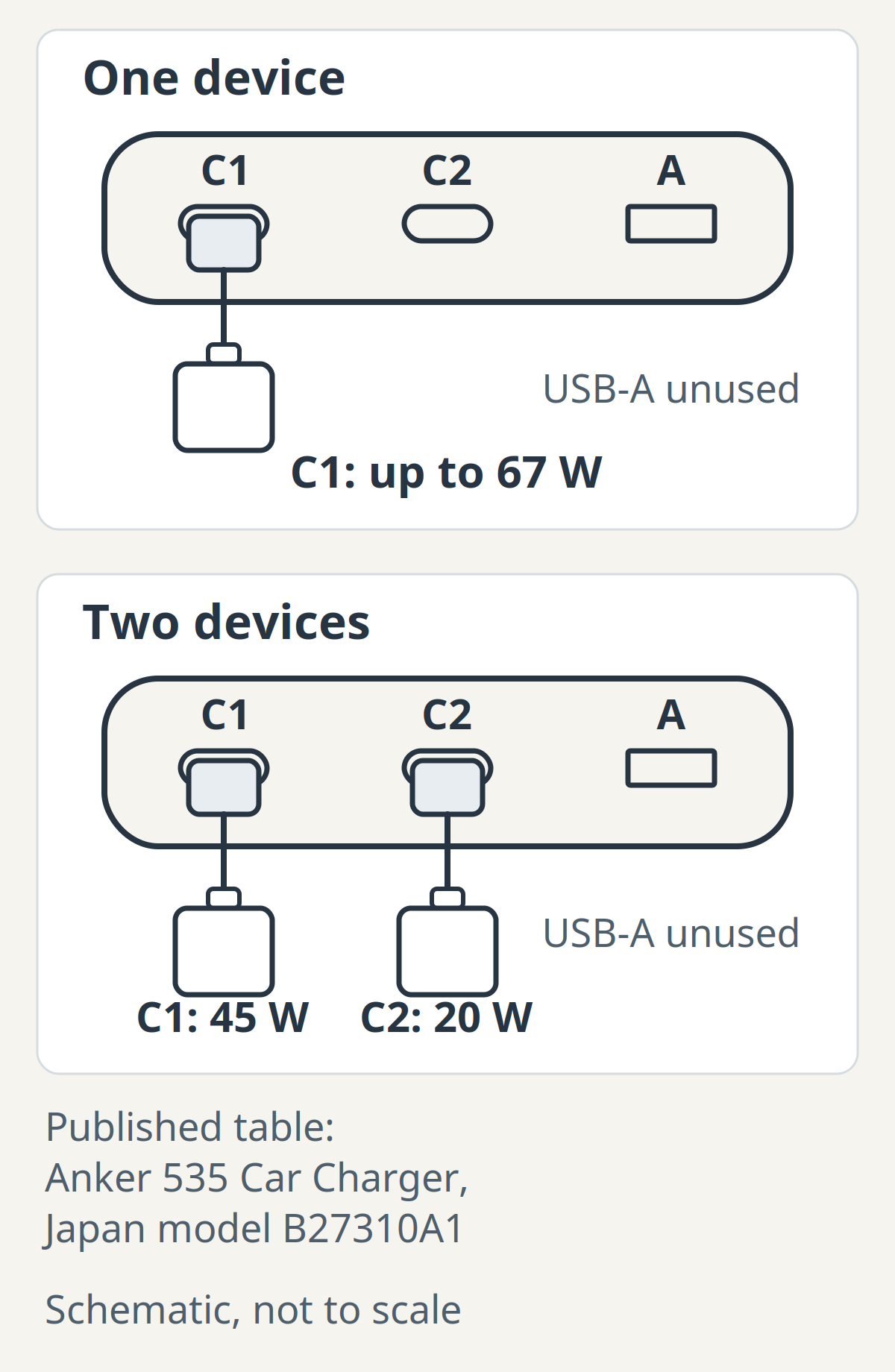
Anker’s Japan page for the 535 (model B27310A1, released June 2023) shows a bigger change. Either USB-C port used alone offers 5V, 9V, 12V and 15V at 3A, and 20V at 3.35A, for up to 67W. With both USB-C ports in use, the published split is 45W on C1 and 20W on C2. With all three ports in use, it is 45W, 9W and 9W.
Scroll horizontally to see all columns.
| Example (maker data) | One device | Two devices | Three devices |
|---|---|---|---|
| Belkin CCB004, one USB-C + one USB-A | USB-C: highest fixed line 9V / 2.77A | USB-C up to 25W + USB-A 12W | Not applicable |
| Anker 535, Japan B27310A1, C1 and C2 | Either USB-C up to 67W | C1 45W + C2 20W | C1 45W + C2 9W + USB-A 9W |
These rows describe two named products from their own documentation. They are not a rule for other chargers, and the Anker figures come from a Japanese listing whose US equivalent we have not confirmed. Use them to practise reading a table, then find the same table for the charger you are considering.
Common mistake: Buying a “65W” or “67W” car charger to run a laptop and a phone together, then expecting the laptop to see the full figure. On the Anker example, the laptop on C1 would have 45W while C2 is occupied.
The GaN charger guide covers the same allocation problem for wall chargers, with a worked power budget.
Takeaway: Find your charger’s shared-port table and plug your most demanding device into the port that keeps the most power.
If a laptop is on the list
Start with the laptop maker’s documentation: it says whether the laptop accepts USB-C charging at all and what input it expects, in volts, amps or watts. Then find an output line on the port you will use that meets that voltage and current, in the sharing state you will actually use.
As a catalogue example, the Anker 535 lists 20V at 3.35A on either USB-C port when used alone, and 45W on C1 once C2 is occupied. Belkin’s CCB004 tops out at 9V on its fixed profiles and 11V on its PPS range, so its documentation shows no 20V line. Anker’s Japanese listing names one laptop, the MacBook Pro (13-inch, M1, 2020), as charging from the 535 in its own testing. Beyond that, these output figures alone do not establish compatibility with your particular laptop, and we have not tested any laptop with either charger. If the port offers less than the laptop’s own charger, check the laptop maker’s documentation for what happens on a lower-rated USB-C source before relying on it.
The GaN guide’s section on matching the laptop input applies here unchanged. If you charge a laptop on the road often, a USB-C power bank charged at home is another option worth pricing, with its own output table to check.
Takeaway: Compare the laptop maker’s stated input with the port’s output in the sharing state you will use.
Match the cable to the port and the mode
If your device charges through a USB-C port, use a USB-C-to-USB-C cable to get USB PD or PPS from the charger’s USB-C port. An earlier iPhone with a Lightning port takes a USB-C-to-Lightning cable instead: Apple’s fast-charging instructions pair that cable with a USB-C adapter that supports USB-PD, and the iPhone charger and cable guide lists the conditions model by model. If your device’s fast mode names a cable current, as Samsung’s 45W mode names a 5A cable, buy that cable or confirm that the one included with the charger meets it.
USB-IF’s cable logo requirements say that certified USB-C-to-USB-C cables must carry a 60W or 240W power label, and that cables faster than USB 2.0 must also show their data rate. A labelled certified cable tells you its power class. It does not add capabilities to the charger or the device on either end.
A USB-A port has its own documented output, such as the CCB004’s 12W. Running a USB-A-to-USB-C cable from it does not raise that figure. For cable lengths, power classes, data rates and connector fit, including cables for a car’s built-in USB or CarPlay port, use the USB-C cable guide.
Takeaway: Match the cable to the device’s port (USB-C-to-USB-C with a power label that covers the charger port, or USB-C-to-Lightning for an earlier iPhone) and meet any cable current your device’s mode names.
Check fit, heat limits and what happens with the engine off
Three practical checks are easy to skip because listings rarely put them in the headline.
Fit comes first. Compare the maker’s published dimensions with the space around your socket: a lid, a cupholder or a gear selector can block a long or wide body. Belkin lists the CCB004 at 1.02 x 2.53 x 0.78 inches, for example. We have not checked how any charger seats in a particular socket.
Temperature is next. Belkin gives the CCB004 an operating range of 0°C to 40°C and a storage range of -20°C to 85°C. Read your shortlisted charger’s own figures and compare them with where the car is parked, especially if the charger will stay in the socket.
Finally, check what the socket does with the vehicle off. Belkin’s FAQ says the CCB004 charges as long as it receives power and that not all vehicles supply power to the 12V accessory port when the vehicle is off. The Ford manual cited above says its power supply works for a maximum of 30 minutes after switch-off and advises against leaving devices plugged in overnight. Your manual will have its own answer.
Takeaway: Check the charger’s dimensions and temperature range, and read your manual’s engine-off statement before you leave a charger plugged in.
What certification claims can and cannot tell you
USB-IF certification means a product passed the USB-IF compliance program. USB-IF’s own announcement of the Certified USB Fast Charger program (January 8, 2018) says that certified fast chargers support the PPS feature of USB PD 3.0, and that certification is not a substitute for local, state, federal or international safety regulations or agencies. Electrical-safety approval is a separate matter.
To check a certification claim, search the USB-IF product list for the exact model. The public list shows products certified in the last two years by default; older certifications need the date filter. If you still cannot find the model, ask the manufacturer before concluding anything, because a missing entry in the default view does not prove the claim false.
Belkin states that the CCB004 is USB-IF certified. We report that as Belkin’s statement; we did not look up its listing for this guide.
Takeaway: Look for the exact model in the USB-IF list; a logo on a listing image is weaker evidence.
Fill in a shortlist worksheet before you order
Write one row for each charger you are considering. A blank cell is a question to answer before you buy, and two listings with the same headline wattage often differ in exactly those cells.
Scroll horizontally to see all columns.
| Field | What to record | Example: CCB004 in the 2016 Focus Electric |
|---|---|---|
| Vehicle socket | Manual page and stated limit | Power point, 12 volt DC 180 watt (manual p.111) |
| Charger input | Voltage range; current if published | 12V – 24V DC; input current not published |
| Port for main device | Port name and its output lines | USB-C: PDO 5V/3A, 9V/2.77A; PPS 3.33–5.9V/3A, 3.33–11V/2.25A |
| Shared-port split | Output per port with both devices in | USB-C up to 25W, USB-A 12W |
| Device mode | Named mode, required V/A and cable | From your phone or laptop maker’s instructions |
| Cable | Type, power label, required current | USB-C to USB-C for a USB-C device, USB-C to Lightning for an earlier iPhone; check against the device’s mode |
| Fit and limits | Dimensions, operating temperature | 1.02 x 2.53 x 0.78 in; 0–40°C operating |
| Engine-off behaviour | Manual statement | Ford: up to 30 minutes after switch-off |
| Certification | Exact listing found, or maker statement only | Maker statement only (not looked up) |
The example row shows how to fill the sheet. It does not recommend that charger or that car. With your own rows filled in, compare the port you will actually use, in the sharing state you will actually use, against your device’s mode.
If a new charger is in the car and your phone shows no charging or keeps disconnecting, the USB-C charger troubleshooting guide walks through isolating the charger, cable and port.
Takeaway: Prefer the charger whose documentation fills every row.
When this guide does not apply
This guide covers plug-in chargers for a 12V accessory socket. A car’s built-in USB ports and CarPlay connections have their own limits; start with the cable guide and your vehicle manual. Wireless phone mounts use a different compatibility chain, covered in the Qi2 and MagSafe guide. Heavy-duty 24V systems, jump starters and inverters are outside its scope, beyond noting that the CCB004 is documented for 12V and 24V systems.
Takeaway: Use this guide for chargers that plug into a 12V accessory socket; built-in ports and wireless mounts start from their own guides.
FAQ
Can you use a USB-C adapter in a car?
Yes. A plug-in USB-C car charger fits the vehicle’s 12V accessory socket. Check the socket’s limit in your owner’s manual and the charger’s input range, then read the output line for the port you will use.
Does USB-C charge faster in a car?
The connector does not set the speed. Your phone reaches its documented fast mode only when the port offers the voltage and current that mode needs and the cable meets its condition, and the phone still adjusts the rate to battery status. Compare the car charger’s output lines with what your phone’s fast mode requires.
Does it matter which USB-C charger I use?
Yes. Chargers with identical USB-C ports can publish different fixed profiles, different PPS ranges and different shared-port splits. Compare the output table for your port against your device’s documented mode.
What is the best USB-C charging cable for my car?
For a phone with a USB-C port, use a USB-C-to-USB-C cable whose power label covers the charger port’s output, and meet any cable current your device’s fast mode names, such as Samsung’s 5A requirement for its 45W mode. An earlier iPhone with a Lightning port uses a USB-C-to-Lightning cable instead. For a built-in USB or CarPlay port, see the cable guide.
Are cheap USB-C cables safe?
Price alone tells you little either way. Look for the USB-IF power label on a certified cable and a matching product listing, and follow your device maker’s cable requirement. A cable cannot add output that the charger port does not offer.
Which charger do I use for charging in car?
Use one whose documents match your car and device: the manual’s socket limit, the charger’s input range, the selected port’s output lines and split, and your device’s mode and cable. If the phone then reports slow charging, unplug the second device, try a known-good cable, and use the troubleshooting guide if the problem stays.
Sources
Official documents, checked October 11, 2026. Model data stays with its named model and region.
- USB-IF compliance updates: USB Automotive Product Certification Requirements, effective July 2018: 9V, 12.5V and 16V certification test inputs.
- Ford: 2016 Focus Electric Owner’s Manual, Auxiliary Power Points, printed page 111: 180 W limit, separate 20 A note, cigar-lighter warning and 30-minute switch-off behaviour for that vehicle.
- Belkin: CCB004 FAQ: input, PDO and PPS lines, 37W dual-port description, dimensions, temperatures, engine-off note, certification statements.
- Anker Japan: Anker 535 Car Charger (67W), B27310A1: input, single-port and shared-port outputs.
- Samsung UK: 45W Travel Adapter EP-TA845: PPS ranges and 5A cable condition.
- Samsung US: fast charging support: device-determined charging speed.
- Apple: fast charge your iPhone: USB-C-to-Lightning cable with a USB-PD adapter for earlier iPhone models.
- USB-IF: Certified USB Fast Charger announcement, January 8, 2018: PPS and the limit of certification.
- USB-IF: cable and connector logo requirements: 60W/240W power labels.
- USB-IF: product search: certified-product list and two-year default view.
Related articles
How to Choose a USB-C Charger for Samsung and Android
Match your Android phone to USB PD PPS, the correct charger port and cable. Check Galaxy S21/S22 25W or 45W needs and shared-port limits.
Read article
Which USB-C Charger and Cable Does Your iPhone Need?
The wrong cable can leave your iPhone uncharged. Match the phone port, cable ends and model-specific USB PD requirements before choosing an adapter.
Read article
USB-C Power Delivery Explained: What a Charger Can Actually Do
USB-C Power Delivery is a charging protocol, not a promise that every USB-C charger, cable, and device will work at full speed.
Read article