Qi2 vs MagSafe: What Changes When You Buy a Wireless Charger
Qi2 wattages come from WPC documents. MagSafe peaks come from Apple's charger page and tech specs. Match the phone, part number, and adapter before you buy.
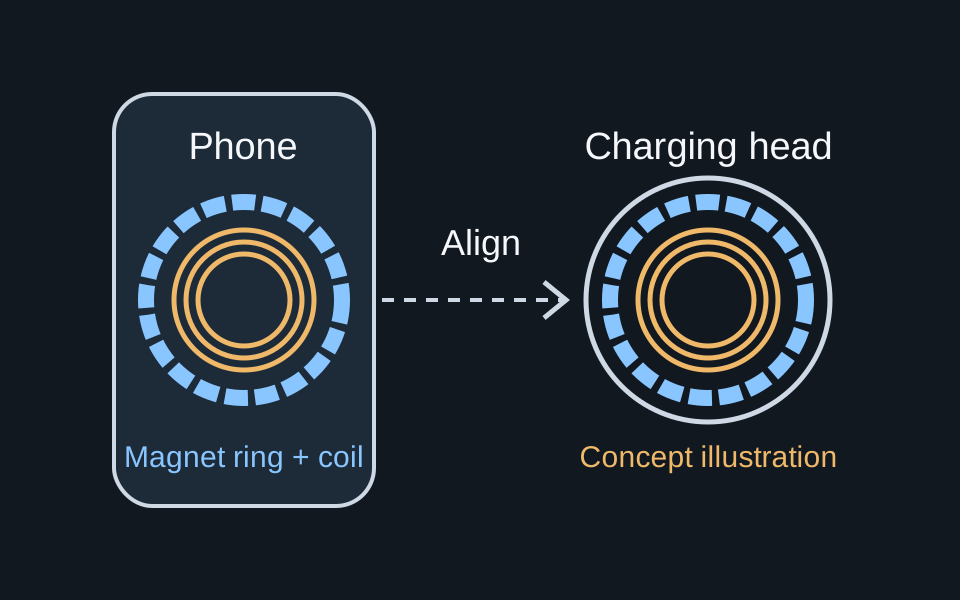
A magnetic word on the box can send you home with the wrong wireless charger for an iPhone. Qi2 is a Wireless Power Consortium standard. MagSafe is Apple’s magnetic charging and accessory system.
Buy an iPhone wireless charger by matching the phone’s tech spec, the charger’s Qi2 certification or Apple part number, and the adapter that source requires. WPC’s November 15, 2023 release says the Qi v2.0 Magnetic Power Profile is based on MagSafe technology Apple contributed, and that profile carries the Qi2 logo. Wattage lines stay with the publisher that printed them. WPC’s July 23, 2025 release brands Qi v2.2.1 as Qi2 25W and says that tier delivers nearly 70% more power than original Qi2, which the same release dates to November 2023 at 15 watts. Apple’s MagSafe Charger page, published September 18, 2026, states an up-to-25W peak only for named iPhone models with named charger part numbers and a 30W or greater adapter at 15V/2.0A or higher. Those two 25W statements describe different products.
What to check before you pay
Scroll horizontally to see all columns.
| Input or item | Published value and source | Why it matters | Dominant failure mode and prevention |
|---|---|---|---|
| Qi2 logo | Magnetic Power Profile, Qi2 logo. Extended Power Profile has no magnets and keeps the Qi logo. WPC release, November 15, 2023 | A magnet on the puck is not the Qi2 logo | Buying on the magnet alone. Look up the WPC certified-product ID |
| Original Qi2 power | 15 watts at the November 2023 launch. WPC release, July 23, 2025. The Qi overview also says Qi2 brought 15W charging | An older Qi2 listing stays at that tier | Reading every Qi2 label as Qi2 25W. Match the generation on the listing |
| Qi2 25W | Qi v2.2.1, branded Qi2 25W, nearly 70% more power than original Qi2. WPC release, July 23, 2025 | This is a WPC brand, not an Apple peak | Copying 25W onto a charger that only shows the older Qi2 logo |
| MagSafe peak | Up to 25W peak for a named model list, part numbers A3502, A3503, A2580, or A3250, and a 30W or greater adapter at 15V/2.0A or higher. Apple MagSafe Charger page, September 18, 2026 | Apple’s peak depends on the phone, the charger revision, and the adapter together | Using part number A2140, which that page places in the up-to-15W group |
| Family tech specs | iPhone 12 through 15 spec pages list MagSafe up to 15W and Qi up to 7.5W. iPhone 13 and iPhone 15 also list Qi2 up to 15W | These lines are Apple spec-page ceilings, not WPC test results | Treating 15W on a spec page as the September 2026 MagSafe peak |
More guides in this section live under Charging and power.
Qi2, from WPC pages only
The Qi overview says Qi2 brought faster 15W charging and that Qi2 devices use magnetic attachment so the phone and charger align. The same page says Qi2 25W is here with nearly 70% more power. It does not assign that increase to an iPhone model.
The July 23, 2025 release is more specific. It says WPC is launching Qi v2.2.1, branded Qi2 25W. It says original Qi2 launched in November 2023 with 15 watts, and that Qi2 25W delivers nearly 70% more power than original Qi2. It also says Qi2’s magnetic power protocol was meant as a step toward faster charging, and that major Android smartphones join the Qi2 system with this launch. The release names no Android models, so this page does not either.
The November 15, 2023 release splits Qi v2.0 into two profiles. The Magnetic Power Profile is based on MagSafe technology contributed by Apple and is branded with the Qi2 logo. The Extended Power Profile has no magnets and uses the existing Qi logo. WPC’s comment in that release is that magnetic attachment reduces the need to nudge the phone until the coils line up. That sentence is about Qi2 products, not a promise for every older iPhone.
The specification history dates the versions:
- Version 2.0, April 2023, introduces the Magnetic Power Profile, magnetic attachment and alignment, and states that Qi v2.0 products are not required to be 100% backward compatible with Qi 1.x certified products.
- Version 2.1, September 2024, adds an automatic alignment profile, magnetic accessory covers, and a test for mechanical obstructions such as protruding cameras close to the charging area.
- Version 2.2, April 2025, adds support for up to 25 watt power transfer, plus power modes that follow the capabilities of USB-C adapters.
- The history page calls 2.2.1 the current version and says the public download is version 2.1. It also lists version 2.3, December 2025, for system gain change reporting.
Version 2.2’s “up to 25 watt” line and the July 23, 2025 “Qi v2.2.1 branded Qi2 25W” line are both on WPC pages. They are still two sentences. Use the branding sentence when a listing says Qi2 25W. Use the history sentence when you are checking what version 2.2 added.
The certified products page says products tested to WPC standards receive a certified WPC ID and appear in the Qi or Ki database. Search that database when the box says Qi2. A missed search leaves the claim unresolved. It does not, by itself, prove a counterfeit.
MagSafe, from Apple pages only
Apple’s MagSafe Charger instructions, published September 18, 2026, say most iPhone models can charge with MagSafe Charger. Setup is: connect the USB-C plug to a recommended 30W or greater Apple USB-C adapter or a compatible third-party USB-C adapter, or to a USB-C port on a Mac or PC. Put the charger face up on a flat surface clear of metal. Then put the iPhone on it.
The page says the charger can optimize charging at up to 25W of peak power, and that the power actually delivered varies with the iPhone model, the adapter wattage, and system conditions. Plug into power before you set the phone down. If you set the phone down first, remove it, wait three seconds, and set it back.
Apple groups the published peaks like this:
Scroll horizontally to see all columns.
| Published peak on the MagSafe Charger page | iPhone models named with that peak | Adapter and charger conditions on that page |
|---|---|---|
| Up to 25W | iPhone 18 Pro, iPhone 18 Pro Max, iPhone 17 Pro, iPhone 17 Pro Max, iPhone 17, iPhone 16 Plus, iPhone 16 Pro Max | 30W or greater, 15V/2.0A or higher, charger part number A3502, A3503, A2580, or A3250 |
| 20W peak | iPhone Air | Stated in the same 25W section, as its own peak |
| 22.5W peak | iPhone 16 and iPhone 16 Pro | Stated in the same 25W section, as their own peak |
| Up to 15W | iPhone 17e, iPhone 15 and earlier | 20W or greater USB-C adapter, 9V/2.22A or 9V/2.56A or higher, charger part number A2140 |
| Up to 12W | iPhone 13 mini and iPhone 12 mini | At least 9V/2.03A |
Higher-wattage adapters at or above 15V/2.0A still top out at the 25W peak for the phones in that first row. A minimum 12W adapter at 5V/2.4A still runs the charger, and Apple says that path charges more slowly.
With USB-C or Lightning accessories such as headphones connected, the same page limits charging to 16W for iPhone 18 Pro and iPhone 18 Pro Max, 10W for iPhone 17 Pro and iPhone 17 Pro Max, 7.5W for iPhone 16, iPhone 16 Plus, iPhone 16 Pro, and iPhone 16 Pro Max, and 16W for iPhone 17 and iPhone Air. For iPhone 15 and earlier, the connected-accessory limit is 7.5W.
Apple lists the phones it designs MagSafe Charger around: iPhone 18 Pro and Pro Max, the iPhone 17 line including iPhone 17e and iPhone Air, the iPhone 16 line, and iPhone 15, 14, 13, and 12 models. Power and charge times differ for non-MagSafe, Qi-compatible phones. Apple names iPhone 16e, iPhone 11 models, iPhone X, iPhone XS models, iPhone XR, and iPhone 8 models in that group. The page does not add a separate wattage for them.
If the iPhone is on MagSafe Charger and also plugged in through Lightning or USB-C, it charges through the connector. Credit cards, badges, passports, and key fobs stay out from between the phone and the charger, because the magnets can damage magnetic strips and RFID chips. In the European Union or the European Free Trade Association, iPhone 15 and later show a notice the first time you use a wireless charger: wireless charging might use more power than wired charging.
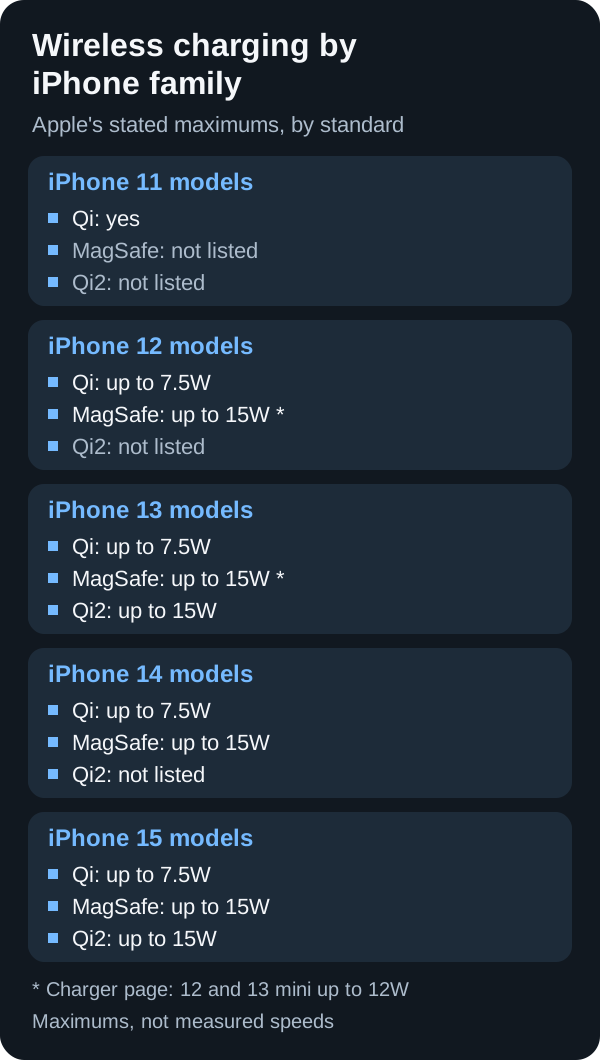
What the iPhone 11 through 15 spec pages list
These rows are the Power and Battery and MagSafe blocks on each family tech spec page, checked October 18, 2026. “Not listed” means that page is silent. The MagSafe Charger page above is a different document, which is why the mini 12W figure is not pasted into this table.
Scroll horizontally to see all columns.
| Family tech spec | Qi | MagSafe | Qi2 | Magnet array on that page |
|---|---|---|---|---|
| iPhone 11 | Works with Qi chargers | Not listed | Not listed | Not listed |
| iPhone 12 | Up to 7.5W | Up to 15W | Not listed | Listed under MagSafe, with an alignment magnet |
| iPhone 13 | Up to 7.5W | Up to 15W | Up to 15W | Listed under MagSafe, with an alignment magnet |
| iPhone 14 | Up to 7.5W | Up to 15W | Not listed | Listed under MagSafe, with an alignment magnet |
| iPhone 15 | Up to 7.5W | Up to 15W | Up to 15W | Listed under MagSafe, with an alignment magnet |
Each of those spec pages says wireless chargers are sold separately. The fast-charge footnotes on them describe a wired test with a 20W USB-C adapter, not a wireless session.
Apple’s iOS 17.2 notes include “Qi2 charger support for all iPhone 13 models and iPhone 14 models.” That is a software note. It does not replace the wattage line on a tech spec. iPhone 13’s spec page already lists Qi2 up to 15W. iPhone 14’s spec page does not list a Qi2 wattage.
Apple’s wireless charging guide says you need an iPhone 8 or later, that Qi is the Wireless Power Consortium standard, and that many Qi-certified chargers charge iPhone at up to 7.5 watts on the latest iOS. Place the phone display-up, in the center or where the charger maker says. Keep cards and other objects out from between the phone and the charger. Magnetic mounts or magnetic cases in that gap can reduce performance.
Rule of thumb: If the adapter is below 30 W, or it is not rated at 15V and 2.0A or higher, leave the MagSafe Charger page’s 25W group. That page ties the 25W peak to those adapter ratings and to part numbers A3502, A3503, A2580, and A3250. Part number A2140 sits in the up-to-15W row with iPhone 17e and iPhone 15 and earlier.
Rule of thumb: If a camera lip, grip, or wallet holds the phone off the pad, treat coil misalignment as the failure mode. WPC version 2.1 adds a test for protruding cameras near the charging area. Apple’s wireless guide says to center the phone and to keep objects out of the gap. A firm magnetic hold does not tell you which power mode the phone negotiated.
Two ceiling ratios, from two publishers
These ratios use only the watt figures printed on the cited page. They are not charge times, and they are not interchangeable.
Worked example from the iPhone 15 tech spec page alone. That page lists MagSafe up to 15W, Qi2 up to 15W, and Qi up to 7.5W.
ceiling_ratio = 15 / 7.5 = 2
On that page, the MagSafe line and the Qi2 line are each twice the Qi line. The page does not say the battery reaches full in half the time.
Worked example from the WPC July 23, 2025 release alone. That release states original Qi2 at 15 watts and Qi2 25W at 25 watts, and it calls the difference nearly 70% more power.
wpc_gain = (25 - 15) / 15 = 0.667
0.667 is two-thirds, which is the arithmetic behind that release’s “nearly 70%.” Leave the fraction on the WPC release. Apple’s 25W peak stays on the MagSafe Charger page with its own phones, part numbers, and adapter ratings.
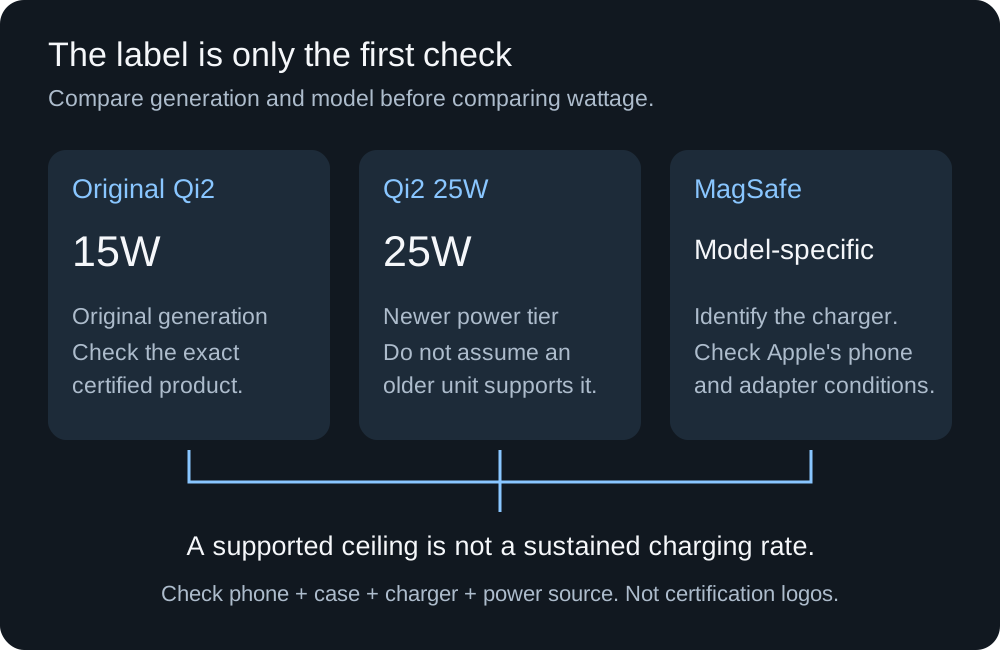
Read the generation on the label. A Qi2 logo from the 15W era does not become Qi2 25W, and Apple’s MagSafe peak still depends on the phone, the charger part number, and the adapter.
The adapter is a separate purchase
Wireless chargers are sold separately from the phone, and the MagSafe Charger page still asks for a specific adapter. The 25W group wants 30W or greater at 15V/2.0A or higher. The 15W group wants 20W or greater at 9V/2.22A or 9V/2.56A or higher. A 12W, 5V/2.4A adapter is enough for the charger to run, with slower charging.
That gap is the hidden cost. You can pay for a magnetic puck and still be on the slow path because the adapter in the drawer is the 12W one. The USB-C Power Delivery explainer is the page for the adapter’s voltage and current lines. How to choose a GaN charger covers picking a wall adapter when one brick has to feed this charger and something else. If the lead between the adapter and the puck is replaceable, use how to choose a USB-C cable for that lead only. It does not set the wireless peak.
Apple also says the phone or the MagSafe Charger might get slightly warmer, and that if the battery gets too warm, software might limit charging above 80 percent. Once that limit is active, the session stops at 80 percent of indicated charge.
unfilled_share = 100 - 80 = 20
That 20 is percentage points of indicated charge. Apple publishes no watt-hour figure for this limit, and it does not say how often the limit turns on. If you need the rest the same night, finish with a cable. The USB-C charger guide for iPhone is the wired path. Heat and the 80 percent cap are battery behavior, which how to compare phone battery life treats as a comparison problem of its own.
For iPhone 15 and later in the EU or EFTA, Apple’s own notice says wireless charging might use more power than wired charging. The page gives no percentage. There is no energy-cost figure to multiply here.
Case fit, and a phone that is only Qi
A case that says magnetic answers whether something sticks. It does not answer which profile the charger negotiates. Check the case maker’s note for your phone and the charger maker’s note for that case. WPC’s version 2.1 obstruction test is the reason to look at a camera lip that holds the coil off the pad.
On a non-MagSafe phone, stay with Apple’s wording. The MagSafe Charger page says power and charge times differ for the Qi-compatible phones it names, including iPhone 11 models and iPhone 16e. The iPhone 11 tech spec lists wireless charging that works with Qi chargers and does not list MagSafe, Qi2, or a magnet array. WPC’s history page says Qi v2.0 products are not required to be fully backward compatible with Qi 1.x products, so a Qi2-only listing still needs a compatibility line for that older phone.
Apple’s USB-C connector guide says iPhone 15 and later can charge AirPods, an Apple Watch, or another small device that supports USB Power Delivery at up to 4.5 watts, using a cable. The wireless charging guide describes the iPhone receiving power from a Qi-certified charger. Those are the two documented directions. They are not a wireless phone-to-phone charge.
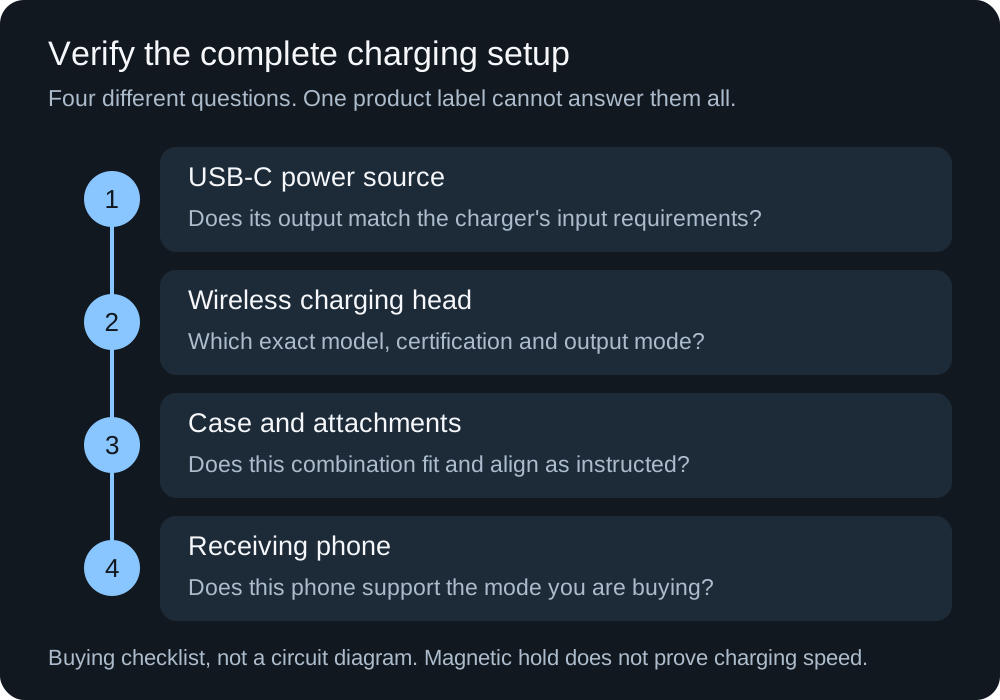
Confirm the adapter rating, the charging head’s part number or certification ID, the case, and the phone. Magnetic hold is not a power measurement.
Record the set you actually ordered
Write the acceptance note in concrete terms: this stand charges this iPhone, through this case, in the orientation you use, on the adapter the listing requires. “Fast charging” leaves the requirement blank.
Scroll horizontally to see all columns.
| Field | What you record |
|---|---|
| Phone and software | Model, and iOS version if you rely on the iOS 17.2 Qi2 note |
| Case | Model, and whether a camera lip or wallet sits in the charging area |
| Charging head | Model, Qi2 generation or Apple part number |
| Adapter | Wattage and the voltage/current line the charger page asks for |
| Certification | WPC ID if the claim is Qi2, or Apple’s part number if the claim is MagSafe |
| Source and date | Page title and the day you checked it |
During the return window, start with the adapter the instructions name. For MagSafe, connect power first. Confirm that charging starts, then repeat with your usual case. If it fails, change one thing: the documented adapter, then case fit, then orientation. The USB-C charger troubleshooting guide is the next page when the input side never starts. The charging icon does not report a wireless wattage.
Takeaway: The phone spec, the charger part number or WPC ID, and the adapter rating define the claim you can hold the seller to.
Sources
Checked October 18, 2026. WPC wattages and Apple wattages stay on the pages that printed them.
- WPC: Qi wireless charging overview
- WPC: Qi2 25W release, July 23, 2025
- WPC: Qi2 certification release, November 15, 2023
- WPC: history of the Qi specifications
- WPC: certified products
- Apple: How to use your MagSafe Charger with iPhone, published September 18, 2026
- Apple: How to wirelessly charge your iPhone
- Apple: About iOS 17 updates, including iOS 17.2
- Apple: iPhone 11 tech specs
- Apple: iPhone 12 tech specs
- Apple: iPhone 13 tech specs
- Apple: iPhone 14 tech specs
- Apple: iPhone 15 tech specs
- Apple: Charge and connect with the USB-C connector on iPhone
Related articles
Portable Battery Charger for iPhone: USB-C PD vs MagSafe
A pack must meet Apple's floors: 18W USB-C PD for iPhone 15 or later, or 30W at 15V/2A for the 25W MagSafe class.
Read article
Portable Power Station for Camping: LiFePO4 vs NMC Guide
Compare LiFePO4 and NMC camping power stations by cell evidence, energy budget, inverter limits, cold charging and solar-input compatibility.
Read article
USB-C Charger Cable: 60W vs 240W E-Marker Identification
Identify a USB-C charger's cable by its 60 W or 240 W label, current capability and e-marker; distinguish older 100 W cables from EPR.
Read article