How to Choose a GaN Charger
Wrong port sharing leaves a laptop short of its documented input. Match the phone, the port split, and the cable before you trust a GaN label.
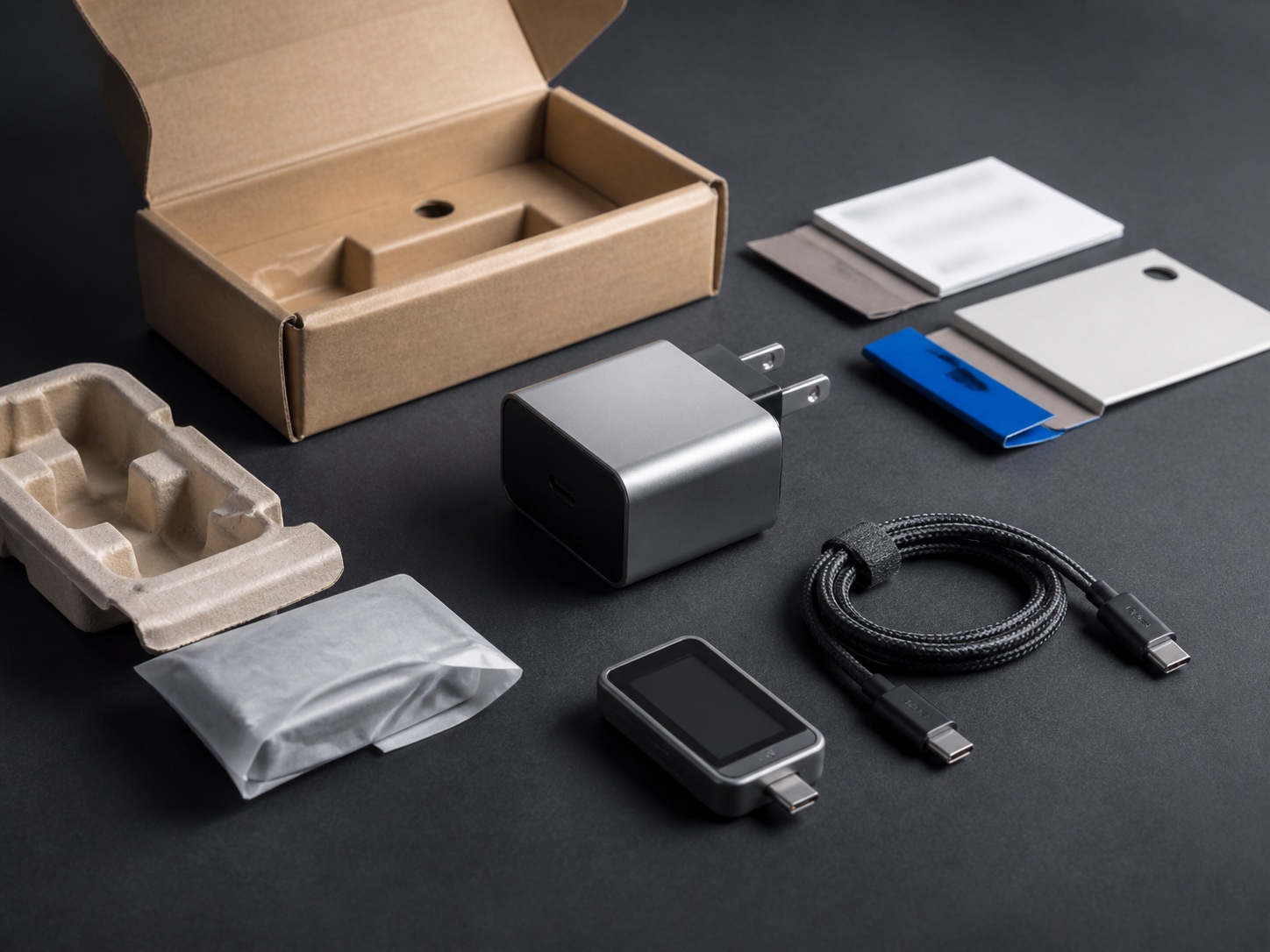
Wrong sharing on a second port pulls a laptop below the input its maker documents, and the charge level falls during ordinary work. Choose a GaN charger by that documented input, the simultaneous split, and the cable current. Gallium nitride names the switch inside the adapter. The output table, the shared-capacity label, and the cable rating decide whether the phone and the laptop can share it.
Choose the GaN charger that still meets the laptop input after the phone is connected. Apple’s MacBook Air specifications, fetched 17 October 2026, list a 40W Dynamic Power Adapter with 60W Max for the M5 13-inch and 15-inch models, and fast charging from a 70W or higher USB PD source. USB Type-C Release 2.5 (March 2026) keeps every USB-C port on a multi-port charger at a floor of 5 V at 1.5 A, which is 7.5 W, however many other ports are busy. A box figure above 70 W does not hold 70 W on the laptop port once a second device joins a shared-capacity group. Read the combination row, then match the cable to the single voltage and current line that pair will use.
Scroll horizontally to see all columns.
| Input or item | Typical value or source | Why it matters |
|---|---|---|
| M5 MacBook Air, 13-inch and 15-inch | 40W Dynamic Power Adapter with 60W Max in the box. Fast charge from a 70W or higher USB PD source. Apple specs, fetched 17 October 2026. | The included adapter and the fast-charge source are different targets. |
| 14-inch MacBook Pro, M5 row | 70W USB-C Power Adapter in the box. Fast charge from a 96W or higher USB PD source. Apple specs, fetched 17 October 2026. | A 70 W brick matches the included adapter, and misses the fast-charge line. |
| iPhone 15 fast-charge claim | Up to 50% in around 30 minutes with a 20W adapter or higher and a USB-C cable. Apple’s August 2023 test used drained preproduction iPhone 15 and 15 Plus units and the 20W Model A2305. | 20 W is the adapter condition for that claim. It does not transfer to another phone. |
| Samsung 45W Travel Adapter, EP-TA845XWEGWW | Input 100-240 V. Fixed PDO lines 9 V at 3 A, 15 V at 3 A, and 20 V at 2.25 A. PPS ranges 3.3-11.0 V at 4.05 A, 3.3-16.0 V at 2.8 A, and 3.3-21.0 V at 2.1 A. A 5 A USB-C cable is in the box. Samsung Business UK, fetched 17 October 2026. | One table shows how fixed lines and PPS ranges differ, and why a 3 A cable misses the 4.05 A line. |
| Multi-port USB-C floor | 5 V at 1.5 A on every USB-C port, independent of the other ports. USB Type-C Release 2.5, section 4.8.6.1, March 2026. | 7.5 W keeps the port alive. It does not run a laptop workload. |
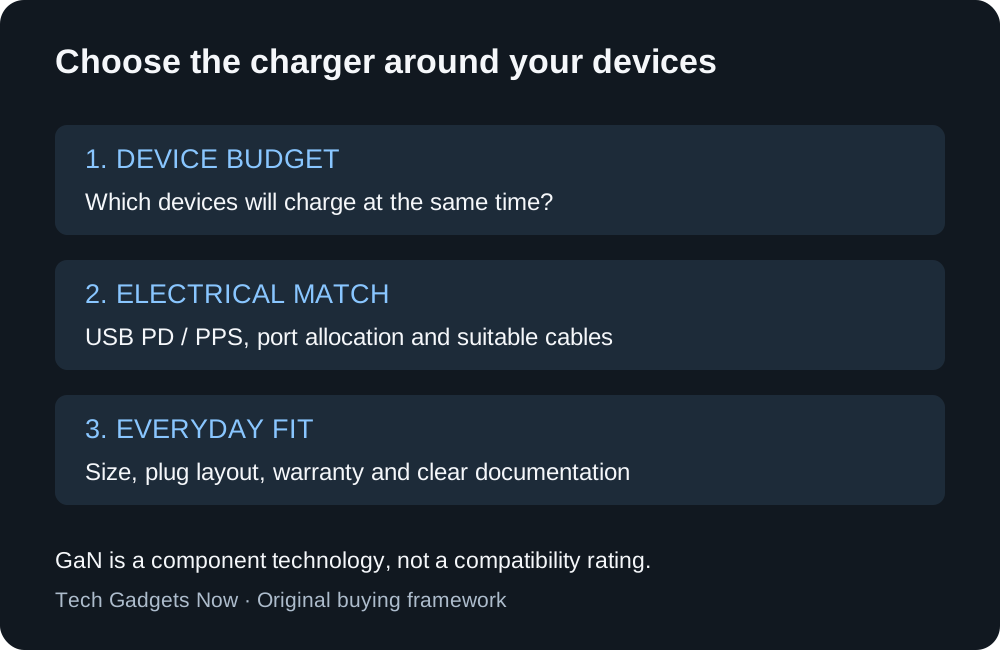
Figure 1. Work through the purchase in that order. Gallium nitride describes the switch. The finished charger still has to fit the devices you plug in together.
Which devices will be plugged in together?
Write down the combination you actually leave connected, not every device you own. A phone charged overnight is a different load from a phone plugged in beside a laptop at a desk.
Scroll horizontally to see all columns.
| Setup | What to require on the label | Dominant failure mode and prevention |
|---|---|---|
| Phone alone | One USB-C port and the phone maker’s mode, including PPS when the mode names it | Fixed voltages only, so the phone stays on a lower mode. Prevention: require the listed PPS range. |
| Laptop alone | A single-port line that meets the included adapter, or the fast-charge source if that is the goal | The brick matches the included adapter and misses fast charge. Prevention: copy both numbers and mark which one this charger is for. |
| Laptop and phone together | The published split for that pair | Shared capacity reclaims the laptop port when the phone attaches. Prevention: if that row is below the documented target, unplug the phone or use an assured-capacity port. |
| Laptop, phone, and a small accessory | The three-port row, with USB-A kept in its own group | The third port shrinks the laptop offer again. Prevention: Release 2.5 keeps USB-A out of the USB-C shared group, at a minimum of 5 V at 500 mA. |
Rule of thumb: If the published laptop-port split is below 70 W while a second device is connected, and the laptop maker documents fast charging only from a 70 W or higher USB PD source, charge the laptop on its own port or on an assured-capacity port.
Apple’s support page for the 35W Dual USB-C Port Power Adapter, fetched 17 October 2026, is a clear allocation record for a small shared adapter. A Mac laptop and an iPhone or iPad each receive up to 17.5 W. An iPhone and an iPad each receive up to 17.5 W. A Mac laptop or iPhone paired with an Apple Watch or AirPods receives up to 27.5 W, and the watch or earbuds receive up to 7.5 W. If either device needs more power, Apple’s instruction is to unplug the other device and its cable. That 35 W adapter is documentation of a split. It is not a candidate for the 70 W or 96 W fast-charge lines above.
For an iPhone, settle the connector and the model-specific adapter condition in the iPhone wired charger and cable checklist before you add the phone to a shared budget. A laptop that does not charge over USB-C needs its own maker’s statement. Apple’s adapter guidance covers Macs that charge by USB-C, and it does not speak for a proprietary barrel plug.
How do you read one output line?
Power on one line is volts times amps. Each line is an alternative the charger can offer. Adding the lines invents a port total the silicon will not deliver.
Worked example. On Samsung’s published table for the EP-TA845XWEGWW, the 20 V fixed line is 2.25 A.
P = V × I
20 × 2.25 = 45
That line is 45 W. The 9 V line on the same table is 3 A, so 9 × 3 = 27 W. The 15 V line is 3 A, so 15 × 3 = 45 W. The 5 V normal-charge line is 3 A, so 5 × 3 = 15 W. A laptop that needs 20 V can use the 45 W line. It cannot add the 27 W line on top.
The PPS lines are ranges with a current ceiling, not a second pile of watts. At the top of the 3.3-11.0 V range the current limit is 4.05 A:
11.0 × 4.05 = 44.55
That product stays under the 45 W maximum printed for the adapter. The other PPS ceilings on the same page are 2.8 A across 3.3-16.0 V and 2.1 A across 3.3-21.0 V. A table that lists fixed PD voltages and no PPS range has not shown PPS.
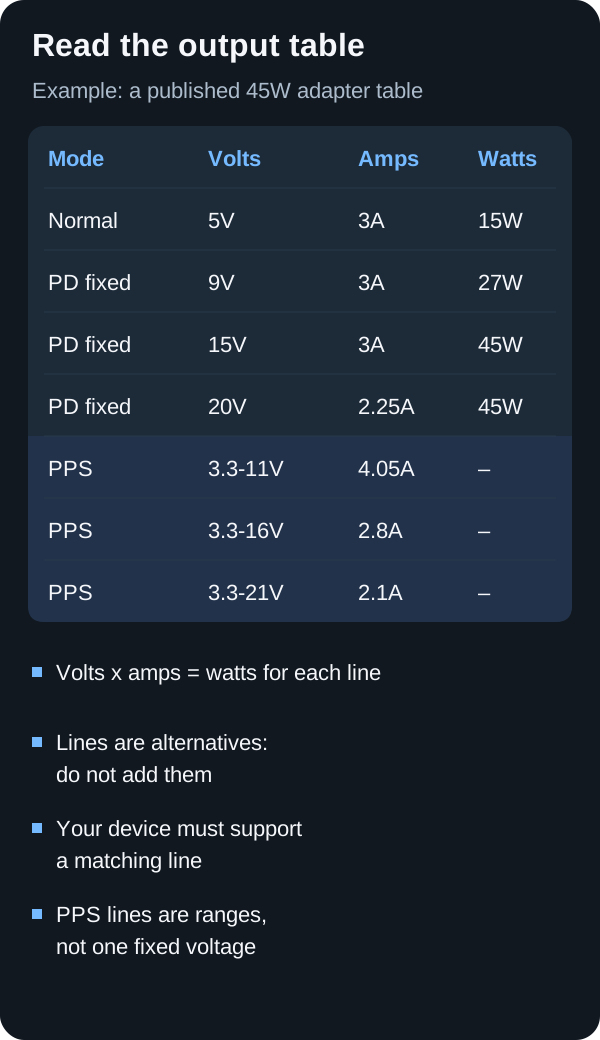
Samsung’s page limits Super Fast Charging 2.0 at 45 W to the Galaxy Note10+ used with this adapter and a 5 A USB-C cable, and says other compatible devices would be listed later. The same page says the adapter also charges at 15 W for Galaxy phones that do not use that mode, and that speed varies by device. Copy the row that names your phone. The Samsung fast-charging guide keeps the phone-side mode separate from this adapter table.
Takeaway: Compare one voltage and current line with the device. Leave the other lines out of the sum.
What does a shared-capacity group do to the second port?
USB Type-C Release 2.5, section 4.8.6 (March 2026), splits multi-port charger ports into two kinds.
An assured-capacity port has a fixed allocation. Other ports do not shrink it, except when the charger has to act for product safety. Its label is that port’s PDP, and a contract consistent with the label should hold no matter how many other source ports are in use.
A shared-capacity port has no fixed allocation. Shared ports exist only as a group of two or more, and the sum of the maxima shown to you is greater than the group’s total power. Every port in the group is labeled with the same PDP, plus a label at least as prominent for the total shared capacity.
Every USB-C port stays at or above 5 V at 1.5 A, which is 7.5 W, however many other ports are in use. To give a newly attached device that floor, the charger reclaims power by normal USB Type-C current rules or USB PD renegotiation. It does not hard-reset, enter error recovery, or disable a port to take the power back.
Remaining power has an explicit definition in section 4.8.6.1. For ports already in a USB PD contract, the charger subtracts the maximum power offered in the source capabilities, not the power the device happened to request.
Remaining Power Available = Total Shared Capacity - offered power on attached ports
The specification’s own two-port illustration uses a 60 W total and a 35 W PDP. After the first port establishes a 35 W contract, the second port can offer 25 W:
60 - 35 = 25
The second device sees 25 W, not the 35 W printed as the port PDP.
Table 4-23 then shows why the total, not the port PDP, sets the experience. These figures are the specification’s examples of two policies, highest-to-lowest and balanced. They are not a reading of any retail GaN charger.
Scroll horizontally to see all columns.
| Example in Table 4-23 | Two devices connected | Four devices connected | Dominant failure mode and prevention |
|---|---|---|---|
| Port PDP 30 W, total shared capacity 30 W | Highest-to-lowest: 22.5 W and 7.5 W. Balanced: 15 W and 15 W. | 7.5 W on each port under both policies | The label on each port still says 30 W while the group holds only 30 W, so the second device knocks the first off its single-port maximum. Prevention: treat a total that equals one port PDP as a one-device charger. |
| Port PDP 30 W, total shared capacity 100 W | 30 W and 30 W under both policies | Highest-to-lowest: 30 W, 30 W, 30 W, and 10 W. Balanced: 25 W on each port | The fourth device is the one that loses a full 30 W share. Prevention: count the devices you connect, and require the total shared capacity to cover that count at the wattage each one needs. |
USB-A ports on the same charger are a separate group. Release 2.5 says they shall not sit inside the USB-C shared group, a load change on USB-A shall not move the voltage on a USB-C port, and each USB-A port keeps at least 5 V at 500 mA. That floor is 2.5 W. A listing that adds the USB-A wattage into the USB-C total is mixing two groups the specification keeps apart.
USB-C Power Delivery explained is the page for the contract itself: who offers source capabilities, and how a sink requests one of them. The plug shape is a different question. How to tell a USB-C plug from USB-A, Micro-USB, and Lightning stops at the connector. A port that physically accepts USB-C still needs the power section on this page.
What does GaN change inside the adapter?
Texas Instruments, on its gallium nitride page fetched 17 October 2026, describes GaN as a wide band-gap semiconductor that enables faster switching, higher efficiency, and greater power density than silicon, and therefore smaller designs with lower power loss. The same page says TI’s integrated power stages switch at up to 1 MHz so the magnetics can be smaller. That frequency describes those power stages. It does not state a retail charger’s protocols, port count, or allocation.
Compare published size and weight at a similar port count and total shared capacity, and include the mains lead when the body has none. Samsung lists this 45 W adapter at 53.1 x 30.1 x 89.3 mm, 112.6 g, and a 1 m cable. Use those fields as the pattern. A smaller body still fails if the shared-capacity row misses the laptop.
USB-IF’s public charger page, fetched the same day, describes USB Power Delivery Revision 3.1 as extending delivery to 240 W over a full-featured USB Type-C cable, with fixed voltages of 28 V, 36 V, and 48 V for up to 140 W, 180 W, and 240 W. The same page says that before that update, USB PD was limited to 100 W at 20 V on USB Type-C cables rated at 5 A. An adjustable voltage supply mode on that page lets the powered device request intermediate voltages between 15 V and the charger’s maximum fixed voltage. Samsung’s PPS ranges start at 3.3 V. That is a different published mechanism from the 15 V adjustable mode. Use the PPS charging guide for the phone-side ranges, and do not treat the word GaN as evidence of either one.
The document library lists USB Power Delivery Specification Revision 3.2, Version 1.2, file date 14 September 2026. The clauses above come from the public feature page and from Type-C Release 2.5, not from that zip.
How do you add a power budget without double-counting?
Start from the laptop maker’s two figures: the adapter in the box, and the source required for fast charge. Add the phone mode only for the hours the two are plugged in together. Reserving a maximum does not mean the accessory draws it all day.
Worked example, planning targets. These three numbers are assumed budgets for a desk session, not measured consumption and not a promise about any model:
65 + 25 + 5 = 95
A 100 W headline is still the wrong document. The three-port row has to offer a laptop line at or above 65 W, a phone line at or above 25 W, and an accessory line at or above 5 W at the same time. An offer of 45 W on the laptop port with three devices attached misses that 65 W target.
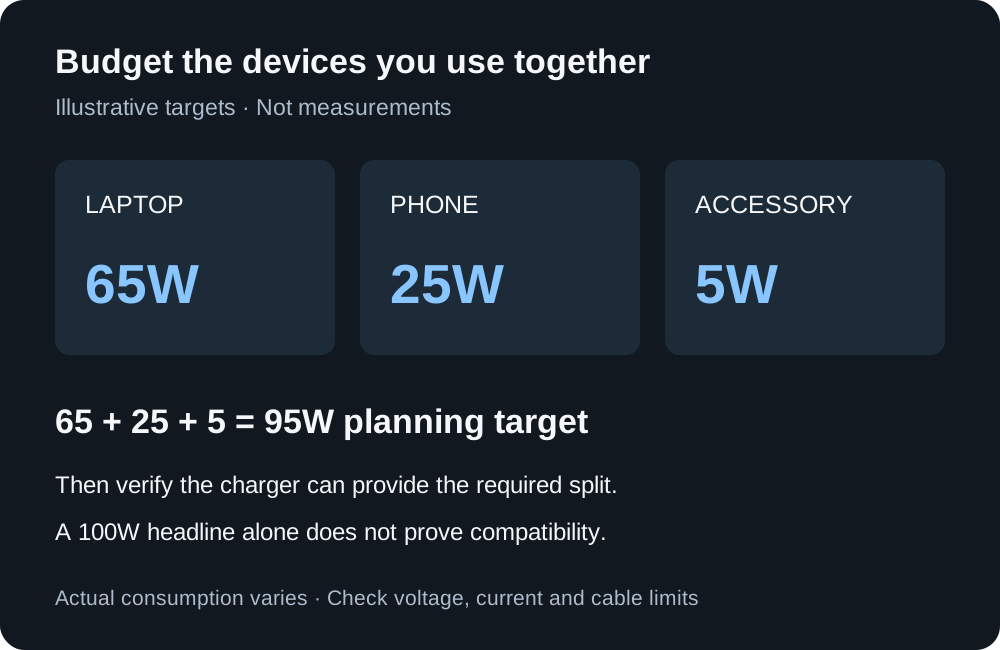
Figure 3. Assumed planning targets, not measured draw. The charger has to provide the split, not only the 95 W sum.
The sourced version of the same arithmetic uses the Apple fast-charge line and the iPhone 15 adapter condition:
70 + 20 = 90
That 90 W sum is the planning total if you want M5 MacBook Air fast charging and the iPhone 15 fast-charge condition together. Release 2.5’s remaining-power rule can still leave the second port at 25 W in the 60 W / 35 W illustration. A 100 W box does not answer the 90 W plan until the allocation row shows at least 70 W still available to the laptop with the phone attached.
Takeaway: Keep the sum. Buy against the row that names the ports you will occupy.
The ownership cost of a miss is the original adapter still in the bag. You carry two chargers, and the laptop battery still falls when the phone is attached. A cable that cannot carry the PPS current leaves that line unused, so the mode you counted never starts. When there is no outlet, the power bank guide is the stored-energy budget, separate from this wall split. The Charging & Power guides hold the wall, cable, and battery pages together.
Which cable and phone mode have to match the port you will use?
Release 2.5 states that the USB Type-C receptacle is specified for 5 A, while standard USB Type-C cable assemblies are rated for 3 A. Cables designed for USB PD and identified by electronic marking are allowed to support up to 5 A. Cables rated above 3 A, and all full-featured cables, are electronically marked. Table 3-1 rates separate assemblies at 3 A or 5 A, and note 1 deprecates the older 5 A Standard Power Range cables in favor of 5 A cables that are also Extended Power Range capable.
Rule of thumb: If the output line’s current is above 3 A under the mode you need, a standard 3 A USB Type-C cable assembly is outside that line. Use a cable rated for the current, which Release 2.5 requires to be electronically marked once the rating exceeds 3 A.
Samsung’s 4.05 A PPS line is the concrete case. 4.05 A is above the 3 A standard-assembly rating, and the adapter’s box includes a 5 A cable. The 20 V at 2.25 A line is under 3 A, so that particular fixed line fits inside a 3 A current rating. The 5 A cable is still the one Samsung names for Super Fast Charging 2.0 on the Note10+. Match the cable to the mode, not to the connector shape.
The USB-C cable guide separates charging current from data and display. A cable that arrived with earbuds is a poor stand-in for the laptop line until you have read its current rating. If the phone’s fastest mode names a PPS window, confirm that window on the port you will use while the laptop is also attached. Shared capacity can remove the high line even when the single-port table shows it.
What do you check for travel and for a desk?
Read the input-voltage line on the exact adapter. Samsung’s EP-TA845XWEGWW lists 100-240 V. A plug adapter changes the pin shape. It does not give that range to a charger whose label shows one mains voltage. Include the regional plug and lead in the packed size.
On a desk, lead exit and outlet distance matter more than the smallest body. Use the multiport brick once its allocation row already meets the laptop. If a bedside light cannot be covered, that unit is a poor fit for that spot.
Apple’s Mac adapter page, fetched 17 October 2026, says a Mac that charges by USB-C can use a USB-C power adapter or display that supports USB PD, including one with higher or lower wattage than the recommended adapter. Third-party adapters should meet applicable international and regional regulations and safety standards. For the best charging experience, the page wants at least the wattage of the recommended adapter. For MacBook Air models introduced in 2022 or later, the recommended list includes a 30 W USB-C adapter for the 13-inch only, the 35 W dual-port adapter, a 67 W adapter, a 70 W adapter, and the 40 W Dynamic Power Adapter with 60 W Max used with a USB-C charge cable. For 14-inch MacBook Pro models introduced in 2021 or later, the list includes 67 W, 70 W, and 96 W. A lower-wattage PD source can charge. It is the wrong tool when you required the fast-charge line.
The same allocation problem in a car is covered by the USB-C car charger guide. The socket and the fuse are different. The port split is the same kind of document.
What belongs on the listing before you order?
A marketplace listing moves the documents around. It does not change which documents you need.
- The model number on the selected variant, including plug type and whether a cable is in the box. One page often covers several wattages.
- The per-port output table, with voltage and current on each line. The headline wattage is not that table.
- For more than one port, the total shared capacity and the row for the combination you will use. A list of single-port maxima has not answered simultaneous use.
- A USB PD statement, and a PPS range if the phone’s mode names PPS. Fixed voltages do not imply the range.
- Any USB-IF logo claim, checked in USB-IF Product Search. The search page says the list is limited to products certified to bear the USB-IF logo, that members maintain their own entries, and that USB-IF does not take responsibility for the contents. The public list defaults to products certified in the last two years. Products with older certification dates can fail the current program, and the page tells you to use the date filter to see them. A missing hit leaves the logo claim unchecked. It is not, by itself, a counterfeit finding.
If a line is missing, get the manual for that model revision before you buy, and keep a copy of the output table with the order. This page does not rank listings.
What do you confirm before you retire the old adapter?
Charge the laptop alone first, on a cable rated for the line you selected. Then add the phone, then the accessory you leave on the brick. Use a normal day’s work and the battery level you usually start from. A full battery on an idle machine hides a split that fails under load.
If the battery falls through that session, the allocation missed the input you required. Unplug the second device, which is what Apple’s 35 W page says to do when a device needs more power, and see whether the laptop recovers. Keep the original adapter until the new combination holds. Case warmth is not an electrical measurement. Stop using a damaged unit.
If the laptop does not charge at all, the USB-C charger troubleshooting guide separates a dead cable, a data-only port, and an adapter that never offers the required line.
Method and sources
Compiled from public specifications and from USB Type-C Cable and Connector Specification Release 2.5 (March 2026), which was downloaded and read for sections 2.4, 3.1.2, and 4.8.6. Manufacturer tables are claims for the named models on the pages fetched 17 October 2026. The 65 W, 25 W, and 5 W budget is an assumed planning sum. No charger on this page was ranked, and no thermal or efficiency measurement was made for this guide.
- USB-IF: USB Charger (USB Power Delivery), fetched 17 October 2026. Public description of PD Revision 3.1, including 240 W, the 28 V / 36 V / 48 V steps, and the earlier 100 W limit at 20 V on 5 A cables.
- USB-IF: USB Type-C Cable and Connector Specification Release 2.5, March 2026 zip. Assured and shared capacity, the 7.5 W floor, Table 4-23, and the 3 A / 5 A cable ratings.
- USB-IF: USB Power Delivery document library, listing Revision 3.2 Version 1.2 with file date 14 September 2026. The zip was not used as a clause source.
- USB-IF: Product Search, fetched 17 October 2026.
- Texas Instruments: Gallium nitride (GaN), fetched 17 October 2026.
- Apple: MacBook Air technical specifications, fetched 17 October 2026.
- Apple: MacBook Pro technical specifications, fetched 17 October 2026.
- Apple: iPhone 15 technical specifications, fetched 17 October 2026, including the August 2023 fast-charge test note.
- Apple: 35W Dual USB-C Port Power Adapter, fetched 17 October 2026.
- Apple: Use a power adaptor with your Mac, fetched 17 October 2026.
- Samsung Business UK: 45W Travel Adapter, model EP-TA845XWEGWW, fetched 17 October 2026.