Apple USB-C Adapter Guide: 20W, 35W, 70W & 140W PDO Specs vs GaN
Compare every Apple USB-C power adapter (20W, 35W Dual, 70W, 96W, 140W PD 3.1 EPR) by exact fixed PDO voltage rails, why Apple bricks cap Samsung PPS phones at 15W, and when to pick a multi-port GaN charger.
Choosing the wrong Apple USB-C adapter or pairing a high-wattage brick with an unrated cord fails to unlock fast charging when the negotiated voltage rail or cable current ceiling misses your device’s input contract. While a larger Apple charger safely powers smaller Apple gear, missing USB Power Delivery 3.0 sub-protocols and shared-port splits frequently throttle cross-brand phones and notebooks.
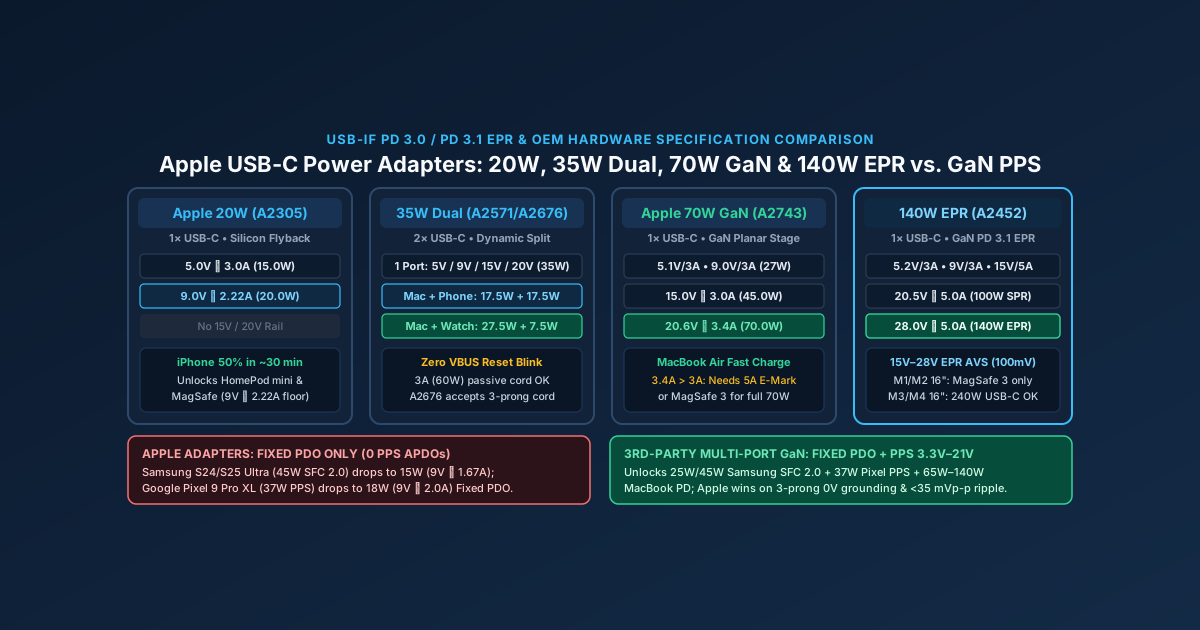
Every official Apple USB-C power adapter (20W A2305, 30W A2164, 35W Dual A2571/A2676, 70W GaN A2743, 96W A2166, and 140W EPR A2452) outputs strictly Fixed USB Power Delivery rails (5V, 9V, 15V, 20V, and 28V at 5A) with zero Programmable Power Supply (PPS) ranges. Consequently, an Apple charger fast-charges iPhones (20W–30W) and MacBooks (35W–140W), but caps PPS-dependent Samsung Galaxy and Google Pixel phones at 15W–18W.
Use this hardware specification reference alongside our iPhone USB-C charger and cable guide, our multi-port GaN charger selection guide, our USB-PD 3.0 PPS protocol explainer, and the full Charging & Power Guides collection in the Buying Guides archive.
Scroll horizontally to see all columns.
| Apple USB-C Adapter Model | Hardware ID & Switch Topology | Ports | Exact Fixed PDO Output Profiles (V ⎓ A = W) |
PPS (APDO) Support |
Mass & Dimensions (US Brick) |
Target Apple Fast-Charge Workload |
|---|---|---|---|---|---|---|
| Apple 20W USB-C Power Adapter | Model A2305 (MU7V2LL/A) — Silicon MOSFET Flyback |
1 × USB-C |
5.0V ⎓ 3.0A (15.0W)9.0V ⎓ 2.22A (20.0W)(No 15V or 20V rail) |
None (0 APDOs) |
~59 g (42 × 42 × 27 mm, fixed prongs on US A2305) |
iPhone 8–16 (50% in ~30 min), iPad mini/Air/Pro baseline, Apple Watch, AirPods, HomePod mini (9V ⎓ 2.22A floor) |
| Apple 30W USB-C Power Adapter | Model A2164 (MY1W2AM/A, replaced A1882) — Silicon MOSFET |
1 × USB-C |
5.0V ⎓ 3.0A (15.0W)9.0V ⎓ 3.0A (27.0W)15.0V ⎓ 2.0A (30.0W)20.0V ⎓ 1.5A (30.0W) |
None (0 APDOs) |
~102 g (56 × 56 × 28 mm, modular duckhead) |
13-inch MacBook Air (M1/M2/M3/M4 standard charge), iPhone 15/16 Pro peak 27W (9V ⎓ 3A), iPad Pro 30W (15V ⎓ 2A) |
| Apple 35W Dual USB-C Port Power Adapter | Model A2571 (Compact US/JP) & Model A2676 (Global Duckhead) |
2 × USB-C (Shared 35W) |
1 Port: 5V/3A (15W), 9V/3A (27W), 15V/2.33A (35W), 20V/1.75A (35W)2 Ports: 17.5W + 17.5W or 27.5W + 7.5W |
None (0 APDOs) |
A2571: ~104 g (48 × 48 × 28 mm)A2676: ~121 g (56 × 56 × 28 mm) |
Standard 13”/15” MacBook Air box adapter; overnight dual charging (MacBook Air + Watch at 27.5W + 7.5W, or 2 × iPhones at 17.5W + 17.5W) |
| Apple 70W USB-C Power Adapter | Model A2743 (MQLN3AM/A, replaced 67W A2518) — GaN Topology |
1 × USB-C |
5.1V ⎓ 3.0A (15.3W)9.0V ⎓ 3.0A (27.0W)15.0V ⎓ 3.0A (45.0W)20.6V ⎓ 3.4A (70.0W) |
None (0 APDOs) |
~206 g (65.5 × 65.5 × 28.5 mm, modular duckhead) |
50% in 30 min Fast Charge on 13”/15” MacBook Air (M2/M3/M4/M5); standard brick for 14” MacBook Pro; requires 5A cable or MagSafe 3 |
| Apple 96W USB-C Power Adapter | Model A2166 (MX0J2AM/A) — Silicon MOSFET PFC + LLC |
1 × USB-C |
5.2V ⎓ 3.0A (15.6W)9.0V ⎓ 3.0A (27.0W)15.0V ⎓ 3.0A (45.0W)20.5V ⎓ 4.7A (96.3W) |
None (0 APDOs) |
~298 g (80 × 80 × 28.6 mm, modular duckhead) |
50% in 30 min Fast Charge on 14” MacBook Pro (M1/M2/M3/M4/M5 Pro/Max); near-100W SPR limit (4.7A requires 5A E-Marked cable) |
| Apple 140W USB-C Power Adapter | Model A2452 (MLYU3AM/A) — GaN PFC + LLC + USB PD 3.1 EPR |
1 × USB-C |
5.2V ⎓ 3.0A (15.6W)9.0V ⎓ 3.0A (27.0W)15.0V ⎓ 5.0A (75.0W)20.5V ⎓ 5.0A (100.0W)28.0V ⎓ 5.0A (140.0W EPR) + 15V–28V AVS |
None (0 PPS APDOs; supports 15V–28V EPR AVS) |
~295 g (95.4 × 74.1 × 28.6 mm, modular duckhead) |
50% in 30 min Fast Charge on 16” MacBook Pro (M1/M2/M3/M4 Pro/Max) via MagSafe 3 or 240W EPR USB-C cable (M3/M4 16” MBP) |
Official Apple USB-C power adapter lineup: exact Fixed PDO voltage and current profiles
Every compliant apple usb-c adapter negotiates power using Biphase Mark Coding (BMC) packets over the USB Type-C Configuration Channel (CC1 or CC2) under the USB Power Delivery specification. When you plug an iPhone, iPad, or MacBook into an official Apple USB-C power adapter, the adapter stays at 0.0V (vSafe0V Cold Socket) until it detects the device’s 5.1 kΩ pull-down resistors (Rd), closes its load switch to provide 5.0V, and broadcasts a Source_Capabilities message listing up to five Fixed Power Data Objects (Fixed PDOs).
As detailed in our USB-C Power Delivery protocol guide, a Fixed PDO is a discrete, non-adjustable voltage rail paired with a maximum current ceiling (V × A = W). Across the six core adapters in Apple’s hardware catalog, each power tier unlocks progressively higher voltage rails and current ceilings:
- The
5.0V(5.0Vto5.2Vat3.0A=15.0Wto15.6W) Base Rail: Present on every Apple USB-C adapter from20Wto140W. It powers AirPods, Apple Watch magnetic fast chargers, Magic Mouse/Keyboard accessories, and compliant 5V USB-C peripherals that present5.1 kΩRdresistors without requesting a higher-voltage USB-PD contract (or legacy 5V peripherals connected through a verified Micro-USB to USB-C adapter with dual 5.1 kΩ resistors). - The
9.0V(2.22Aon20W;3.0Aon30W–140W=20.0Wto27.0W) Smartphone & Tablet Rail: This is the primary fast-charge rail for wired iPhone fast charging. An iPhone 12 through iPhone 16 base model draws up to9.0V × 2.22A = 20.0Won the20W A2305brick, while Pro and Pro Max models draw up to9.0V × 3.0A = 27.0Wwhen attached to a30W,35W,70W,96W, or140Wadapter. - The
15.0V(2.0Ato5.0A=30.0Wto75.0W) Tablet & Ultraportable Rail: Excluded from the20W A2305phone brick, the15.0Vrail starts on the30W A2164(15.0V ⎓ 2.0A), steps to15.0V ⎓ 2.33A(35.0W) on the35WDual adapter, reaches15.0V ⎓ 3.0A(45.0W) on the70Wand96Wbricks, and peaks at15.0V ⎓ 5.0A(75.0W) on the140Wadapter. Newer USB-C iPad Pro and iPad Air models, Nintendo Switch consoles, and USB-C iPhones operating under low-current thermal profiles frequently select the15.0Vrail to reduce cableI²Rresistive heat. - The
20.0V(20.0Vto20.6Vat1.5Ato5.0A=30.0Wto100.0W) Standard Power Range (SPR) Notebook Rail: Present on every Mac adapter (30Wand above), the20Vrail feeds the multi-cell battery buck-boost charger inside MacBook Air and MacBook Pro notebooks. Notice that Apple slightly elevates the nominal open-circuit voltage on its high-current bricks—20.6Von the70W A2743and20.5Von the96W A2166and140W A2452—to compensate for resistiveIRvoltage drop across a 2-meter cable at3.4Ato5.0A. - The
28.0V(28.0V ⎓ 5.0A=140.0W) Extended Power Range (EPR) Workstation Rail: Exclusive to the140W A2452adapter, this USB-PD 3.1 rail breaks the legacy100W(20V ⎓ 5A) barrier to fast-charge 16-inch MacBook Pro systems.
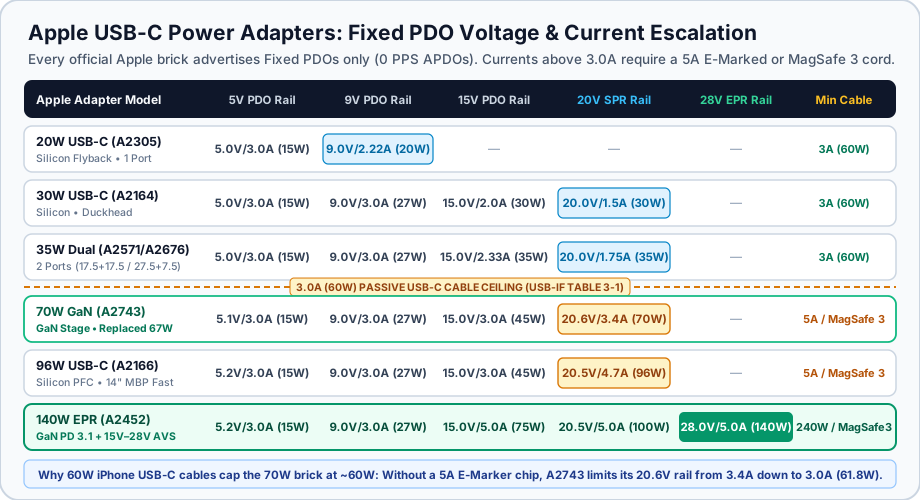
Fixed PDO voltage and current escalation across all six official Apple USB-C power adapters, highlighting the 3.0A (60W) passive cable ceiling from USB Type-C Specification Table 3-1.
Why Apple replaced the 18W (A1720) with the 20W (A2305): the 9.0V ⎓ 2.22A hardware check
When Apple retired the 18W USB-C Power Adapter (Model A1720, originally bundled with iPhone 11 Pro and 2018/2020 iPad Pro) in favor of the 20W USB-C Power Adapter (Model A2305), the 5.0V ⎓ 3.0A (15.0W) rail stayed identical. The only electrical change was a 220 mA increase on the 9.0V Fixed PDO:
18W Adapter (Model A1720): P_max = 9.0V × 2.00A = 18.00W
20W Adapter (Model A2305): P_max = 9.0V × 2.22A = 19.98W (20.0W nominal)
That 0.22A increment is a hard firmware gate for two Apple accessories:
- HomePod mini boot check: When a HomePod mini boots, its internal USB-PD controller inspects the attached charger’s
Source_Capabilitiespacket for a9.0VPDO advertising at least2.22A(20W). If you plug a HomePod mini into an older18W A1720brick (9.0V ⎓ 2.00A) or a multi-port hub port capped at18W, the speaker refuses to boot audio playback and flashes an orange status light. - MagSafe Charger
15Wwireless threshold: The original Apple MagSafe Charger (Model A2140) requires a9.0V ⎓ 2.22A(20W) or9.0V ⎓ 2.56A+contract to sustain full15Wmagnetic wireless charging on iPhone 12 through iPhone 16; on an18W(9.0V ⎓ 2.0A) brick, wireless output is throttled to12W–13W.
Can you charge a MacBook Air with an iPhone’s 20W A2305 adapter in an emergency? Yes, with a major caveat. Because A2305 omits the 15V and 20V PDO rails, a connected MacBook Air negotiates 9.0V ⎓ 2.22A (20W) and runs its internal buck-boost battery charger (ISL9240) in boost mode to step 9.0V up to the ~11.4V–13.0V 3-cell battery voltage. That 20W input charges a sleeping or closed MacBook Air overnight, or slows battery drain during light web browsing, but under heavy CPU or display load the notebook draws more than 20W and the battery percentage slowly declines while plugged in.
Why 60W (3A) iPhone USB-C cables throttle the 70W (A2743) and 96W (A2166) adapters
A frequent surprise for MacBook owners who pack a single woven USB-C cable from an iPhone 15 or iPhone 16 box is discovering that their 70W (A2743) or 96W (A2166) MacBook charger caps out at 60W in macOS System Information (System Settings → General → About → System Report → Power → AC Charger Information → Wattage (W): 60).
Under Section 3.1.2 and Table 3-1 of the USB Type-C Cable and Connector Specification Release 2.5, passive USB-C to USB-C cables without an internal electronic marker (E-Marker) chip are strictly limited to 3.0A of continuous current (20.0V × 3.0A = 60.0W). As explained in our 60W vs 240W E-Marker cable identification guide, any USB-PD contract above 3.0A requires the charger to query the cable’s VCONN pin (SOP' packet) and verify a 5.0A-rated E-Marker transponder.
Inspect the highest Fixed PDO of Apple’s 70W (A2743) and 96W (A2166) adapters:
Apple 70W (A2743) Peak PDO: 20.6V × 3.4A = 70.04W (Exceeds 3.0A passive cable limit by 0.4A!)
Apple 96W (A2166) Peak PDO: 20.5V × 4.7A = 96.35W (Exceeds 3.0A passive cable limit by 1.7A!)
When you connect an A2743 (70W) or A2166 (96W) brick to a MacBook using an iPhone’s bundled 1m 60W (3A) USB-C charge cable, the adapter queries VCONN, receives no 5A E-Marker response, and rewrites its 20V Fixed PDO current ceiling down to 3.0A (20.6V × 3.0A = 61.8W, reported by macOS as 60W). To unlock the full 3.4A (70W) or 4.7A (96W) output required to fast-charge a MacBook Air or 14-inch MacBook Pro to 50% in 30 minutes, you must pair the adapter with either the USB-C to MagSafe 3 Cable or a 100W / 240W (5A) E-Marked USB-C Charge Cable.
How the Apple 35W Dual USB-C adapter splits power (17.5W + 17.5W vs 27.5W + 7.5W)
Apple sells two physical enclosures of its 35W Dual USB-C Port Power Adapter, both sharing identical internal power-allocation firmware documented in Apple Support 111805:
- Apple 35W Dual USB-C Port Compact Power Adapter (
Model A2571): Designed for North America, Japan, and Type-A mains regions, featuring built-in folding flat blades, side-by-side downward-facing USB-C receptacles, and a48 × 48 × 28 mm(~104 g) footprint. Because its prongs are permanently attached to the casing,A2571cannot accept international slide-on duckheads or the 3-prong Apple Power Adapter Extension Cord. - Apple 35W Dual USB-C Port Power Adapter (
Model A2676): Sold worldwide and bundled with select MacBook Air configurations, using the classic56 × 56 × 28 mm(~121 g) square MacBook brick profile with a removable regional AC duckhead and stainless-steel grounding channel for the 1.8m Apple Power Adapter Extension Cord.
Unlike many third-party 45W or 65W two-port GaN chargers that wire Port C1 as a dedicated high-power laptop port and Port C2 as a low-power phone port, both USB-C ports on A2571 and A2676 are electrically symmetric. Furthermore, when a second device plugs in or unplugs, Apple’s dual-port controller renegotiates power dynamically by sending an updated Source_Capabilities message over CC without dropping VBUS to 0V—conforming to the Multi-Port Shared-Capacity rules in Section 4.8.6 of the USB Type-C Specification Release 2.5 and avoiding the annoying 1-second disconnect/reconnect power blink seen on many multi-port GaN bricks.
Scroll horizontally to see all columns.
Attached Device Combination on 35W Dual (A2571 / A2676) |
Port 1 Max Allocation (PDOs Offered) |
Port 2 Max Allocation (PDOs Offered) |
Real-World Charging Impact |
|---|---|---|---|
| 1. Single Device Connected (MacBook, iPhone, or iPad on either port; second port completely empty) | 35.0W (5V ⎓ 3A, 9V ⎓ 3A, 15V ⎓ 2.33A, 20V ⎓ 1.75A) |
0.0W (No cable or sink attached) |
Full 35W standard charging for 13”/15” MacBook Air, or 27W–30W peak fast charging for iPhone Pro / iPad Pro |
| 2. MacBook + iPhone or iPad (or Two iPhones / Two iPads attached simultaneously) | 17.5W (5.0V ⎓ 3.0A or 9.0V ⎓ 1.94A) |
17.5W (5.0V ⎓ 3.0A or 9.0V ⎓ 1.94A) |
50/50 Balanced Split: MacBook Air drops from 35W (20V) down to 17.5W (9V); iPhone is capped at 17.5W (9V ⎓ 1.94A) |
3. MacBook or iPhone + Apple Watch or AirPods (1 high-draw PD sink + 1 low-power 5V wearable) |
27.5W (5V ⎓ 3A, 9V ⎓ 3A, 15V ⎓ 1.83A, or 20V ⎓ 1.375A) |
7.5W (5.0V ⎓ 1.5A USB-IF Section 4.8.6.1 floor) |
Asymmetric Split: Wearable reserves only the 7.5W (5V ⎓ 1.5A) multi-port floor, leaving 27.5W for the MacBook or iPhone |
| 4. One Device + Idle Active Cable Left in Port 2 (e.g., unplugged MagSafe 3 or Lightning cord left in brick) | 27.5W (Port 2 cable E-Marker/controller still holds 7.5W floor) |
7.5W Reserved (Consumed by idle active cable handshake) |
As warned in Apple Support 111805, unplug the unused cable from the adapter body to restore full 35W on Port 1 |
Notice the critical operational consequence of Row 2 (17.5W + 17.5W): if you are working on a MacBook Air plugged into the 35W Dual adapter and connect an iPhone or iPad to the second port, the adapter withdraws the 15V and 20V PDOs on Port 1 and steps the MacBook down to 17.5W (9.0V ⎓ 1.94A). For overnight bedside charging of a sleeping MacBook Air and an iPhone, 17.5W + 17.5W easily fills both batteries by morning. During an active daytime work session, however, 17.5W is too low to fast-charge the MacBook Air; either pair the MacBook with a low-power Apple Watch/AirPods case (27.5W + 7.5W), unplug the second cable from the brick when you need 35W, or upgrade to the 70W (A2743) adapter or a 65W–100W multi-port GaN charger.
Apple 140W USB-C adapter (A2452) and USB PD 3.1 Extended Power Range (28V ⎓ 5A EPR)
For nearly a decade after the original USB Power Delivery 2.0/3.0 specification launched, USB-C charging hit a hard architectural ceiling at 100W (20.0V × 5.0A = 100.0W), now designated by the USB Implementers Forum as the Standard Power Range (SPR). Raising current above 5.0A would have required thicker, stiffer copper wires and larger connector pins that could not fit inside the slim reversible USB Type-C shell.
To scale USB-C power beyond 100W for workstation laptops while keeping cable current capped at 5.0A, the USB Promoter Group released the USB Power Delivery Revision 3.1 specification, introducing the Extended Power Range (EPR) up to 240W via three higher Fixed PDO voltages (28V for up to 140W, 36V for up to 180W, and 48V for up to 240W at 5.0A) plus EPR Adjustable Voltage Supply (AVS), which steps output voltage between 15.0V and the charger’s maximum EPR rail in 100 mV increments.
Apple’s 140W USB-C Power Adapter (Model A2452) was the industry’s first commercial USB PD 3.1 EPR charger, combining a high-frequency Gallium Nitride (GaN) power factor correction (PFC) and resonant LLC stage with five Fixed PDO rails (5.2V/3A, 9.0V/3A, 15.0V/5A, 20.5V/5A, and 28.0V ⎓ 5.0A = 140.0W EPR) plus 15.0V–28.0V AVS.
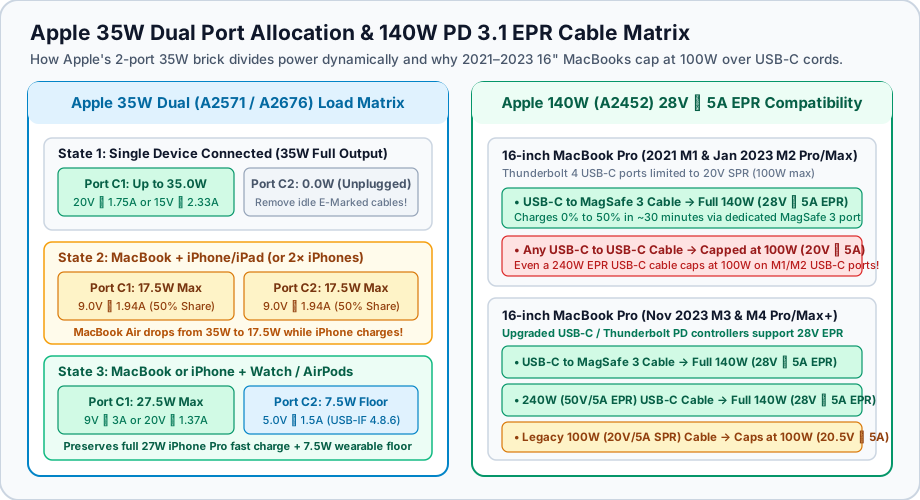
Left: Dynamic load sharing on the Apple 35W Dual USB-C adapter (A2571/A2676). Right: Why 28.0V ⎓ 5.0A (140W EPR) requires MagSafe 3 on 2021–2023 M1/M2 16-inch MacBook Pros but works over 240W EPR USB-C cables on M3/M4 16-inch models.
Why some 16-inch MacBook Pros cap at 100W over USB-C with the 140W (A2452) adapter
A widespread source of confusion when pairing the 140W (A2452) adapter with a 16-inch MacBook Pro is seeing macOS report 100W instead of 140W when connected via a USB-C to USB-C cable. As documented in Apple Support 102378 (Fast charge your MacBook Air or MacBook Pro), whether a 16-inch MacBook Pro can negotiate the 28.0V ⎓ 5.0A (140W) EPR rail over a USB-C port depends on both the MacBook generation and the cable’s EPR E-Marker rating:
Scroll horizontally to see all columns.
| 16-inch MacBook Pro Generation | Apple 140W (A2452) + USB-C to MagSafe 3 Cable |
Apple 140W (A2452) + 240W (50V/5A EPR) USB-C Cable |
Apple 140W (A2452) + Legacy 100W (20V/5A SPR) or 60W (3A) USB-C Cable |
|---|---|---|---|
16” MacBook Pro (Oct 2021 M1 Pro / M1 Max) |
Full 140W (28.0V ⎓ 5.0A EPR) — Fast charges 0–50% in ~30 min |
Capped at 100W (20.5V ⎓ 5.0A SPR) — Thunderbolt 4 port controllers are rated for 20V SPR max |
100W on 5A SPR cable (20.5V ⎓ 5.0A); 60W on 3A passive cable (20.5V ⎓ 3.0A) |
16” MacBook Pro (Jan 2023 M2 Pro / M2 Max) |
Full 140W (28.0V ⎓ 5.0A EPR) — Fast charges 0–50% in ~30 min |
Capped at 100W (20.5V ⎓ 5.0A SPR) — Thunderbolt 4 port controllers are rated for 20V SPR max |
100W on 5A SPR cable (20.5V ⎓ 5.0A); 60W on 3A passive cable (20.5V ⎓ 3.0A) |
16” MacBook Pro (Nov 2023 M3 Pro / M3 Max & M4 Pro / M4 Max+) |
Full 140W (28.0V ⎓ 5.0A EPR) — Fast charges 0–50% in ~30 min |
Full 140W (28.0V ⎓ 5.0A EPR) — Upgraded USB-C PD 3.1 controllers negotiate 28V ⎓ 5A directly over USB-C! |
Capped at 100W (20.5V ⎓ 5.0A) on 100W SPR cable; 60W (20.5V ⎓ 3.0A) on 60W 3A cable |
14” MacBook Pro (M1/M2/M3/M4 Pro/Max) |
Up to 96W (20.5V ⎓ 4.7A SPR) — Fast charges 0–50% in ~30 min |
Up to 96W–100W (20.5V ⎓ 4.7A–5.0A SPR) — 14” chassis only requests 20V SPR rail |
96W–100W on 5A SPR cable; 60W (20.5V ⎓ 3.0A) on 60W 3A cable |
Here is the hardware reason behind that split:
- On 2021 (
M1 Pro/Max) and early 2023 (M2 Pro/Max) 16-inch MacBook Pros, the internal USB-C / Thunderbolt 4 port power switches (CD3217) were designed for a20.0V(100WSPR) ceiling. Only the dedicated MagSafe 3 port routes directly to the high-voltage28VEPR battery charger rail. Even if you buy a certified240WUSB-C to USB-C cable, anM1orM216-inch MacBook Pro will never draw more than100Wthrough its USB-C ports; you must use the USB-C to MagSafe 3 Cable to reach140W. - On November 2023 (
M3 Pro/Max) andM4 Pro/Max(and newer) 16-inch MacBook Pros, Apple upgraded the Thunderbolt / USB-C port power path to full28.0VUSB PD 3.1 EPR compliance. These machines achieve full140Wfast charging over either the USB-C to MagSafe 3 Cable or a USB-IF certified240W(50V/5AEPR) E-Marked USB-C Charge Cable. However, if you plug an older100W(20V/5ASPR) E-Marked cable into the140Wbrick, theA2452adapter reads the cable’s20Vvoltage ceiling from its E-Marker chip and refuses to enter28VEPR mode, capping the session at100W(20.5V ⎓ 5.0A) to prevent disconnect arcing across an non-EPR connector.
Why Apple USB-C chargers throttle Samsung Galaxy and Google Pixel phones (No PPS Support)
One of the most frequent cross-brand compatibility questions for anyone searching for a usb c charger for phone is: “If I already carry an Apple 70W (A2743) or 140W (A2452) MacBook USB-C charger, will it fast-charge my Samsung Galaxy S24/S25 Ultra at 45W or my Google Pixel 9 Pro XL at 37W?”
The electrical answer is no: plugging a 45W-capable Samsung Galaxy flagship into any official Apple USB-C power adapter (20W, 30W, 35W, 70W, 96W, or 140W) throttles the phone all the way down to 15.0W (9.0V ⎓ 1.67A).
To understand why a $99 140W Apple GaN charger charges a Samsung phone slower than a $15 25W phone brick, compare how Apple devices and Android flagships convert wall voltage into battery charging current under the USB-IF Programmable Power Supply (PPS) specification and the USB-IF QuadraMAX PPS compliance test manual:
- How iPhones and MacBooks Charge (
Fixed PDOs+ Internal Buck-Boost Conversion): Every iPhone and MacBook incorporates a high-efficiency multi-phase switching regulator inside the device chassis designed to accept a fixed step voltage (9.0V,15.0V,20.0V, or28.0V) and regulate battery voltage internally. When Apple introduced variable voltage negotiation on the140W A2452and its newest40W Dynamic Power Adapter with 60W Max, it adopted USB PD 3.1/3.2 Adjustable Voltage Supply (AVS), which steps in100 mVincrements (15V–28Vfor EPR or9V–20Vfor SPR AVS). Consequently, no Apple USB-C power adapter includes USB-PD 3.0 Programmable Power Supply (PPS) Augmented Power Data Objects (APDOs). - How Samsung Super Fast Charging (
25W/45W) and Google Pixel (27W–37W) Work (USB-PD 3.0 PPSDirect Charge Pumps): High-wattage Android flagships minimize heat inside the slim phone body by using a2:1(or4:2) switched-capacitor direct charge pump. Instead of stepping a fixed9Vor15Vrail down through an inductive buck converter inside the phone, a2:1charge pump divides the input voltage exactly in half (V_out = V_in ÷ 2) and doubles the current (I_out = I_in × 2) at97%+efficiency directly into the lithium-ion cell (~3.8Vto4.45V). Because the charge pump has a fixed2:1ratio, the wall charger itself must dynamically regulate its output voltage in20 mVsteps (3.3V–11.0Vor3.3V–21.0V) and50 mAcurrent limits every few seconds as the battery voltage rises. That fine-grained20 mVmode is USB-PD 3.0 Programmable Power Supply (PPS).
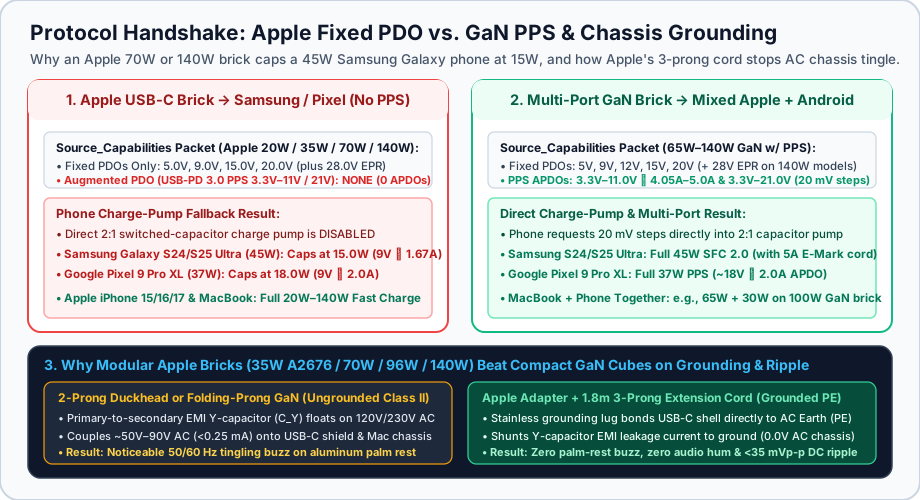
Protocol handshake comparison between an official Apple Fixed-PDO adapter and a third-party GaN PPS charger, alongside 2-prong Y-capacitor touch leakage versus 3-prong grounded extension cord shunting.
As published on Samsung’s official 45W USB-C PD Travel Adapter (EP-TA845) specification sheet and detailed in our Samsung & Android fast-charger selection guide, compare the exact contract negotiated when you plug flagship phones into an Apple 70W (A2743) or 140W (A2452) brick versus a PPS-compliant GaN charger:
Scroll horizontally to see all columns.
| Smartphone Model & Peak Rating | Required Protocol for Peak Speed | Actual Contract on Any Apple USB-C Adapter (20W–140W) |
Resulting Speed on Apple Brick | Actual Contract on Third-Party GaN w/ PPS (3.3V–21V) |
|---|---|---|---|---|
Samsung Galaxy S24 Ultra / S25 Ultra / S24+ / S25+ (45W SFC 2.0) |
USB-PD 3.0 PPS APDO: 3.3V–11.0V ⎓ 4.05A–5.0A (or 3.3V–16.0V ⎓ 2.8A / 3.3V–21.0V ⎓ 2.1A) + 5A cable |
No PPS APDO found → Disables 2:1 charge pump → Falls back to Fixed 9.0V ⎓ 1.67A |
15.0W (Standard “Fast Charging”; loses 67% of peak power) |
45.0W (~9.2V ⎓ 4.8A PPS) — Triggers blue “Super Fast Charging 2.0” ring |
Samsung Galaxy S24 / S25 / Z Fold6 / Z Flip6 (25W SFC) |
USB-PD 3.0 PPS APDO: 3.3V–11.0V ⎓ 2.75A–3.0A (25W over standard 3A cable) |
No PPS APDO found → Disables 2:1 charge pump → Falls back to Fixed 9.0V ⎓ 1.67A |
15.0W (Standard “Fast Charging”; loses 40% of peak power) |
25.0W (~8.8V ⎓ 2.8A PPS) — Triggers teal “Super Fast Charging” ring |
Google Pixel 9 Pro XL (37W Peak Fast Charge) |
USB-PD 3.0 PPS APDO: 3.3V–21.0V ⎓ 2.0A+ (operates near ~18.0V ⎓ 2.05A into 4:2 charge pump) |
No PPS APDO found → Falls back to Fixed 9.0V ⎓ 2.0A inductive buck charger |
18.0W (Loses 51% of peak 37W charging rate) |
37.0W (~18.2V ⎓ 2.03A PPS) — Full Google 37W peak charging curve |
Google Pixel 9 / 9 Pro / 8 Pro (27W–30W Peak) |
USB-PD 3.0 PPS APDO: 3.3V–11.0V ⎓ 3.0A (or 3.3V–21.0V) |
No PPS APDO found → Falls back to Fixed 9.0V ⎓ 2.0A inductive buck charger |
18.0W (Caps at legacy 18W USB-PD fixed profile) |
27.0W–30.0W (~9.4V ⎓ 3.0A PPS) — Full fast-charge curve |
Apple iPhone 15 / 16 / 17 Series (20W–40W Peak) |
Fixed PDO (9.0V ⎓ 2.22A–3.0A or 15.0V ⎓ 2.0A–2.67A) + PD 3.2 AVS on newest Pro models |
Negotiates native Fixed 9.0V ⎓ 2.22A–3.0A (20W–27W) or 15.0V (30W+) rail |
Full 20W–30W+ Peak Speed (50% in ~20–30 min) |
Full 20W–30W+ Peak Speed via backwards-compatible Fixed 9V/15V PDOs |
The takeaway is unambiguous: if your household or travel bag mixes a MacBook or iPad with a Samsung Galaxy or Google Pixel phone, an official apple charger usb-c will bottleneck your Android phone at 15W–18W. A certified third-party GaN charger that advertises both Fixed PDOs (5V/9V/15V/20V/28V) and full-range PPS APDOs (3.3V–11V ⎓ 4.05A–5A and 3.3V–21V) charges both ecosystems at their full hardware ceiling.
Apple USB-C adapter vs. third-party GaN chargers: ripple, grounding, and port sharing
Why do electrical engineers, audio professionals, and MacBook power users still buy Apple’s single-port 70W (A2743), 96W (A2166), and 140W (A2452) adapters when third-party 65W to 140W GaN chargers offer 2 to 4 ports, smaller folding-prong footprints, and full Samsung/Pixel PPS support?
As detailed in Apple Support 120548 (About Apple USB power adapters) and Texas Instruments wide-bandgap GaN topology documentation, Apple’s adapter architecture trades away multi-port density and PPS compatibility in favor of three electrical engineering advantages:
Scroll horizontally to see all columns.
| Engineering Parameter | Official Apple USB-C Adapters (20W / 35W / 70W / 140W) |
Third-Party Multi-Port GaN (65W–140W Class, e.g., Anker Prime / UGREEN Nexode Pro) |
Which Design Wins & Why |
|---|---|---|---|
USB-PD 3.0 PPS (APDO) Support |
None (0 PPS ranges) — Caps Samsung S24/S25 Ultra at 15W (9V ⎓ 1.67A) and Pixel 9 Pro XL at 18W |
Full PPS (3.3V–11V ⎓ 4.05A–5A & 3.3V–21V ⎓ 3A–5A) — Unlocks 25W/45W Samsung SFC 2.0 & 37W Pixel 9 Pro XL |
Third-Party GaN wins whenever you charge a Samsung Galaxy, Google Pixel, or PPS power bank alongside Apple gear |
| Multi-Port Shared Capacity | 1 port (except 35W Dual, which splits 17.5W + 17.5W or 27.5W + 7.5W) |
2 to 4 ports (e.g., 65W splits 45W + 20W; 100W splits 65W + 30W; 140W splits 100W + 30W or 70W + 70W) |
Third-Party GaN wins for one-brick travel when you must fast-charge a MacBook (45W–100W) and a phone (20W–30W) simultaneously |
Port Re-Negotiation Interrupt (VBUS Drop) |
Single-port bricks never renegotiate; 35W Dual updates Source_Capabilities smoothly with 0V drop (No Hard Reset) |
Most multi-port GaN chargers briefly cut VBUS (~0.5s–1.5s disconnect/reconnect blink) across shared ports when a second cord attaches |
Apple wins when powering bus-powered USB-C hubs, external SSDs, or portable monitors that crash if VBUS blinks |
| Output Voltage Ripple & EMI Shielding | Ultra-low full-load ripple (20 mVp-p to 45 mVp-p); full copper/brass Faraday cage + internal thermal potting |
Premium tier: 50–90 mVp-p; ultra-compact budget bricks often reach 120–250 mVp-p (far below the 500 mVp-p USB-PD ceiling) |
Apple wins for sensitive capacitive touchscreens, MacBook Force Touch trackpads, and low-noise DAC/audio setups |
3-Prong Earth Grounding (Y-Cap Touch Leakage) |
Modular 30W, 35W (A2676), 70W, 96W, and 140W accept the 3-prong grounded Apple Extension Cord (0.0V AC chassis leakage) |
Almost all compact folding-prong GaN chargers are 2-prong Class II ungrounded (~50V–90V AC <0.25 mA Y-cap chassis buzz) |
Apple modular adapter + 3-prong cord wins decisively for eliminating the 50/60 Hz tingling vibration on aluminum MacBooks |
How Apple’s 3-prong extension cord eliminates the 50V–90V AC “tingling / vibrating” MacBook palm rest
If you have ever slid your fingertips lightly across the anodized aluminum palm rest of a charging MacBook Air, MacBook Pro, or iPad Pro and felt a distinct 50 Hz or 60 Hz buzzing vibration that vanishes the instant you unplug the USB-C charging cable, you have experienced Class II switch-mode Y-capacitor leakage current.
Every compact 2-prong AC-to-DC wall charger (both Apple’s own 2-prong folding duckhead and virtually every 2-prong third-party GaN cube) must pass international electromagnetic interference (EMI) regulations (FCC Part 15 Class B / CISPR 32). To prevent high-frequency switching noise (100 kHz to 1 MHz) from radiating down the USB-C cord, engineers bridge a small safety-rated Class Y1 capacitor (C_Y, typically 470 pF to 2,200 pF) across the galvanic isolation barrier between the high-voltage AC primary side and the low-voltage USB-C secondary ground (GND).
When the charger is plugged into a wall outlet via an ungrounded 2-prong plug, that secondary GND has no connection to the building’s protective earth (PE). Instead, the Y-capacitor forms an AC capacitive voltage divider between the 120V AC or 230V AC mains line and neutral, floating the USB-C cable shield and the MacBook’s aluminum enclosure at roughly half the mains voltage (~50V to 90V AC RMS). Because the Y-capacitor’s reactance at 50/60 Hz is several hundred kilohms, the maximum current is strictly limited below the 0.25 mA (250 µA) IEC 62368-1 Class II touch-current safety ceiling—completely harmless to human physiology, yet high enough in voltage to electrostatically attract and release the dry keratin layer of your skin 100 to 120 times per second (2 × f_mains), creating the unmistakable mechanical “buzzing” sensation and occasionally introducing 50/60 Hz ground-loop hum into unbalanced 3.5 mm studio monitors or guitar interfaces.
Here is where Apple’s modular duckhead bricks (30W A2164, 35W Dual Standard A2676, 70W A2743, 96W A2166, and 140W A2452) have a permanent mechanical advantage over fixed-prong GaN chargers:
- When you slide off the 2-prong regional duckhead, the adapter exposes a precision circular stainless-steel grounding lug encompassing the figure-8 AC inlet pins. That metal collar is bonded internally to the USB-C receptacle ground shell and secondary return plane.
- When you snap on the Apple Power Adapter Extension Cord (
1.8m3-prong grounded AC cord), an internal metal grounding clip inside the cord’s mating shroud locks onto the adapter’s stainless-steel lug and connects it directly to the wall outlet’s third Protective Earth (PE) pin. - With
PEearth connected, the Y-capacitor’s EMI return current is shunted directly to building ground, clamping the MacBook chassis to0.0V ACand eliminating both palm-rest tingling and audio interface ground-loop buzz. (Note that the20W A2305and the35W Compact A2571have permanently molded 2-prong blades and cannot accept the grounded extension cord.)
Frequently asked questions
Can I use a 70W or 140W Apple MacBook USB-C charger on my iPhone?
Yes. Under the USB Power Delivery specification and Apple Support 102574, every Apple USB-C power adapter (30W, 35W, 70W, 96W, and 140W) starts at 5.0V and only delivers the voltage and current requested by the connected device. When you plug an iPhone into a 70W (A2743) or 140W (A2452) MacBook adapter, the iPhone ignores the high-voltage 20V and 28V laptop rails and selects the 9.0V ⎓ 3.0A (27W) or 15.0V Fixed PDO rail, drawing only the 20W to 30W its internal battery management controller requires without any risk of overcharging.
Does an Apple USB-C power adapter support Samsung Super Fast Charging (PPS)?
No. Official Apple USB-C power adapters (20W A2305, 30W A2164, 35W Dual A2571/A2676, 70W A2743, 96W A2166, and 140W A2452) advertise strictly Fixed PDO voltage steps (5V, 9V, 15V, 20V, and 28V) and omit USB-PD 3.0 Programmable Power Supply (PPS) 3.3V–11V or 3.3V–21V ranges. Because Samsung 25W Super Fast Charging and 45W Super Fast Charging 2.0 require 20 mV PPS voltage regulation to drive the phone’s internal 2:1 switched-capacitor charge pump, plugging a Samsung Galaxy S24/S25 Ultra into any Apple USB-C charger forces the phone back to standard Fixed PDO charging at 15.0W (9.0V ⎓ 1.67A).
Why is my 16-inch MacBook Pro only charging at 100W on an Apple 140W USB-C adapter?
Reaching the full 140W (28.0V ⎓ 5.0A USB PD 3.1 Extended Power Range) output of the Apple 140W (A2452) adapter requires both a 28V-capable port on the Mac and an EPR-rated cable. On 2021 (M1 Pro/Max) and January 2023 (M2 Pro/Max) 16-inch MacBook Pro models, the Thunderbolt 4 USB-C ports are hardware-limited to 100W (20V ⎓ 5A SPR), so you must use the USB-C to MagSafe 3 Cable to achieve 140W. On November 2023 (M3 Pro/Max) and M4 Pro/Max 16-inch MacBook Pros, the USB-C ports support 140W EPR directly, provided you use a certified 240W (50V/5A EPR) E-Marked USB-C cable rather than an older 100W (20V/5A SPR) or 60W (3A) USB-C cord.
How does the Apple 35W Dual USB-C Port Power Adapter split wattage between two devices?
According to Apple Support 111805, when a single device is connected to either port of the 35W Dual adapter (A2571 or A2676), that port offers the full 35W (20V ⎓ 1.75A or 15V ⎓ 2.33A). When you connect a MacBook plus an iPhone or iPad (or two iPhones/iPads), the adapter divides output evenly into 17.5W + 17.5W (9.0V ⎓ 1.94A per port). When you connect a MacBook or iPhone alongside a low-power Apple Watch or AirPods charger, the primary port retains 27.5W while the wearable port receives 7.5W (5.0V ⎓ 1.5A).
How do I stop the tingling vibration on my MacBook palm rest when charging with a USB-C adapter?
That 50/60 Hz buzzing sensation is caused by a tiny safety-limited AC leakage current (< 0.25 mA at ~50V–90V AC) coupled through the charger’s internal EMI suppression Y-capacitor when using an ungrounded 2-prong wall plug. On Apple’s modular adapters (30W A2164, 35W Dual Standard A2676, 70W A2743, 96W A2166, and 140W A2452), slide off the 2-prong duckhead plug and attach the 3-prong grounded Apple Power Adapter Extension Cord, which bonds the adapter’s stainless-steel grounding lug to earth ground and drops chassis AC voltage to 0.0V.
Sources
- Apple Support (109509): Use a power adapter with your Mac (Official 30W, 35W Dual, 70W, 96W, and 140W USB-C Power Adapter Specifications)
- Apple Support (111805): How to use the 35W Dual USB-C Port Power Adapter (17.5W + 17.5W and 27.5W + 7.5W Dynamic Load-Sharing Matrix)
- Apple Support (102378): Fast charge your MacBook Air or MacBook Pro (70W, 96W, and 140W MagSafe 3 vs. 240W USB-C Cable Requirements)
- Apple Support (102574): Fast charge your iPhone (20W Model A2305 and Higher-Wattage USB-PD Adapter Compatibility)
- Apple Support (120548): About Apple USB power adapters (100V–240V AC Input and Safety Compliance)
- USB Implementers Forum (USB-IF): USB Charger (USB Power Delivery) & Extended Power Range (EPR) Overview
- USB Promoter Group / USB-IF: USB Power Delivery Specification Revision 3.1 Announcement (28V/36V/48V EPR up to 240W and 15V–28V AVS)
- USB Implementers Forum (USB-IF): Fast Charging Certified USB Charger Initiative (Programmable Power Supply / PPS in USB PD 3.0)
- USB Implementers Forum (USB-IF): USB Type-C Cable and Connector Specification Release 2.5 (Section 3.1.2 3A/5A Cable Limits & Section 4.8.6 Multi-Port Shared Capacity)
- USB Implementers Forum (USB-IF): QuadraMAX PPS Compliance Test Manual (APDO Voltage Step & Shared Power Budget Verification)
- Samsung Electronics UK: 45W USB-C PD Travel Adapter Technical Specifications (Model EP-TA845 Fixed PDO vs. 3.3V–11V/16V/21V PPS APDO Table)
- Texas Instruments: Gallium Nitride (GaN) Integrated Power Stages & High-Frequency Switching Topologies
Related articles
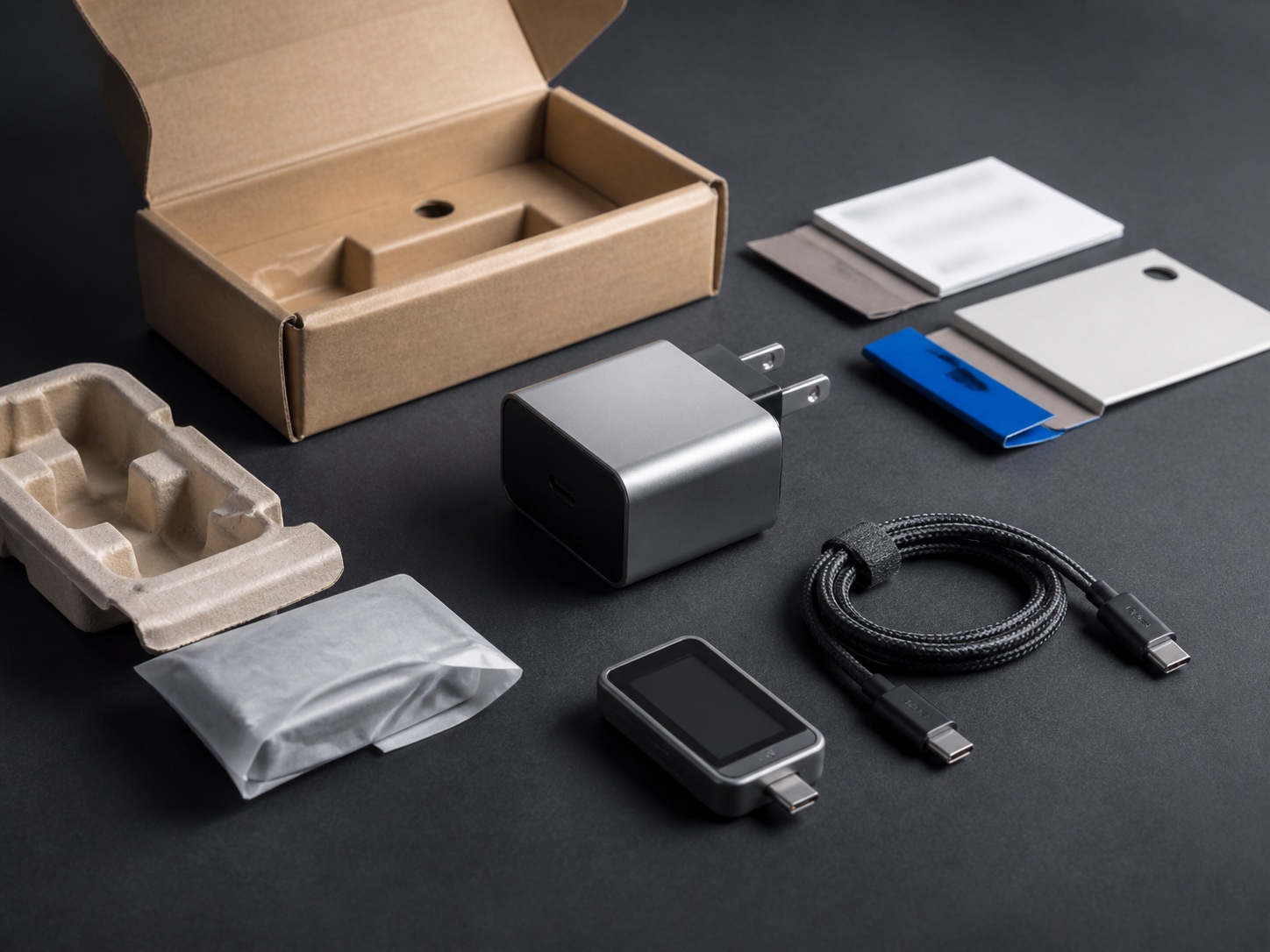
How to Choose a GaN Charger
Wrong port sharing leaves a laptop short of its documented input. Match the phone, the port split, and the cable before you trust a GaN label.
Read article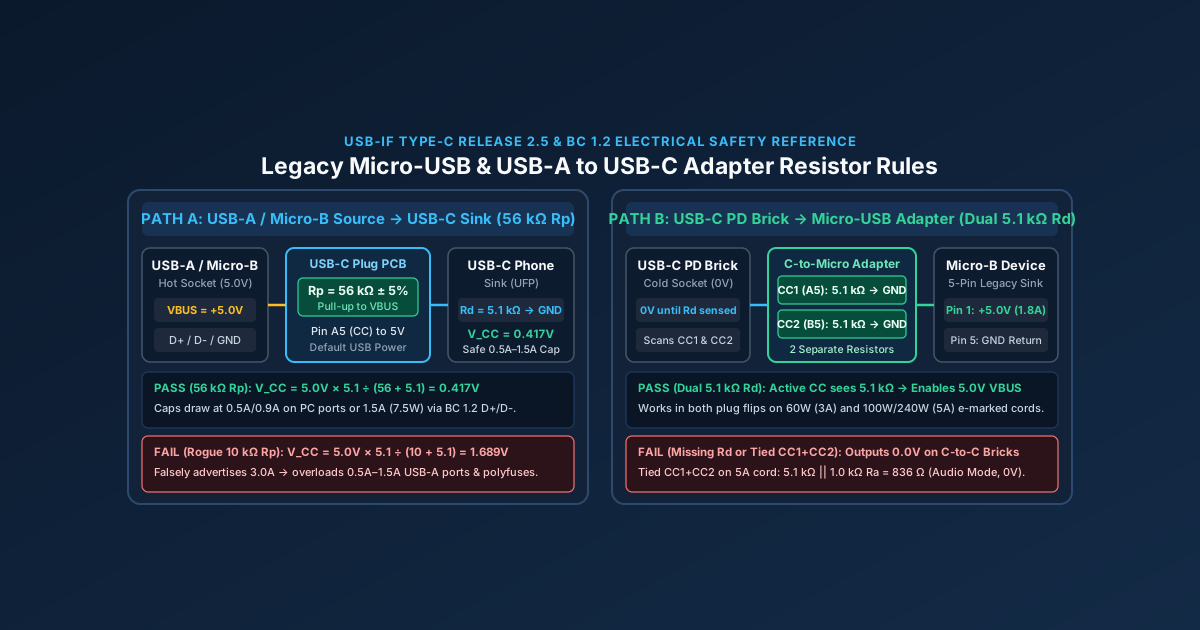
Micro-USB Charger & USB-A to USB-C Adapter Safety: 56kΩ Rp & 5.1kΩ Rd Guide
A Micro-USB to USB-C adapter without dual 5.1kΩ Rd resistors fails to charge on USB-C PD bricks, while a wrong 10kΩ Rp resistor can damage legacy USB-A ports.
Read article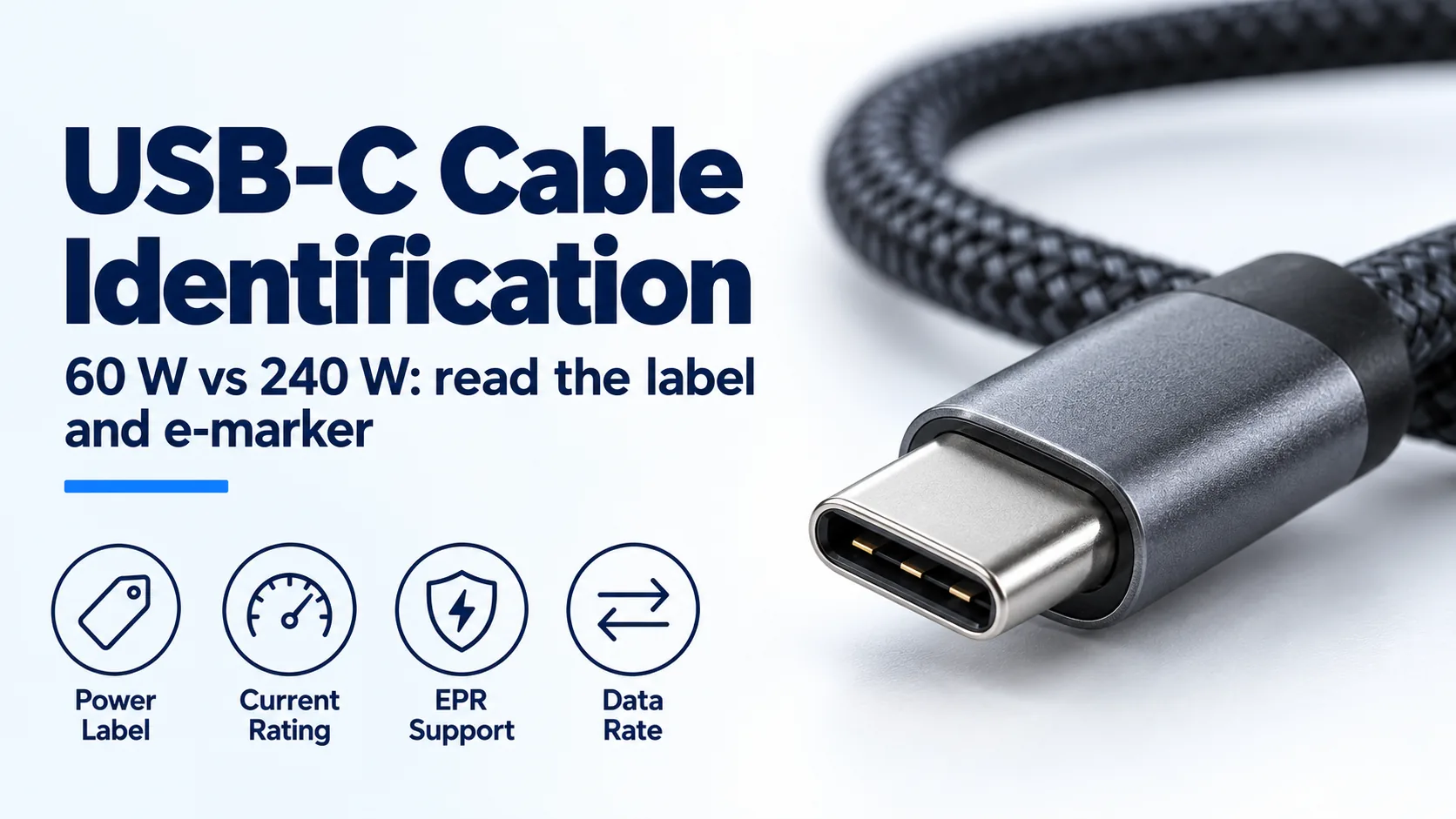
USB-C Charger Cable: 60W vs 240W E-Marker Identification
Identify a USB-C charger's cable by its 60 W or 240 W label, current capability and e-marker; distinguish older 100 W cables from EPR.
Read article