Micro-USB Charger & USB-A to USB-C Adapter Safety: 56kΩ Rp & 5.1kΩ Rd Guide
A Micro-USB to USB-C adapter without dual 5.1kΩ Rd resistors fails to charge on USB-C PD bricks, while a wrong 10kΩ Rp resistor can damage legacy USB-A ports.
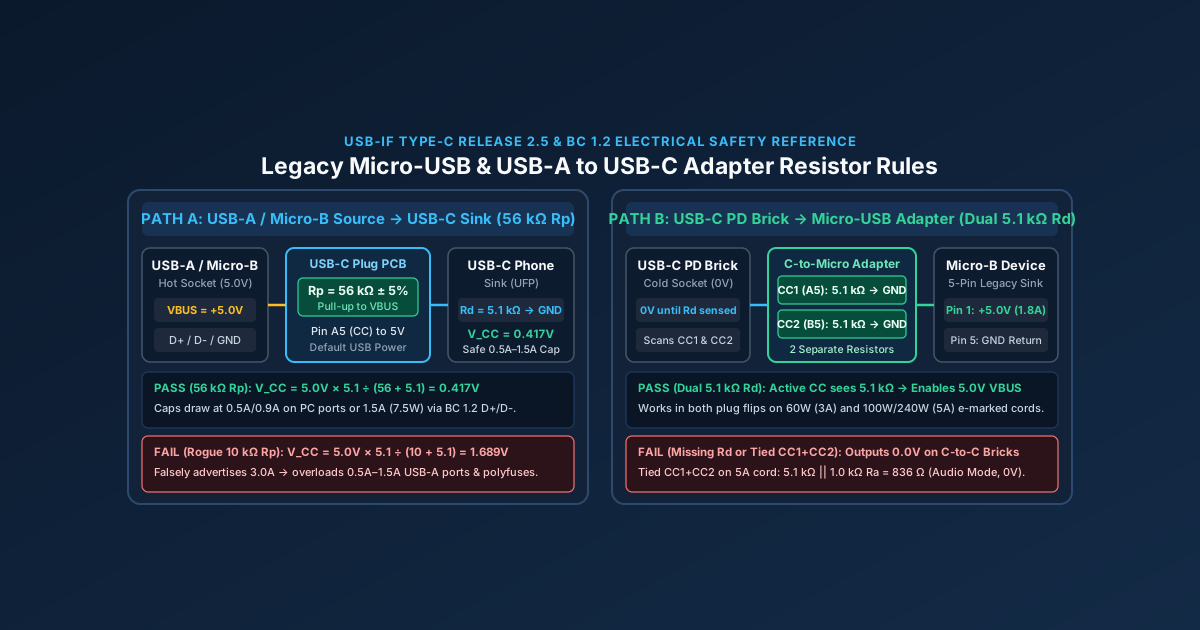
Plugging an older Micro-USB peripheral into a modern USB-C wall brick through a passive adapter frequently produces zero charging current, while pairing a USB-C phone with an unverified USB-A adapter can overload a legacy host port. Both failures trace directly to the Configuration Channel (CC) termination resistors inside the connector shell.
A legacy 5V Micro-USB charger (type b charger) outputs power continuously as an always-hot 5V source (2.5W to 10W), whereas a USB-C Power Delivery charger stays at 0V (Cold Socket) until it detects a 5.1 kΩ pull-down resistor (Rd) to ground on CC1 or CC2. Conversely, any USB-A to USB-C cable or adapter requires a 56 kΩ pull-up resistor (Rp to VBUS) so the device does not overdraw 3.0A from a legacy 0.5A to 1.5A port.
Use this electrical reference alongside the USB-C connector identification guide, the USB-C Power Delivery specification guide, and our full Charging & Power Guides collection in the Charging category archive.
Scroll horizontally to see all columns.
| Parameter / Scenario | Legacy Micro-USB (Type-B) Charger |
USB-A to USB-C Cable / Adapter (Rp) |
Micro-USB to USB-C Female Adapter (Rd) |
|---|---|---|---|
| Default VBUS socket state | Always-hot +5.0V (4.75V to 5.25V) on Pin 1 |
Always-hot +5.0V supplied from USB-A source |
Cold Socket (0.0V vSafe0V) until Rd is detected |
| Required CC pin termination | No CC wire in 5-pin Micro-B cord |
Rp = 56 kΩ ± 5% pull-up from CC (Pin A5) to VBUS |
Two separate Rd = 5.1 kΩ ± 10% pull-downs (CC1 and CC2 to GND) |
Target CC detection voltage (V_CC) |
None (uses D+ and D- data pins for BC 1.2) |
V_CC = 0.417V across sink’s 5.1 kΩ (0.25V to 0.61V window) |
0.417V (at 56 kΩ), 0.941V (at 22 kΩ), or 1.689V (at 10 kΩ) |
| Maximum continuous current & wattage | 1.8A pin rating (7.5W BC 1.2 DCP; 10W at 5V / 2.0A) |
0.5A (2.5W) USB 2.0, 0.9A (4.5W) USB 3.x, or 1.5A (7.5W) BC 1.2 |
0.5A to 1.8A at 5.0V (2.5W to 9.0W), governed by Micro-B sink |
| Primary resistor failure mode | Floating D+/D- in 2-wire cord caps draw at 100 mA to 500 mA |
Wrong 10 kΩ Rp (V_CC = 1.689V) causes 3.0A draw and port burnout |
Missing Rd yields 0V on all C-to-C bricks; 1 shared Rd fails on 5A cords |
Digital multimeter (DMM) pass check |
< 200 Ω between Pin 2 (D-) and Pin 3 (D+) on DCP brick |
53.2 kΩ to 58.8 kΩ between VBUS and CC (Pin A5) |
4.6 kΩ to 5.6 kΩ (CC1 to GND and CC2 to GND); 10.2 kΩ (CC1 to CC2) |
How a legacy Micro-USB charger (Type-B) regulates 5V power
Before USB Type-C unified host and peripheral plugs, the USB-IF Micro-USB Cables and Connectors Specification Revision 1.01 established the 5-pin Micro-USB Type-B connector as the standard charging and data interface for portable electronics. People searching for a type b charger often encounter three distinct legacy B-series geometries: the square 4-pin USB Standard-B plug used on desktop printers and audio interfaces, the trapezoidal 5-pin Mini-USB Type-B plug found on 2000s cameras and DualShock 3 controllers, and the low-profile 5-pin Micro-USB Type-B plug used on e-readers, Bluetooth speakers, action cameras, bicycle lights, and DualShock 4 gamepads.
Micro-USB Type-B solved the primary mechanical weakness of Mini-USB by relocating the retention springs from the device receptacle onto the replaceable cable plug. While Standard-B and Mini-B receptacles wear out after 1,500 to 5,000 insertion cycles, a Micro-USB Type-B plug uses dual stainless-steel shell latches rated for 10,000 mating cycles, matching the mechanical lifecycle rating of USB Type-C. Electrically, the 5-pin Micro-B contact array assigns distinct current ceilings to power versus signal pins:
Pin 1(VBUS, Red wire): Supplies+5.0VDC (4.75Vto5.25V) and is rated for a maximum continuous current of1.8Aat a contact temperature rise of30°Cor less.Pin 2(D-, White wire): Carries the USB 2.0 differential data minus signal and is rated for0.5Amaximum.Pin 3(D+, Green wire): Carries the USB 2.0 differential data plus signal and is rated for0.5Amaximum.Pin 4(ID, Mode Identification): Determines USB On-The-Go (OTG) role assignment. GroundingPin 4toGNDacross less than10 Ωinside a Micro-A plug or OTG host adapter commands the mobile device to act as a host and source5VonVBUS. LeavingPin 4floating (> 100 kΩ) inside a standard Micro-B charging cable keeps the device in peripheral sink mode.Pin 5(GND, Black wire): Provides the ground return path, rated for1.8Acontinuous current and staggered slightly longer than the signal pins soVBUSandGNDmate first and break last.
Because a 5-pin Micro-USB charger lacks a dedicated Configuration Channel wire, its Pin 1 (VBUS) rail operates as an always-hot 5.0V socket. The wall adapter applies 5.0V across VBUS and GND continuously, whether or not a peripheral is attached. To prevent an attached battery charger IC from overloading a weak computer port, the sink inspects the DC impedance and voltage bias across Pin 3 (D+) and Pin 2 (D-) under the USB Battery Charging Specification Revision 1.2 (BC 1.2) and Texas Instruments application note SLVA618:
- Standard Downstream Port (
SDP,5V × 0.5A = 2.5Wfor USB 2.0 or5V × 0.9A = 4.5Wfor USB 3.x): A computer host pulls bothD+andD-toGNDthrough internal15 kΩresistors. An unenumerated device must draw less than100 mAuntil USB data enumeration completes, after which it can draw up to500 mA(2.5W). If you connect a Micro-USB device using a 2-wire “power-only” cord that omits theD+andD-conductors, a BC 1.2 compliant power management IC (PMIC) sees open data pins, assumes an unconfigured SDP host, and throttles charging to100 mAto500 mA. - Dedicated Charging Port (
DCP,5V × 1.5A = 7.5W): Inside a compliant universal Micro-USB wall charger,Pin 3 (D+)andPin 2 (D-)are shorted directly together across a resistance below200 Ω(R_DCP_DAT ≤ 200 Ω) with no connection toVBUSorGND. During primary detection, the sink’s charger IC sources a0.6Vtest voltage (V_DP_SRC) ontoD+. When it reads that0.6Vsignal Returning onD-through the< 200 Ωinternal bridge, the device bypasses USB data enumeration and draws up to1.5Aat5V(7.5W). - Charging Downstream Port (
CDP,5V × 1.5A = 7.5Wwith simultaneous High-Speed data): Found on high-output laptop ports and powered hubs, a CDP performs a sequential0.6Vhandshake onD+andD-before releasing the lines for480 Mbpsdata transfer while allowing1.5Acurrent draw. - Legacy Resistor-Divider Signatures (
5Wto12W): Prior to USB-C, Apple USB-A power adapters biasedD+andD-to fixed DC voltages using resistor networks connected to5V VBUS(D+ = 2.0VandD- = 2.0Vfor5V / 1.0A = 5W;D+ = 2.0VandD- = 2.7Vfor5V / 2.1A = 10.5W;D+ = 2.7VandD- = 2.7Vfor5V / 2.4A = 12W). Because Micro-USB Type-B power pins carry a1.8Acontinuous rating (occasionally pushed to2.0Aon heavy20 AWGcaptive cords), non-Quick-Charge 5V Micro-USB charging reaches its ceiling between7.5W(5V × 1.5A) and10W(5V × 2.0A).
Why IR voltage drop across thin 28 AWG Micro-USB cords throttles 5V charging
Even when a legacy micro usb charger advertises 5.0V at 2.0A (10W) and shorts D+ to D- across less than 200 Ω, the physical resistance of the cable’s VBUS and GND wires often prevents the device from reaching 1.5A. Unlike USB Power Delivery, which raises bus voltage to 9V, 15V, or 20V to keep cable current low, a 5V Micro-USB circuit has only a 500 mV margin between the nominal 5.0V charger output and the 4.40V to 4.50V minimum input voltage threshold (V_INDPM, Input Dynamic Power Management) of a typical lithium-ion battery charger IC.
By Ohm’s law (V_drop = I × R_loop), a bargain 2-meter Micro-USB cable wound with thin 28 AWG copper power conductors (~213 mΩ per meter on VBUS plus ~213 mΩ per meter on GND, plus 60 mΩ across the mated Micro-B and USB-A contacts) presents a total round-trip loop resistance (R_loop) of roughly 0.91 Ω:
V_sink = V_source - (I_charge × R_loop) = 5.00V - (1.5A × 0.91 Ω) = 5.00V - 1.365V = 3.635VLong before the device’s input port can sag to 3.635V, its internal charger IC hits its 4.50V V_INDPM floor and throttles input current down to 0.55A (5.00V - 4.50V = 0.50V ÷ 0.91 Ω = 0.55A, or 2.75W). By contrast, a short 1.0 m Micro-USB cord built with 22 AWG or 20 AWG power conductors (R_loop ≈ 0.16 Ω) loses only 0.24V at 1.5A (V_sink = 4.76V), allowing the peripheral to sustain full 7.5W BC 1.2 charging speed. When adding a passive Micro-USB to USB-C adapter onto an existing cable run, each extra mated connector interface adds another 30 mΩ to 50 mΩ of contact resistance, making low-gauge primary cables essential.
Why a Micro-USB to USB-C adapter stops charging on USB-C PD chargers (5.1 kΩ Rd)
When households retire their last 5V Micro-USB bricks and attempt to charge older Micro-USB accessories (or low-cost USB-C gadgets such as rechargeable book lights, mini desk fans, bicycle tail lights, and wireless lavalier microphones) from a modern USB-C Power Delivery charger, they frequently run into the micro usb to usb c adapter not charging fault. The accessory charges normally when plugged into an old USB-A port via a USB-A to USB-C cable, yet remains completely unresponsive (0.0V on VBUS, dark status LED) when plugged into any USB-C to USB-C charger or power bank.
As detailed in Section 4.5.1.2 of the USB Type-C Cable and Connector Specification Release 2.5 and Texas Instruments USB Type-C protocol guide SLVA842, this behavior is a deliberate safety mechanism of the USB-C architecture. Unlike a legacy USB-A or Micro-B charger whose 5V rail is permanently energized, every USB-C Downstream Facing Port (DFP, such as a USB-PD wall adapter, laptop port, or bidirectional power bank) operates as a Cold Socket. Because a USB-C cable can connect two hosts together, a USB-C charger keeps its high-side VBUS load switch open (vSafe0V, defined as 0.0V to 0.8V) until it detects a valid sink signature on its Configuration Channel (CC1 or CC2).
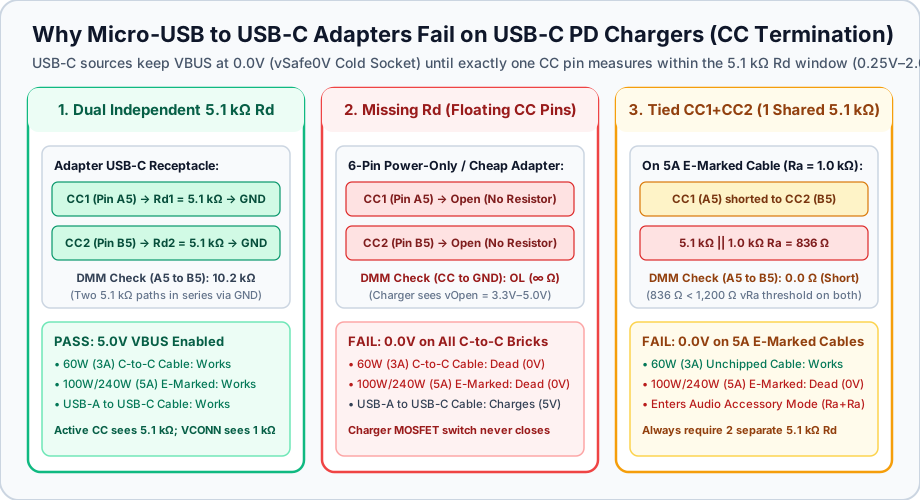
USB-C Cold Socket detection across three adapter wiring topologies: dual independent 5.1 kΩ Rd resistors (compliant), floating CC pins (open circuit), and tied CC1+CC2 pins sharing one 5.1 kΩ resistor.
To instruct a USB-C charger to close its internal MOSFET switch and supply 5.0V (vSafe5V), a USB-C sink receptacle (or a Micro-USB male to USB-C female adapter) must terminate both Configuration Channel pins to ground through two separate 5.1 kΩ ± 10% (or ± 20%) pull-down resistors (Rd = 5.1 kΩ):
Rd1 = 5.1 kΩconnected fromCC1(Pin A5) toGNDRd2 = 5.1 kΩconnected fromCC2(Pin B5) toGND
Why are two separate 5.1 kΩ resistors required when only one CC wire runs from end to end inside a standard USB-C to USB-C cord? Because the USB-C plug is reversible. In the standard orientation, the cable’s single CC wire mates with CC1 (Pin A5) in the receptacle; flipped 180 degrees, that same wire mates with CC2 (Pin B5). When the charger’s internal pull-up resistor (Rp or current source Ip) connects to the sink’s 5.1 kΩ Rd resistor on whichever CC pin matches the plug orientation, V_CC drops into the valid vRd attachment window (0.25V to 2.04V) for the 100 ms to 200 ms debounce timer (tCCDebounce). Only then does the USB-C charger energize VBUS to 5.0V.
Two manufacturing shortcuts in inexpensive Micro-USB to USB-C adapters and budget 6-pin USB-C devices break this handshake:
Defect 1: Zero Rd resistors (CC1 and CC2 left floating)
Many bare-bones USB-C female to Micro-USB male adapters and low-cost rechargeable accessories solder only VBUS and GND from the USB-C receptacle to the load, leaving CC1 (Pin A5) and CC2 (Pin B5) unconnected. When you plug a USB-A to USB-C cable into that adapter, the device charges because the USB-A host port has no cold-socket switch and forces 5.0V down VBUS unconditionally. When you plug a USB-C to USB-C cable from a USB-C Power Delivery charger into the exact same adapter, the charger sees an open circuit (vOpen, 3.3V to 5.0V) on both CC1 and CC2, concludes nothing is attached, and holds VBUS at 0.0V.
Defect 2: One shared 5.1 kΩ resistor across shorted CC1 and CC2 pins
A second, subtler failure occurs when an adapter manufacturer shorts CC1 (Pin A5) and CC2 (Pin B5) together on the PCB and routes both pins through a single shared 5.1 kΩ resistor to GND to save a fraction of a cent. This design defect (which also affected the initial 2019 hardware revision of the Raspberry Pi 4 Model B) exhibits a specific symptom: the adapter charges normally with a basic 60W (3A) USB-C to USB-C cable, yet delivers 0.0V when plugged into any 100W or 240W (5A) electronically marked (e-marked) USB-C cable or Apple MacBook charging lead.
As documented in Texas Instruments white paper SLLY017 and our 60W vs 240W e-marker cable identification guide, a passive 3A (60W) USB-C cable contains no internal chip and leaves the unattached CC pin open (VCONN unconnected). On that passive cable, shorting CC1 and CC2 inside the adapter still presents a single 5.1 kΩ resistance to GND, so 5.0V turns on.
However, every 5A (100W SPR or 240W EPR) USB-C cable and full-featured USB4/Thunderbolt cord contains an internal e-marker transponder IC powered by the second CC pin (VCONN). Inside the cable plug, that e-marker circuit terminates the VCONN pin to GND through an Ra pull-down resistor of 800 Ω to 1,200 Ω (1.0 kΩ nominal). When the adapter ties CC1 and CC2 together, the adapter’s shared 5.1 kΩ Rd resistor and the cable’s 1.0 kΩ Ra resistor are wired directly in parallel across both CC1 and CC2:
R_eq = (Rd × Ra) ÷ (Rd + Ra) = (5.1 kΩ × 1.0 kΩ) ÷ (5.1 kΩ + 1.0 kΩ) = 5.1 ÷ 6.1 = 0.836 kΩ (836 Ω)Because 836 Ω falls below the 1,200 Ω maximum threshold for Ra (vRa < 0.80V) on both CC1 and CC2 simultaneously, the USB-C charger detects Ra + Ra across the two pins. Under Table 4-12 of the USB Type-C Specification, Ra on both CC1 and CC2 is the hardware signature for Audio Adapter Accessory Mode (an unpowered analog 3.5 mm headphone dongle). The charger enters analog audio mode and keeps VBUS switched off at 0.0V. Installing two separate 5.1 kΩ resistors (Rd1 on A5 and Rd2 on B5) isolates the active CC line (5.1 kΩ) from the VCONN line (1.0 kΩ), ensuring 5.0V turns on with every passive and e-marked USB-C cable.
How the 56 kΩ pull-up resistor (Rp) protects legacy USB-A ports from 3A burnout
While 5.1 kΩ Rd pull-down resistors govern sinks (UFP), pull-up resistors (Rp) govern sources (DFP) and legacy host cables. As explained in USB-IF Type-C Specification Section 4.5.3.2.2, Texas Instruments SLLY017, and Microchip Technology application note AN1953, a USB-C sink determines how much 5.0V current it may draw before any digital USB Power Delivery (BMC) negotiation by measuring the DC voltage V_CC developed across its internal 5.1 kΩ Rd pull-down resistor.
When a source (or a legacy USB-A to USB-C cable plug) connects a pull-up resistor Rp from a 5.0V (4.75V to 5.5V) supply rail to the CC pin, Rp and the sink’s Rd = 5.1 kΩ form a series voltage divider:
V_CC = V_pullup × Rd ÷ (Rp + Rd)Tables 4-24 and 4-25 of the USB Type-C Specification define three Rp pull-up values to 5.0V (alongside equivalent 80 µA, 180 µA, and 330 µA constant-current sources):
Scroll horizontally to see all columns.
Source Pull-Up Resistor (Rp to 5.0V) |
Equivalent Current Source (Ip) |
Advertised 5V Current Tier | Worked Divider Math (V_CC = 5.0V × 5.1 kΩ ÷ [Rp + 5.1 kΩ]) |
Valid USB-IF Sink Detection Window (vRd) |
|---|---|---|---|---|
Rp = 56 kΩ ± 5% (53.2 kΩ to 58.8 kΩ) |
80 µA ± 20% |
Default USB Power (0.5A USB 2.0 / 0.9A USB 3.x / 1.5A via BC 1.2) |
25.5 ÷ 61.1 = 0.417V |
0.25V to 0.61V (vRd-USB) |
Rp = 22 kΩ ± 5% (20.9 kΩ to 23.1 kΩ) |
180 µA ± 8% |
USB Type-C 1.5A @ 5V (7.5W native) |
25.5 ÷ 27.1 = 0.941V |
0.66V to 1.16V (vRd-1.5) |
Rp = 10 kΩ ± 5% (9.5 kΩ to 10.5 kΩ) |
330 µA ± 8% |
USB Type-C 3.0A @ 5V (15.0W native) |
25.5 ÷ 15.1 = 1.689V |
1.23V to 2.04V (vRd-3.0) |
In a native USB-C wall charger, the charger’s controller IC selects 22 kΩ (1.5A) or 10 kΩ (3.0A) because the charger knows its own transformer rating. In a USB-A to USB-C cable or a Micro-USB female to USB-C male adapter, however, no CC wire exists in the 4-wire legacy cord (VBUS, D-, D+, GND). Instead, the Rp resistor is soldered directly onto the tiny paddle card inside the overmolded USB-C male plug, bridged between the plug’s VBUS pad (+5.0V) and its single CC contact (Pin A5).
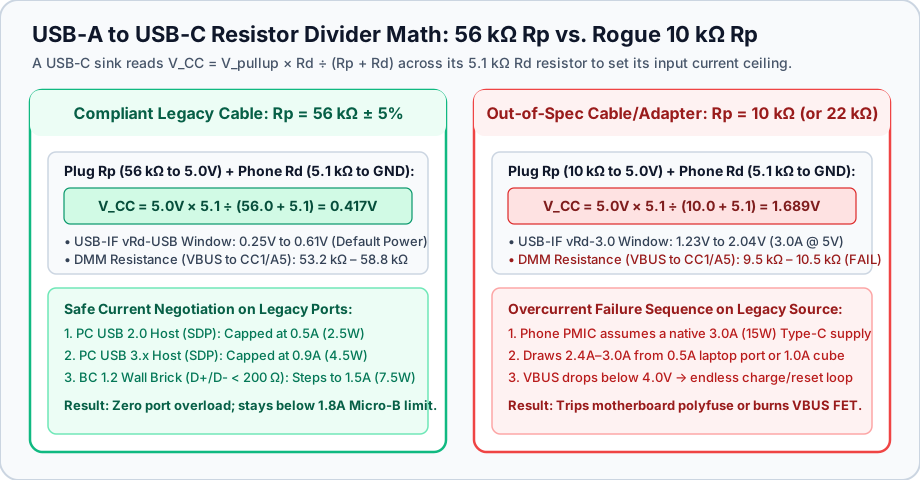
Voltage-divider comparison inside a USB-A to USB-C cable plug: Rp = 56 kΩ (V_CC = 0.417V, compliant Default USB Power) versus an out-of-spec Rp = 10 kΩ (V_CC = 1.689V, false 3.0A advertisement).
Because the cable cannot know whether you have plugged its USB-A end into a 2.4A wall adapter, a 500 mA (2.5W) notebook USB 2.0 port, a car infotainment socket, or a 900 mA monitor hub, Section 3.5 and Section 4.5.3.2.2 of the USB Type-C Specification mandate that every USB-A to USB-C cable and every Micro-USB female to USB-C male adapter install Rp = 56 kΩ ± 5%.
When an uncertified cable factory installs a 10 kΩ resistor (or 22 kΩ resistor) between VBUS and CC inside a USB-A to USB-C cable or adapter, the connected smartphone, tablet, or power bank measures V_CC = 1.689V across its 5.1 kΩ Rd resistor. As detailed in Microchip AN1953 and Google Pixel charging support documentation, the phone’s power management IC interprets 1.689V as an explicit guarantee from a native USB-C supply that 3.0A (15W) is continuously available on VBUS:
- The phone immediately ramps its input buck converter toward
2.4Ato3.0A, completely ignoring the500 mAUSB 2.0 or900 mAUSB 3.x limit of the upstream USB-A port. - On a Micro-USB female to USB-C male adapter attached to an older Micro-USB cord, drawing
3.0Aexceeds the1.8Acontinuous thermal ceiling of Micro-USBPin 1 (VBUS)andPin 5 (GND)by67%, overheating the miniature spring contacts. - On a laptop motherboard or desktop front panel, the
3.0Aload either trips the port’s resettable PTC polyfuse, collapsesVBUSbelow4.0Vin a continuous connect/disconnect brownout loop, or permanently damages the high-side USB power distribution switch. - On an unfused
5V / 1.0A(5W) legacy USB-A wall cube, sustained2.4Ato3.0Aoverdraw overheats the primary flyback transformer.
Does a compliant 56 kΩ resistor restrict wall charging to 500 mA (2.5W)?
A common misconception is that a compliant 56 kΩ USB-A to USB-C cable limits charging to 500 mA (2.5W) even on a 2.0A wall brick. Section 4.5.2.3 of the USB Type-C Specification explicitly prevents that bottleneck by defining precedence between Type-C CC advertisement and legacy BC 1.2 charging detection. When a USB-C sink reads V_CC = 0.417V (Rp = 56 kΩ), it enforces the 500 mA / 900 mA ceiling only when attached to a data host (SDP). At the same time, the sink tests D+ and D- for a BC 1.2 Dedicated Charging Port (< 200 Ω short between D+ and D-) or legacy 2.0V / 2.7V divider bias. If present, the device steps its current limit up to 1.5A at 5V (7.5W).
As confirmed in Apple Support HT213839 (105099) and Apple Support 120619 on iOS Slow Charger notifications, connecting an iPhone 15 or later through a compliant USB-A to USB-C cable or legacy USB-A brick caps charging at 7.5W (5V × 1.5A), which triggers the amber “Slow Charger” indicator in iOS Settings while keeping the legacy USB-A source within safe thermal limits. To reach 20W to 30W fast charging, review the iPhone USB-C charger guide and pair a USB-PD wall adapter with a direct USB-C to USB-C cord.
USB-IF permitted vs. forbidden legacy USB-C adapter topologies
Not every physical combination of USB-C, USB-A, and Micro-USB connectors can be made electrically safe with passive resistors. Section 2.2 and Section 3.5 of the USB Type-C Specification Release 2.5 draw a strict architectural boundary between defined legacy adapters (which always put a USB-C Male Plug on the adapter body) and forbidden legacy adapters (which place a USB-C Female Receptacle on a legacy plug).
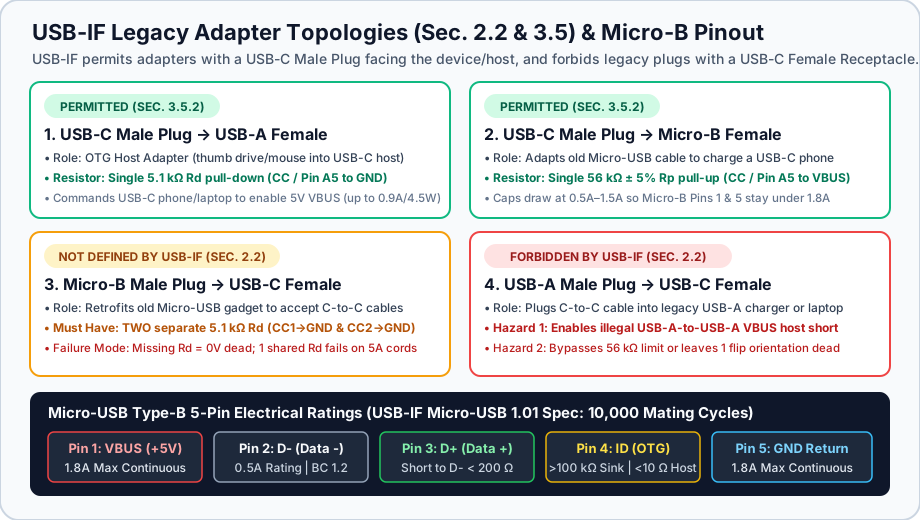
USB-IF Release 2.5 Section 2.2 and Section 3.5 adapter matrix alongside the 5-pin Micro-USB Type-B contact ratings (1.8A maximum on Pin 1 VBUS and Pin 5 GND).
Scroll horizontally to see all columns.
| Adapter Topology (Plug → Receptacle) | USB-IF Release 2.5 Status | Mandatory Internal Resistor Network | Primary Electrical Risk When Non-Compliant | Recommended Alternative |
|---|---|---|---|---|
1. USB-C Male Plug → USB-A Female Receptacle (OTG Host Adapter) |
Permitted & Defined (Section 3.5.2; 150 mm max length) |
Single 5.1 kΩ ± 10% Rd pull-down from USB-C plug CC (Pin A5) to GND |
Missing Rd leaves the host phone or laptop at 0V, so thumb drives and keyboards fail to power on |
Direct USB-C thumb drive or certified USB-C hub |
| 2. USB-C Male Plug → Micro-USB Type-B Female Receptacle | Permitted & Defined (Section 3.5.2; USB 2.0 only) | Single 56 kΩ ± 5% Rp pull-up from USB-C plug CC (Pin A5) to VBUS |
Incorrect 10 kΩ Rp causes a USB-C phone to pull 3.0A through 1.8A-rated Micro-B pins |
Direct USB-C to USB-C cable or certified USB-A to USB-C cable |
| 3. Micro-USB Type-B Male Plug → USB-C Female Receptacle | Not Defined by USB-IF (Section 2.2 legacy receptacle rule) | Two separate 5.1 kΩ ± 10% Rd pull-downs (CC1 / A5 to GND and CC2 / B5 to GND) |
Missing Rd causes 0V on all USB-C PD chargers; 1 shared Rd causes 0V on 5A e-marked cords |
Single-piece USB-C Male to Micro-USB Male cable (5.1 kΩ Rd inside C plug) |
| 4. USB-A Male Plug → USB-C Female Receptacle | Explicitly Forbidden by USB-IF (Section 2.2 safety prohibition) | Requires 56 kΩ Rp to VBUS on both CC1 and CC2 plus an active 5V eFuse / current limiter |
Allows illegal USB-A to USB-A VBUS host collision; wrong 10 kΩ Rp burns out USB-A ports; 1-sided Rp fails in 50% of plug flips |
Dedicated USB-A to USB-C cable or native USB-C wall/car charger |
Why USB-A Male to USB-C Female adapters (Topology 4) are hazardous
Section 2.2 of the USB Type-C Specification states explicitly: “USB Type-C receptacle to USB legacy adapters are explicitly not defined or allowed. Such adapters would allow many invalid and potentially unsafe cable connections to be constructed by users.” The USB-A Male to USB-C Female dongle (often bundled with inexpensive headsets or sold to plug a USB-C to USB-C cord into an older computer or car port) combines three distinct failure modes:
- Direct
5VHost-to-HostVBUSShort Circuit: If a user plugs a standard USB-A to USB-C cable into a USB-A Male to USB-C Female adapter, the assembly becomes a USB-A Male to USB-A Male cable with hardwired5.0V VBUSon both ends. Connecting that assembly between two computers, a computer and a powered hub, or a laptop and a portable power bank ties two independent5Vvoltage regulators directly together with no Cold-Socket negotiation, back-feeding current into whichever supply has the slightly lower voltage regulation setpoint. - Bypassing Cable E-Marker and
56 kΩProtections: A USB-C to USB-C cable contains no56 kΩRppull-up resistor because it expects the USB-C source receptacle to manageRpandVBUS. If a passive USB-A Male to USB-C Female adapter omitsRponCC1orCC2, one or both plug orientations fail (0Vor unenumerated draw). Conversely, if the adapter uses10 kΩRpresistors to advertise “fast charging,” any connected USB-C phone pulls up to3.0Afrom the host USB-A port. - No USB Power Delivery Overvoltage Protection on
VBUS: Passive adapters lack a high-side load switch or over-current protection IC (OCP), exposing legacy5Vhost rails directly to downstream transients.
Safe vs. unsafe use of Micro-USB Male to USB-C Female adapters (Topology 3)
While Section 2.2 also excludes Micro-USB Male to USB-C Female adapters from formal USB-IF certification, these compact dongles are widely used to charge legacy 5V Micro-USB peripherals (such as Kindle e-readers, DualShock 4 controllers, Garmin cycling computers, and portable headlamps) from a single travel USB-C cable. Because the Micro-USB plug mates only with a peripheral sink receptacle (Pin 4 ID floating), it cannot create a host-to-host VBUS collision.
To work safely and reliably on modern USB-C PD chargers, a Micro-USB Male to USB-C Female adapter (or a 6-pin USB-C replacement port soldered into a legacy housing) must satisfy three electrical conditions:
- Dual independent
5.1 kΩRdresistors:Pin A5 (CC1)andPin B5 (CC2)inside the USB-C female receptacle must each have their own dedicated5.1 kΩresistor toGNDso the adapter works in both plug orientations across both60W (3A)passive cables and100W / 240W (5A)e-marked cables. - No USB-PD decoy / trigger IC inside the adapter: A legacy Micro-USB device’s internal linear or buck charger (
TP4056,BQ24074, or equivalent PMIC) is rated strictly for5.0Vinput (6.0Vto6.5Vabsolute maximum breakdown voltage). Never connect a9V,12V,15V, or20VUSB-PD trigger adapter to a Micro-USB port; doing so destroys the device’s charging regulator immediately. A pure5.1 kΩRdtermination with no BMC PD communication guarantees that every compliant USB-C PD charger outputs strictly5.0V(vSafe5V). - Continuous current under
1.8A: Because the Micro-USB Type-B plug contacts (Pin 1andPin 5) are rated for1.8Acontinuous current, use these adapters only on legacy devices that regulate their own 5V input current between0.5Aand1.5A.
Multimeter verification & safe USB-C retrofit checklist for legacy Micro-USB devices
Before putting an unbranded USB-A to USB-C cable, a Micro-USB to USB-C adapter, or a 6-pin USB-C breakout board into service, you can verify its internal Rp and Rd resistor network in under 60 seconds using a standard Digital Multimeter (DMM) and a $3 USB-C Male or Female Pinout Breakout Board (which breaks out VBUS, GND, CC1 / A5, CC2 / B5, D+, and D- onto labeled test pads). Always perform resistance checks with the cable or adapter completely disconnected from all power sources and devices.
Scroll horizontally to see all columns.
| Test Target | Breakout & DMM Setup (Ω Mode, Unpowered) |
Probes (Red ↔ Black) |
Compliant Reading (PASS) |
Fault Reading (FAIL / Retire) |
|---|---|---|---|---|
USB-A Male to USB-C Male cable (or Micro-B Female → USB-C Male adapter) |
Plug USB-C Male end into USB-C Female Breakout Board; leave USB-A / Micro-B end unplugged in air | VBUS ↔ CC1 (Pin A5) (flip plug if reading OL on CC2) |
53.2 kΩ to 58.8 kΩ (56 kΩ ± 5% Default USB Power) |
9.5 kΩ to 10.5 kΩ (10 kΩ 3.0A overload hazard) or 20.9 kΩ to 23.1 kΩ (22 kΩ 1.5A fault) |
| USB-A Male to USB-C Male cable (sanity check for internal short) | Same unpowered setup on USB-C Female Breakout Board | CC1 (Pin A5) ↔ GND |
OL (Open Loop / > 1 MΩ) |
~5.1 kΩ (Miswired as an OTG host cable; will not charge a phone) |
| Micro-USB Male to USB-C Female adapter (or 6-pin USB-C sink PCB, Check 1) | Plug USB-C Male Breakout Board into adapter’s USB-C Female port; leave Micro-B end unplugged | CC1 (Pin A5) ↔ GND and CC2 (Pin B5) ↔ GND |
4.6 kΩ to 5.6 kΩ on BOTH CC1 and CC2 (5.1 kΩ ± 10%) |
OL (∞ Ω) on either pin (missing Rd; will output 0V on USB-C PD chargers) |
| Micro-USB Male to USB-C Female adapter (or 6-pin USB-C sink PCB, Check 2: 5A E-Marker Test) | Keep USB-C Male Breakout Board inserted in adapter’s USB-C Female port | CC1 (Pin A5) ↔ CC2 (Pin B5) directly |
9.2 kΩ to 11.2 kΩ (~10.2 kΩ) (Rd1 + Rd2 in series via GND) |
0.0 Ω to 1.0 Ω (Short) (CC1 tied to CC2 on 1 resistor; fails at 836 Ω on 5A cords) |
USB-C Male to Micro-USB Male cable (Type-C Host to Legacy Micro-B Device) |
Plug USB-C Male end into USB-C Female Breakout Board; leave Micro-B end unplugged | CC1 (Pin A5) ↔ GND |
4.6 kΩ to 5.6 kΩ (5.1 kΩ Rd inside USB-C plug) |
OL (∞ Ω) (Will not activate 5V VBUS on a USB-C PD brick or laptop port) |
Legacy 5V Micro-USB charger (type b charger DCP check) |
Unplug wall brick from AC mains for 5 minutes so VBUS capacitor discharges to 0.0V |
Pin 2 (D-) ↔ Pin 3 (D+) on Micro-B plug |
0.1 Ω to 200 Ω (BC 1.2 DCP < 200 Ω data bridge) |
OL (∞ Ω) (2-wire cord or non-BC-1.2 brick; many devices cap draw at 500 mA) |
Best-practice replacement: Single-piece USB-C Male to Micro-USB Male cable
If you want to charge a legacy Micro-USB device from a modern GaN USB-C wall charger, a USB-C car charger, or a laptop USB-C port without worrying about dual-resistor adapter defects or 5A e-marker incompatibilities, use a single-piece USB 2.0 Type-C Male to Micro-B Male cable (defined in Section 3.5.1 and Table 3-2 of the USB Type-C Specification).
Because the USB-C end of that single-piece cable is a Male Plug rather than a Female Receptacle, the cable only needs a single 5.1 kΩ Rd pull-down resistor wired from Pin A5 (CC) to GND inside the USB-C plug shell, and the cord never mates with a second e-marked cable. When plugged into any USB-C PD charger in either orientation, that single 5.1 kΩ Rd resistor cleanly enables 5.0V VBUS and routes up to 1.5A (7.5W) directly to the Micro-USB peripheral. If a USB-C charger still fails to output power after verifying cable termination, step through the isolation checks in our USB-C charger troubleshooting guide.
Internal PCB retrofit guide: converting a Micro-USB device to a 6-pin or 16-pin USB-C receptacle
When a Micro-USB Type-B receptacle breaks off the circuit board inside a headlamp, wireless mouse, e-reader, or cycling computer, replacing the damaged port with a modern USB-C female breakout PCB eliminates external dongles altogether. Hardware modders choose between two surface-mount USB-C receptacle footprints defined in Section 2.1 of the USB Type-C Specification:
- 6-Pin Power-Only USB-C Receptacle (
VBUS,GND,CC1,CC2): Intended for charging-only devices that do not transfer USB 2.0 data. A raw 6-pin receptacle exposes symmetric outerGNDtabs, innerVBUStabs, and two center pads forCC1 (Pin A5)andCC2 (Pin B5). If you buy a bare 6-pin connector without a carrier PCB, you must solder two separate5.1 kΩ(0402or0603SMD,1%or5%tolerance) resistors fromCC1toGNDand fromCC2toGND. Never bridge theCC1andCC2pads together with a solder blob onto a single5.1 kΩresistor, or the retrofitted gadget will fail to charge on every100Wand240W(5A) e-marked laptop cable. - 16-Pin USB 2.0 Type-C Receptacle (
VBUS,GND,CC1,CC2,D+,D-,SBU1,SBU2): Required whenever the legacy Micro-USB device also syncs data over USB 2.0 (480 Mbps) or relies on a BC 1.2D+/D-< 200 Ωcharger check before drawing more than500 mA. On a 16-pin USB-C footprint, the top and bottomD+pads (Pin A6andPin B6) are tied together on the PCB and wired to the legacy board’sPin 3 (D+)trace, while the top and bottomD-pads (Pin A7andPin B7) are tied together and wired toPin 2 (D-). UnlikeD+andD-, theCC1 (Pin A5)andCC2 (Pin B5)pads must remain electrically separate, each routed through its own5.1 kΩresistor to thePin 5 (GND)plane.
For legacy devices built around standalone 5V linear lithium-ion charger ICs (such as the 1.0A TP4056 or Texas Instruments BQ24074), wiring VBUS and GND from a dual-5.1 kΩ USB-C breakout board directly to the original Micro-USB Pin 1 (+5V) and Pin 5 (GND) pads preserves the circuit’s existing input current regulation (R_PROG resistor setting) while making the device natively compatible with every USB-C Power Delivery wall adapter and portable power bank.
Frequently asked questions
Why is my Micro-USB to USB-C adapter not charging with a USB-C to USB-C cable?
A USB-C to USB-C charger operates as a Cold Socket (0.0V on VBUS) until it detects a 5.1 kΩ pull-down resistor (Rd) connected from CC1 or CC2 to ground inside the sink. Low-cost Micro-USB to USB-C adapters often omit these 5.1 kΩ resistors (leaving CC1 and CC2 floating) or tie CC1 and CC2 together onto a single shared 5.1 kΩ resistor. When CC1 and CC2 are floating, the adapter only works on an always-hot USB-A to USB-C cable and stays at 0V on every USB-C PD charger. When CC1 and CC2 share a single 5.1 kΩ resistor, the adapter fails on 100W and 240W (5A) e-marked cables because the parallel combination with the cable’s 1.0 kΩ Ra resistor drops to 836 Ω, triggering unpowered Audio Adapter Accessory Mode.
What does a 56k ohm pull-up resistor do in a USB-A to USB-C cable?
Inside a USB-A to USB-C cable (or a Micro-USB female to USB-C male adapter), a 56 kΩ ± 5% pull-up resistor (Rp) connects the USB-C plug’s CC pin (Pin A5) to the +5.0V VBUS wire. Together with the phone’s internal 5.1 kΩ Rd pull-down resistor, the 56 kΩ Rp resistor creates a voltage divider of V_CC = 0.417V (within the 0.25V to 0.61V Default USB Power window). This tells the connected USB-C device that it is plugged into a legacy source and must restrict draw to 0.5A (USB 2.0) or 0.9A (USB 3.x) unless the charger separately advertises 1.5A (7.5W) via a BC 1.2 < 200 Ω short across D+ and D-. Without the 56 kΩ resistor, an incorrect 10 kΩ pull-up (V_CC = 1.689V) causes the device to demand 3.0A and overload legacy USB-A ports.
Why does my USB-C adapter work with a 60W cable but not a 100W or 240W E-Marked cable?
A 60W (3A) USB-C to USB-C cable is passive and has no internal e-marker chip on the VCONN pin, whereas every 100W or 240W (5A) USB-C cable contains an e-marker IC that terminates the second CC pin (VCONN) to ground through a 1.0 kΩ (800 Ω to 1,200 Ω) Ra resistor. If your adapter or USB-C device ties CC1 (Pin A5) and CC2 (Pin B5) together across a single 5.1 kΩ resistor instead of using two independent 5.1 kΩ resistors, the 5.1 kΩ and 1.0 kΩ resistors connect in parallel (5.1 kΩ × 1.0 kΩ ÷ 6.1 kΩ = 836 Ω). Seeing 836 Ω (< 1,200 Ω) on both CC1 and CC2, the charger enters analog Audio Adapter Accessory Mode and keeps VBUS switched off at 0.0V.
What is the maximum wattage of a standard 5V Micro-USB Type-B charger?
Under the USB-IF Micro-USB 1.01 specification, the power contacts (Pin 1 VBUS and Pin 5 GND) are rated for a maximum continuous current of 1.8A at 5.0V (9.0W). Standard USB Battery Charging 1.2 (BC 1.2) Dedicated Charging Ports (DCP), which short D+ to D- across less than 200 Ω, deliver up to 1.5A at 5.0V (7.5W), while heavy-gauge 5V / 2.0A legacy bricks reach 10.0W. Higher wattages such as 15W (9V × 1.67A) or 18W (9V × 2.0A / 12V × 1.5A) over Micro-USB require proprietary high-voltage handshakes on D+ and D- such as Qualcomm Quick Charge 2.0 or 3.0 rather than standard 5V USB charging.
Are USB-A male to USB-C female adapters safe to use?
Section 2.2 of the USB Type-C Specification explicitly forbids USB-A male to USB-C female adapters because they allow users to plug in a USB-A to USB-C cable and create a hardwired USB-A to USB-A cable that shorts two 5V host supplies together. Additionally, many passive USB-A male to USB-C female dongles either wire Rp on only one CC pin (causing the cable to fail in one of its two plug orientations) or install a 10 kΩ Rp resistor that tricks connected phones into drawing 3.0A from a 0.5A to 1.5A USB-A port. Instead of adding a USB-C female receptacle onto a USB-A port, use a compliant one-piece USB-A to USB-C cable with a verified 56 kΩ Rp resistor.
Sources
- USB Implementers Forum (USB-IF): USB Type-C Cable and Connector Specification Release 2.5 (Sections 2.2, 3.5, 4.5.1.2, and 4.5.3.2.2; Tables 4-24, 4-25, and 4-26)
- USB Implementers Forum (USB-IF): Battery Charging Specification Revision 1.2 (BC 1.2) and Adopters Agreement
- USB Implementers Forum (USB-IF): USB Charger (USB Power Delivery) & Legacy Charging Overview
- USB Implementers Forum (USB-IF): USB-IF Cables and Connectors Compliance Program
- USB Implementers Forum (USB-IF): Universal Serial Bus 2.0 & Micro-USB Cables and Connectors Specification Revision 1.01
- Texas Instruments White Paper SLLY017: A Primer on USB Type-C and Power Delivery Applications and Requirements
- Texas Instruments Application Note SLVA842: USB Type-C and Power Delivery 101: Power Delivery Protocol and CC Termination
- Texas Instruments Application Note SLVA618: Overview of USB Battery Charging Revision 1.2 and Important Design Considerations
- Microchip Technology Application Note AN1953: Introduction to USB Type-C (Configuration Channel Resistor Values & Legacy Cables)
- Google Pixel Phone Help: Fix a Pixel phone that won’t charge or turn on (USB-C Compliant Cables & Adapters)
- Apple Support (105099): Charge and connect with the USB-C connector on your iPhone 15 or later
- Apple Support (120619): If your iPhone says Slow Charger or Incompatible Charger
Related articles
Which USB-C Charger and Cable Does Your iPhone Need?
Match the iPhone port, then copy the adapter watts from the Apple page for that model. A 60W or 240W mark on a USB-C cable is a cable logo. PPS is a USB Power Delivery 3.0 mode.
Read article
How to Choose a USB-C Car Charger for a Phone or Laptop
Match the socket limit, charger input, port PDO and PPS, and cable logo. PPS is USB PD 3.0 Programmable Power Supply. 60W and 240W are cable logos.
Read article
How to Choose a Fast Charger for a Samsung Android Phone
Match the Galaxy model row, then copy that adapter's PDO and PPS. PPS is USB Power Delivery 3.0 Programmable Power Supply. A 60W or 240W cable mark is a logo.
Read article